We Tested the 14 Best (& Underrated) AI SEO Tools in 2026
SEO isn’t dead in 2026, but it’s definitely different.
It’s not just about ranking on Google anymore, but also about showing up on AI search engines and LLMs like ChatGPT and Perplexity.
The way we do SEO has also changed. There are now tons of exciting new tools, powered by AI, that can help you deliver better results—faster—for your clients or your brand.
In this guide, I'll review 14 AI SEO tools I've personally tested or spoken to SEO strategists about - covering what each does well, where it falls short, and who it's actually built for.

Aug 24 2026●10 min read



Not every tool that labels itself "AI" is worth your budget, though.
After testing and talking to SEO experts, here's what actually separates the useful ones from the noise:
✅ Real AI, not a wrapper: The best tools use AI to give actionable insights - not just repackage data you already have.
✅ Workflow integration: A tool that doesn't fit into how your team already works creates more friction than it removes.
✅ GEO and traditional SEO coverage: Strong traditional SEO is still the foundation - but in 2026, you also need visibility on AI platforms. The best tools track and optimize for both.
✅ Data quality and accuracy: AI outputs are only as good as the data underneath them. Flaky connectors and stale data produce bad recommendations.
✅ Agency-friendly pricing: Predictable costs that don't punish you for onboarding a new client.
Semrush research suggests AI search visitors could surpass traditional search visitors for digital marketing topics by early 2028.
Here are the best tools that help you prepare.
How I Chose AI SEO Tools
SEO is very close to my heart.
I spent 3 years as Head of Content at an SEO agency, and now as Senior Content Marketing Manager at Whatagraph, SEO is our most important channel for bringing in MQLs and ICP leads.
So, I didn’t want this article to be just another roundup of the same tools you’ve seen a dozen times.
I wanted you to discover underrated AI SEO software that:
- Agencies and SEO strategists are actually using right now
- Excel in specific, niche use cases
Here’s how I picked them:
1. I asked SEO strategists what tools they recommend.
I asked SEO strategists on LinkedIn what AI tools they’re using every day and what they love about them—and got dozens of honest, unsponsored replies.
But I also mined through all these recommendations and picked just the tools that are either powered by AI, or lets you do something with AI.
2. I tested most of them myself or interviewed others who are currently using them.
Unless noted otherwise, I’ve personally tried these AI-powered SEO tools. If they didn’t deliver real value or improve our workflow, they didn’t make the cut. If I didn't test a tool myself, I included quotes from others who have.
3. I checked for agency-friendly pricing.
For agencies trying to scale, predictable pricing is non-negotiable, especially when onboarding new clients or building internal processes around a platform. I scoured the latest pricing details of each tool and included them in detail wherever possible.
That being said, here’s a summary of the SEO AI tools I'll review:
Tool Name | Best For | Pricing Summary |
| Writesonic | Speeding up SEO research and content creation with real-time SEO data | From $16/month. Tiered plans based on users/projects. Free trial available. |
| AirOps | Automating SEO ops and content production with flexible workflows | Free starter plan. Custom pricing for Scale and Agency plans. |
| Clearscope | Optimizing human-written content for SEO that ranks fast and well | Starts at $189/month. Scales with usage and features. |
| Ahrefs AI Content Helper | Optimizing for real search intent using AI, built into Ahrefs suite | Starts at $129/month. Included in Ahrefs subscription plans. |
| Rankscale.ai | Tracking brand visibility in AI search engines by keyword, engine, and region | Starts at $20 (credit-based). No subscription needed. |
| Whatagraph | Creating beautiful, accurate SEO reports for clients and leadership | All-inclusive pricing. Based on source credits. No hidden fees. |
| DataForSEO | Pulling real-time SEO data at scale to power custom tools and dashboards | Pay-as-you-go. Minimum $50 to start. Pricing varies by API usage. |
| Pitchbox | Automating backlink outreach with smart personalization and tracking | From $165/month. Scales by users and features. |
| Ranking Raccoon | Exchanging backlinks with vetted websites through a moderated community | Free plan available. Pro version is $25/month. |
| Indexly | Automating indexing so pages show up in search faster | Free plan available. Paid plans from $14/month. |
| SE Ranking (AI Tracker) | Tracking Google AI Overview presence and comparing with organic rankings | Starts at $95.20/month (annual). AI tracker included in Pro and Business plans. |
| AIclicks | Tracking brand visibility across 10+ AI search engines | From $59/month. 3-day free trial. Free brand audit available. |
| Semrush | Tracking brand visibility in AI search and fixing the SEO signals behind mentions, citations, and sentiment | From $139/month (SEO). Bundled SEO + AI plans at higher tiers. Free trial available. |
Important note: We do not get any commissions from these tools featured. We chose them purely based on how well they work—not because we’re getting sponsored.
Let’s dig in.
1. Writesonic
Best for: Speeding up SEO research and content creation with real-time data from SEO tools and multi-model AI agent
Writesonic is an all-in-one content creation and AI SEO platform that lets you research, write, optimize, and even publish blog posts—all from one place.
The best thing about Writesonic is Chatsonic, an AI SEO agent where you can ask multiple LLMs—like GPT-4o, o1, Claude, Gemini, and Flux 1.1—to do SEO tasks with real-time data streaming in from your SEO tools.
For instance, Evelina Milenova, SEO and Growth Manager at Opinion Stage, used Chatsonic to review one of their best-converting pages ranking in the middle of page 1.
Chatsonic pulled insights from multiple data sources including Google Search Console, Semrush, Ahrefs, and Keywords Everywhere, and gave specific and actionable tips to improve their content:
- Identified missing alt text across key images that could be hurting SEO
- Flagged missed keyword opportunities in headers like the H1 and H2s
- Suggested a new content structure optimized for better readability and engagement
You can find the full breakdown in her LinkedIn post:
Evelina raved about Chatsonic:
LLMs like ChatGPT provide generic advice that doesn't consider what's already on the page. But Chatsonic identified real areas for improvement and concrete suggestions—it felt like collaborating with another SEO expert on the team!
But what about when it comes to AI writing?
Writesonic generously gave us free trial access to try out their AI writer, and I opted for the “10-step AI article writer” to have full control over the content generation process:
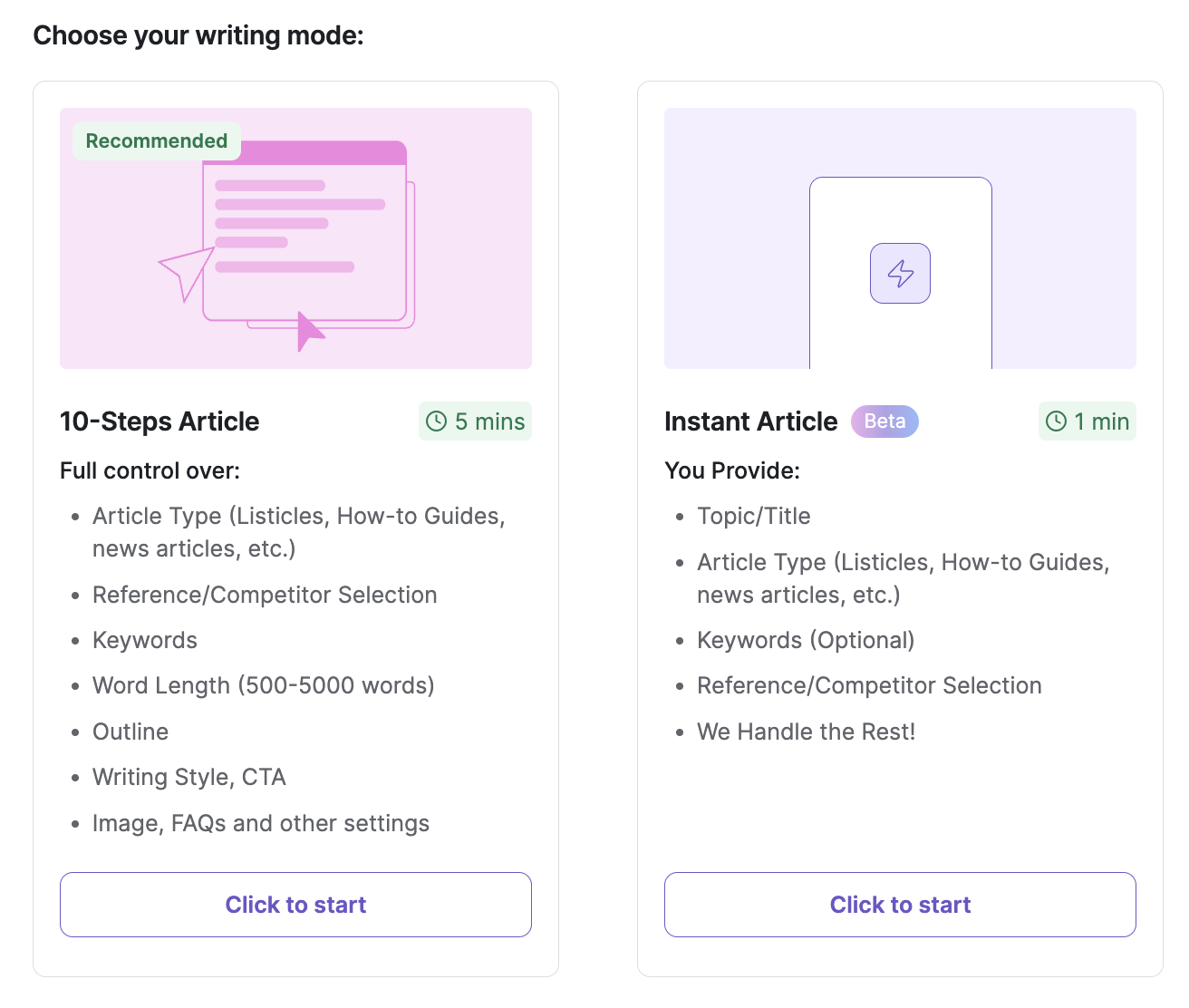 To be “meta”, I decided to generate an AI article for this exact article I’m writing: AI SEO tools. This is what the process looked like:
How Writesonic’s AI writer works
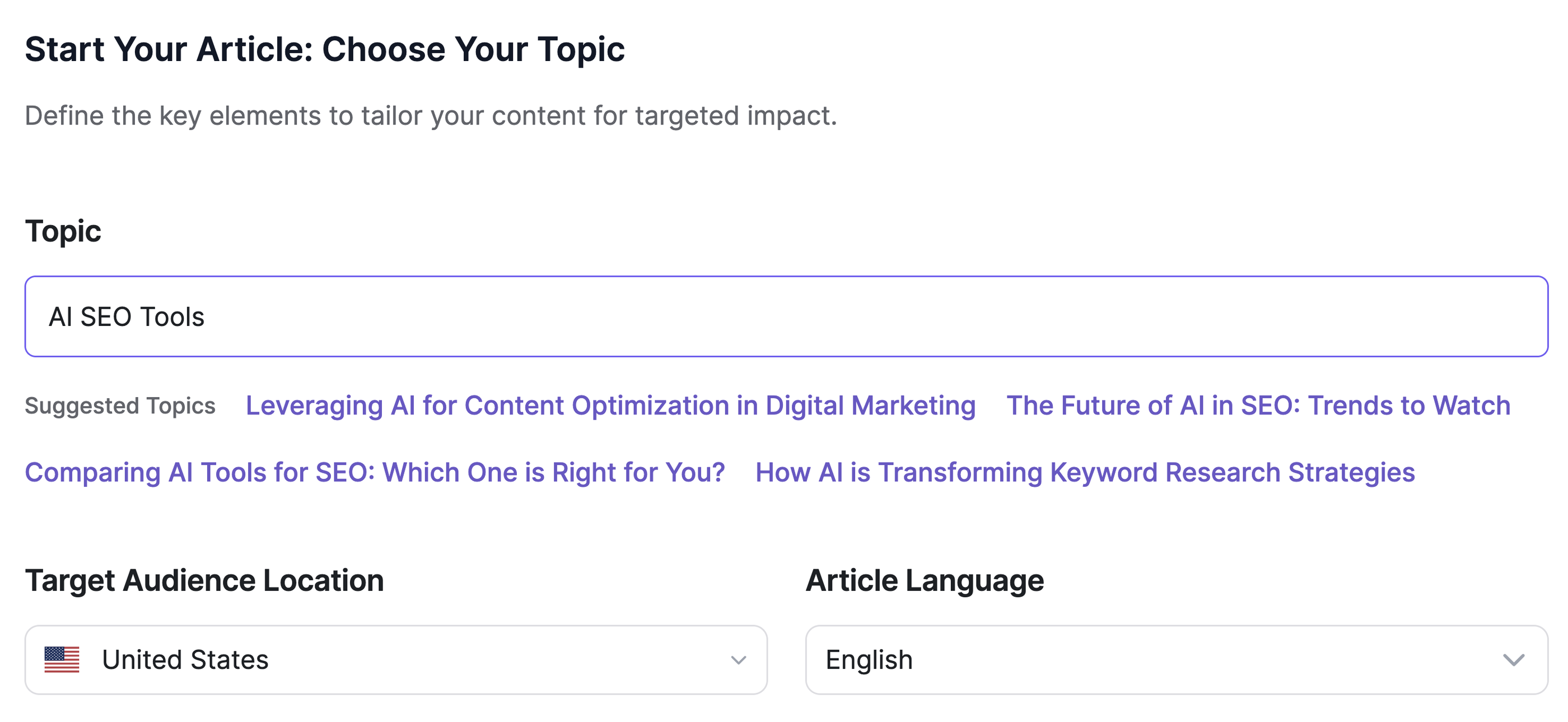
1. Set your topic
I started by choosing a topic (like “AI tools for SEO”). I could either pick from suggested ideas or enter my own. I also selected the audience location and language to tailor the content accordingly.
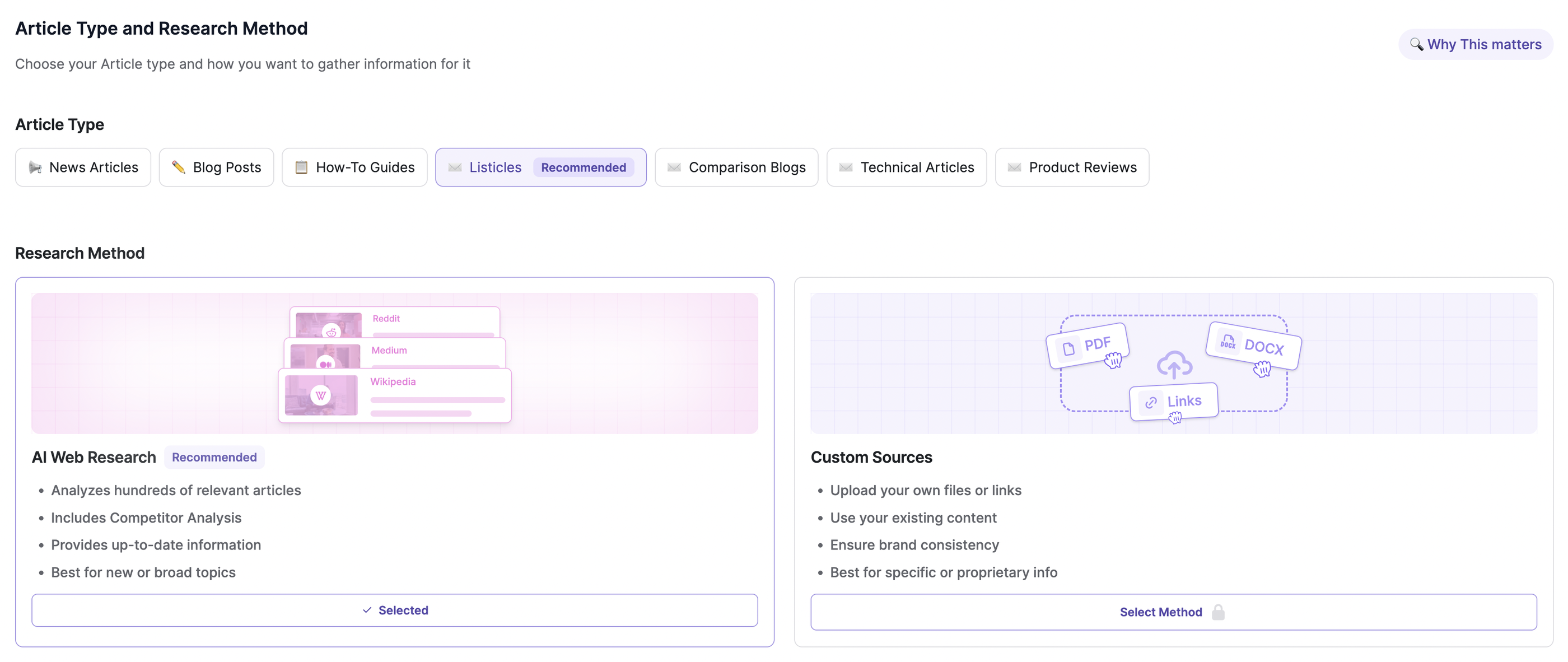
 2. Select your article type and research method
Next, I chose the format—like a blog post, listicle, or product roundup—and decided whether to pull live web insights or use custom sources like PDFs, internal docs, or brand content.
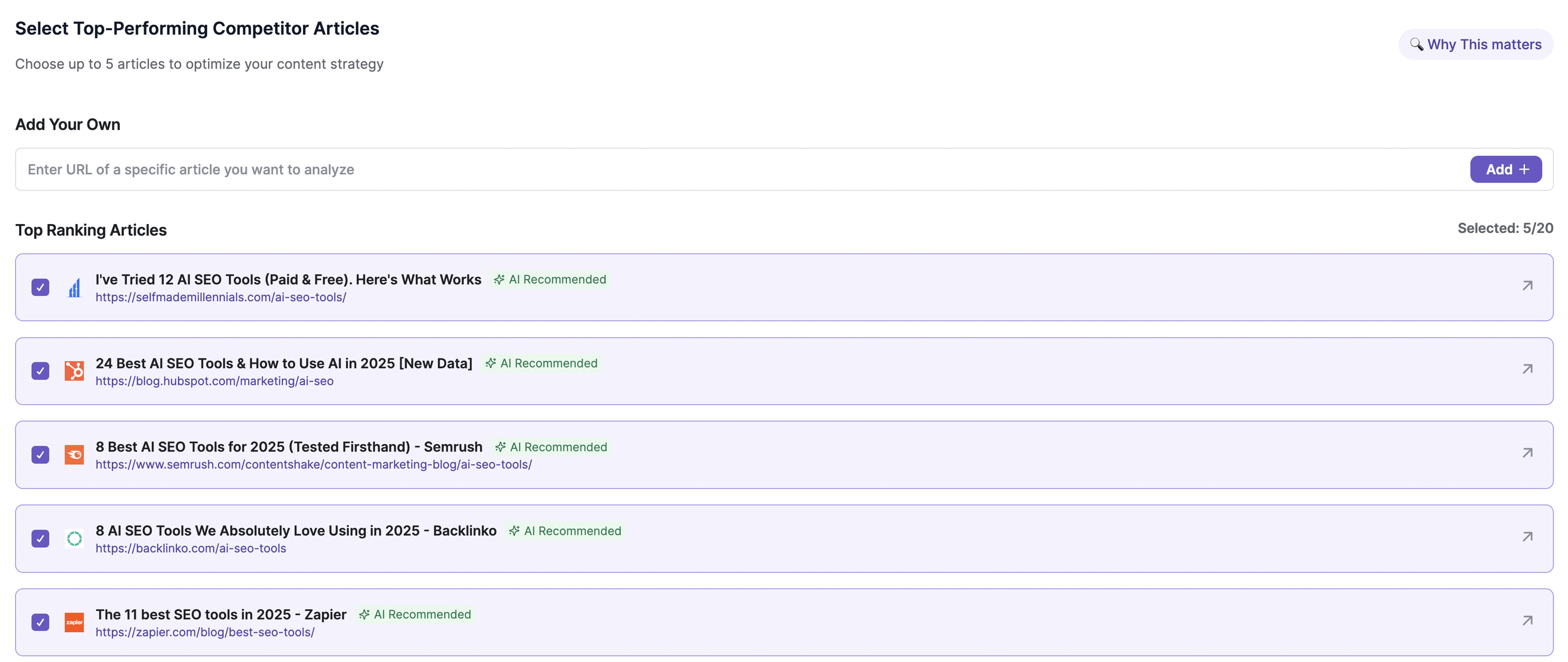
 3. Analyze top-performing competitor content
Writesonic recommended top-ranking articles from trusted sources like HubSpot and Backlinko. I picked a few to inform my outline and keyword approach.
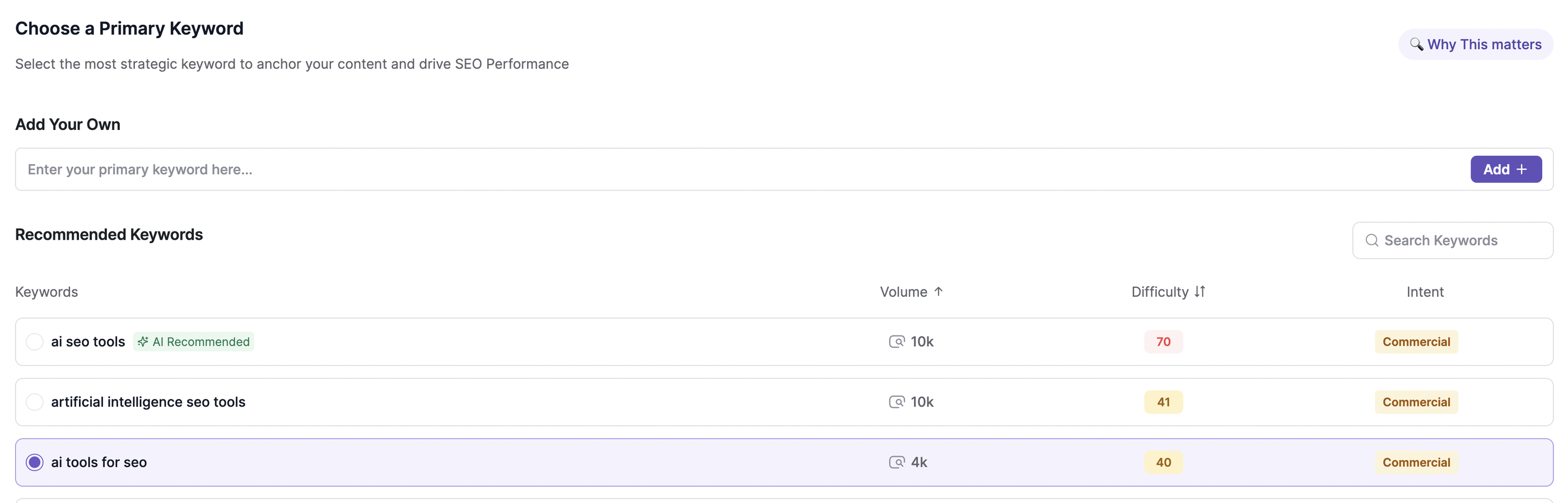
 4. Choose primary and secondary keywords
Based on search volume and intent, I selected a primary keyword and added up to 20 secondary keywords to build a strong SEO foundation.
 5. Set your tone and brand voice
This was a major plus point for me.
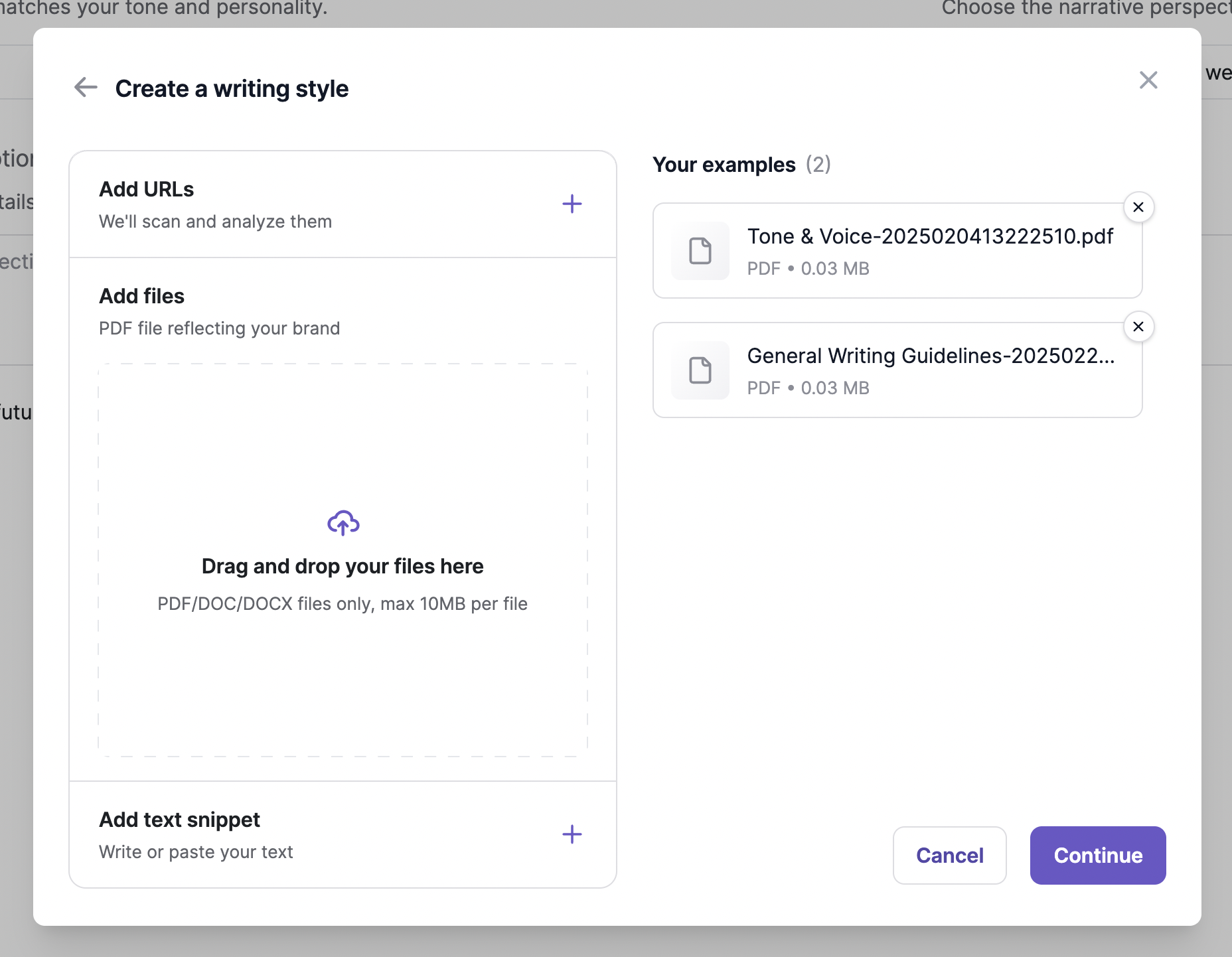
On Writesonic, you can upload brand guidelines, past examples, or PDF files to match the writing style to your brand—which is great because I had just recently put together a huge documentation on our brand tone and voice.
If you don’t have one, you can select from pre-set tones like professional, conversational, or casual.
 6. Pick your title and article outline
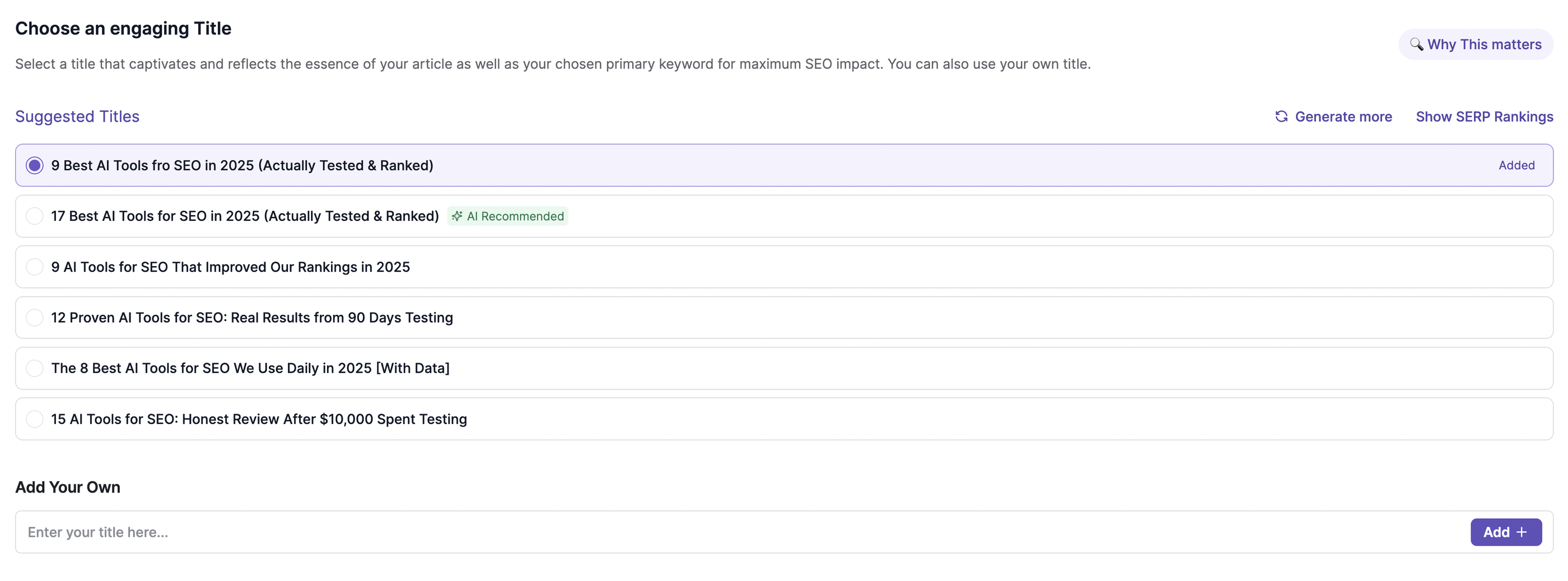
You can either write your own titles or select from the suggested list.
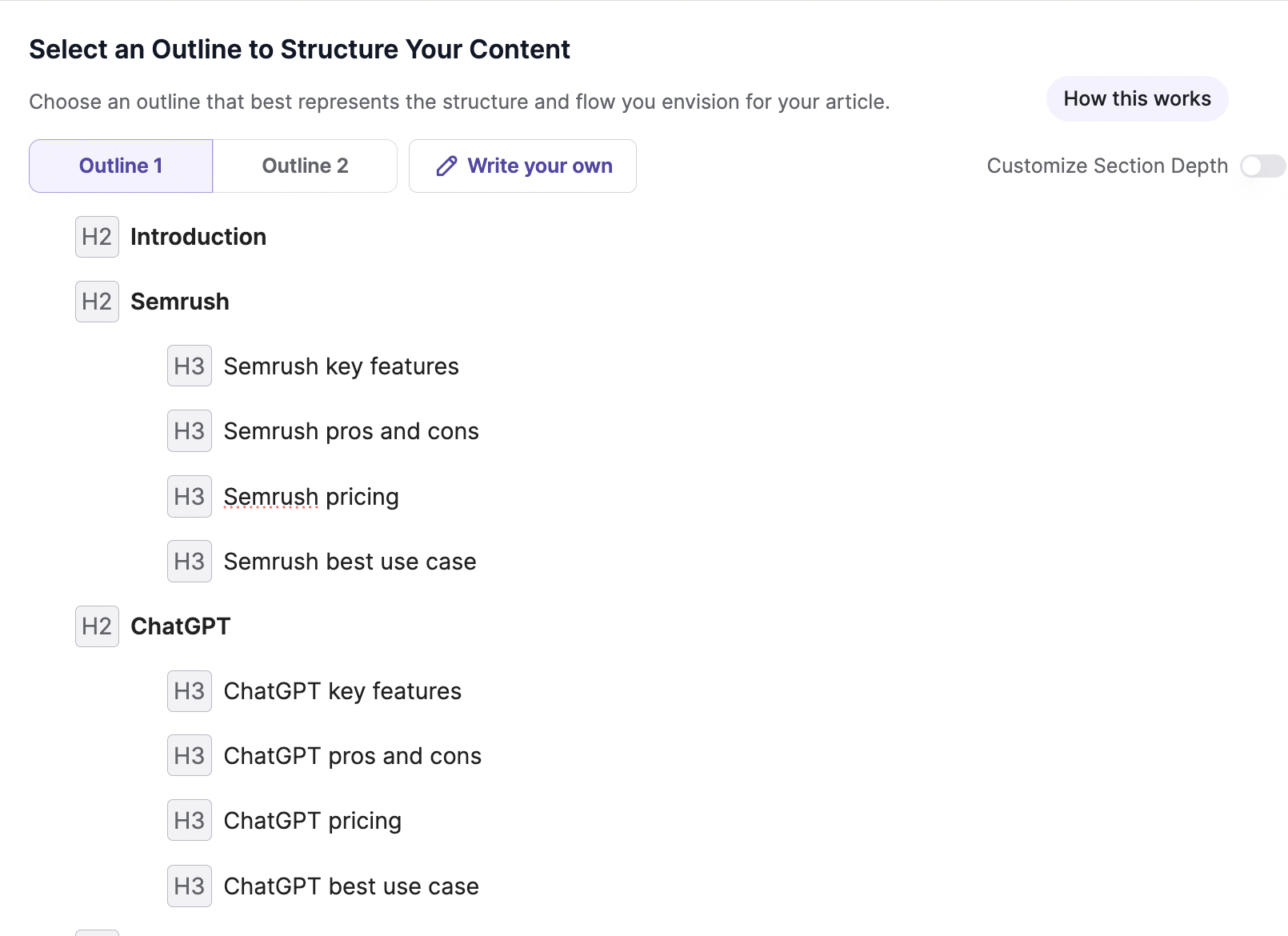
I wrote my own and selected a content outline that included an intro, breakdowns, and summary. I could adjust the depth of each section based on what I needed.
 It generated 2 outlines as default based on your title but the tools selected in the listicle were pretty basic – ChatGPT, Semrush, e.t.c – basic tools that people already know.
You CAN write your own outline but the interface was quite clunky and it kept glitching and the cursor kept going back to the beginning of my sentences.
At one point, I gave up trying to write my own (because it was taking up too much time) and decided to just use one of the outlines.
 7. Generate the content
Once everything was locked in, Writesonic’s AI pulled in the research, applied my keywords and structure, and wrote the article. I could follow progress in real time as it fact-checked and built out the draft.
There is an option to choose an “human” article, but this is locked in the paid plan:
 This writing process took about 10 minutes. And beware—do not press the “back” button or close the tab, because you will need to restart the whole process again (yes from the very beginning). I made that mistake and lost my article on the first try.
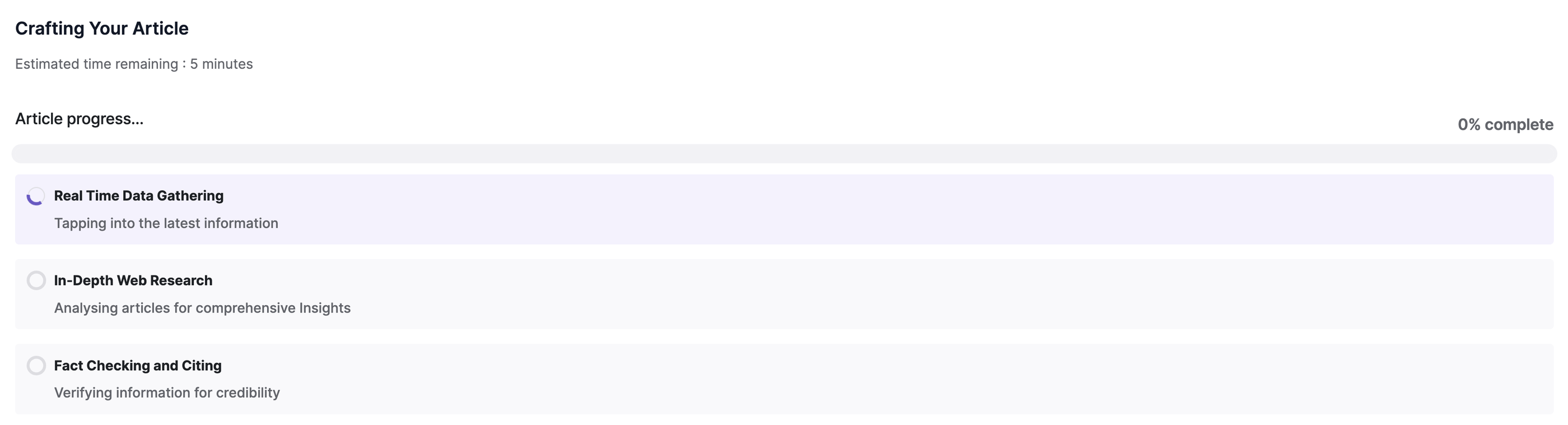 8. Review, edit, and publish
I got the final article and it was…meh. It looks good on the surface, and gets the facts right (like pricing), but reads bland and monotonous, without much insight into target audience pain points.
You can see from the intro itself:
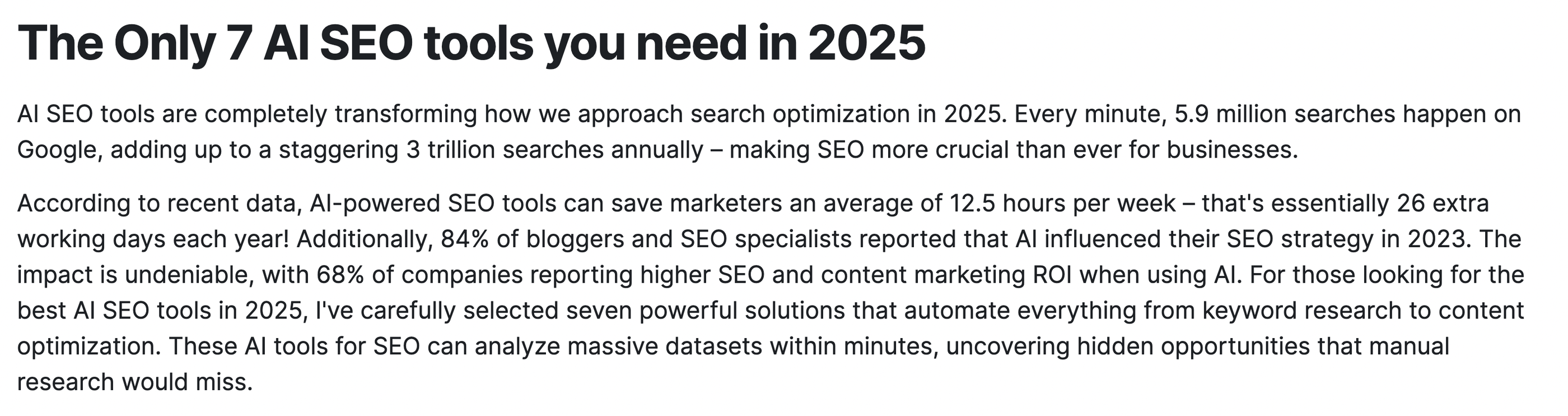
Even though I had our tone and voice guidelines uploaded, it didn’t capture the tone correctly.
But the good thing is you can add more context around the target audience so it’ll create a more targeted article. And you can also use their Surfy assistant to rephrase or refine copy.
I do like how the content is very factual—you can get it to show you citations. You can also publish this article directly if you use WordPress, which can save you hours of having to upload it yourself.
All in all, Writesonic may not produce perfect content out of the gate, but it might be the most comprehensive and customizable AI content tool right now.
Key features
- Real-time integrations with Ahrefs, Semrush, and Google Search Console
- AI Article Writer using models like GPT-4o and Claude.
- Brand voice customization with uploaded guidelines or sample content
- Real-time SEO optimization suggestions powered by AI
- One-click publishing to WordPress and social media platforms
- Flexible AI generation with access to GPT-4o, Claude, Gemini, and more
Writesonic pricing 2026
| Feature | Starter | Basic | Growth | Enterprise |
| Price (Billed Annually) | $79 / month | $199 / month | $399 / month | Custom Pricing |
| Annual Savings | Save $240/year | Save $600/year | Save $1200/year | Tailored to scale |
| AI Platforms Tracked | ChatGPT only | ChatGPT, Gemini, Google AI Overviews | ChatGPT, Gemini, Google AI Overviews | All 10 platforms (incl. Claude, Perplexity, Grok, DeepSeek, etc.) |
| Prompts & Answers Daily | 50 prompts / 50 answers | 100 prompts / 300 answers | 200 prompts / 600 answers | Custom prompts & answers |
| AI Articles / Month | 15 articles | 25 articles | 50 articles | Custom |
| Site Audits / Month | 10 audits (100 pages each) | 20 audits (1,200 pages each) | 50 audits (2,500 pages each) | Custom audits & pages |
| Agentic Workflows | Limited (10 trial runs) | Limited (50 trial runs) | Limited (100 trial runs) | Full access |
| Action Center Access | Not available | Not available | Limited (5 off-page + 5 on-page actions/mo) | Full Action Center |
| Sentiment Analysis | Not available | Not available | Included | Included |
| Included Users / Projects | 1 user / 1 project | 2 users / 1 project | 3 users / 2 projects | Custom users & projects |
| Support | Standard email | Standard email | Priority email | Dedicated Slack, Teams, Email + Account Manager |
2. AirOps
Best for: Automating SEO ops and content production from one intuitive and flexible platform
AirOps is a customizable AI content operations platform that helps agencies automate SEO and content workflows at scale.
It combines the power of large language models (like GPT-4, Claude, and Gemini) with flexible templates and integrations—so you can generate high-quality, on-brand content faster, without adding headcount.
Essentially, it’s like building a custom GPT on ChatGPT, but much more powerful and customizable.
Marco Schlauri, Founder at Digital Leverage, an SEO agency based in Switzerland, uses AirOps to automate research and content creation. He said:
We love how easy AirOps is. No coding, no API juggling or maintaining a tool stack. It’s just one intuitive platform with seamless integrations for tools like SEMrush, ChatGPT and Perplexity, plus out-of-the-box solutions for SEO tasks.
Aimee Jurenka, Director of SEO at Rocketship digital marketing agency, even built an automated LLM Brand Audit workflow on AirOps to identify content gaps.
And if you don’t want to build from scratch, AirOps also provides done-for-you templates based on SEO best practices.
I decided to try it out and here’s how it went:
How AirOps works
When you create an account, AirOps will ask you to name the project and add the URL of the project. Based on this URL, it’ll automatically generate a “Brand Kit” for you, which you can fully edit.
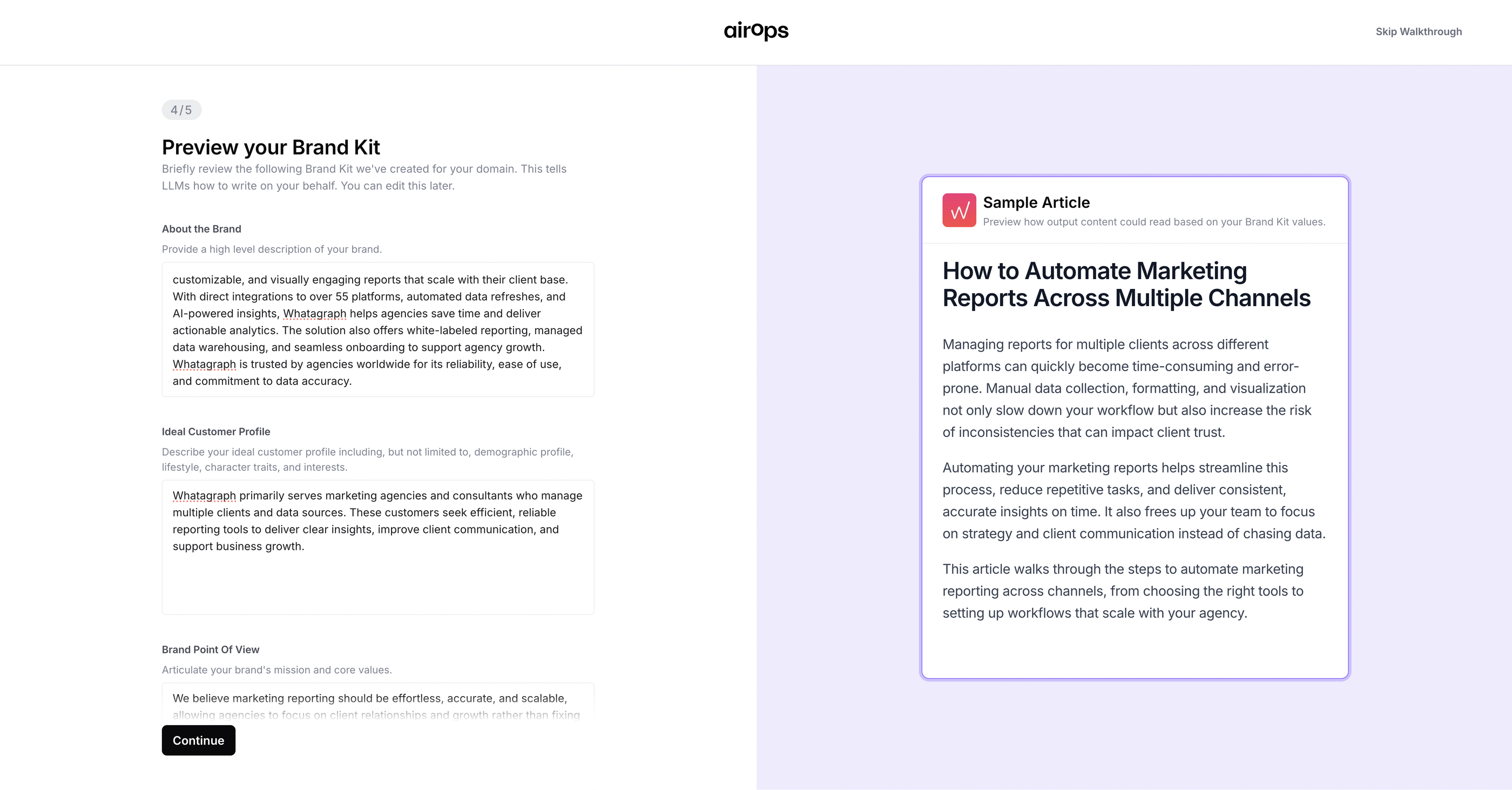
I personally loved the option to add your brand’s point of view, since we know this is what matters the most to stand out.
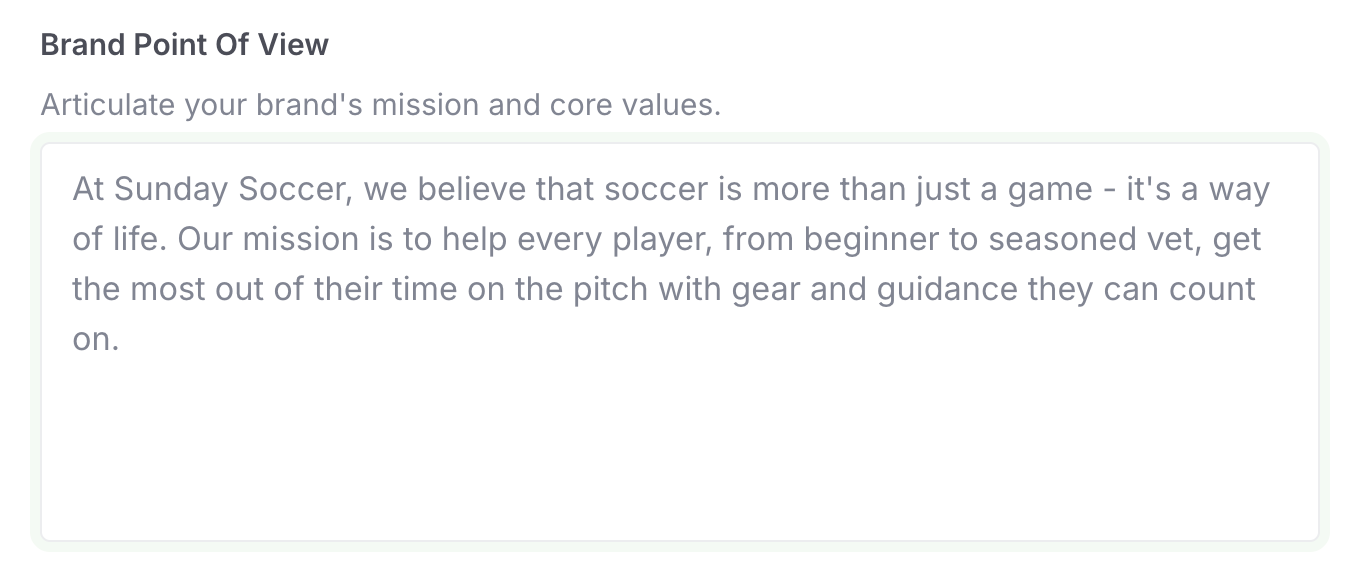 From there, you can either start with a template or build your own workflows. Here’s what you can automate:
- Content briefs: Pulls in live SEO data to build structured, keyword-rich briefs your writers can use right away.
- Long-form articles: Generates long-form content with your brand voice baked in. You control tone, structure, and sources.
- Internal/external linking: Automates linking between your content pieces, based on semantic relevance and performance.
I decided to try out the content brief template and I was taken to a spreadsheet where I could add the topic I wanted to create the brief for.
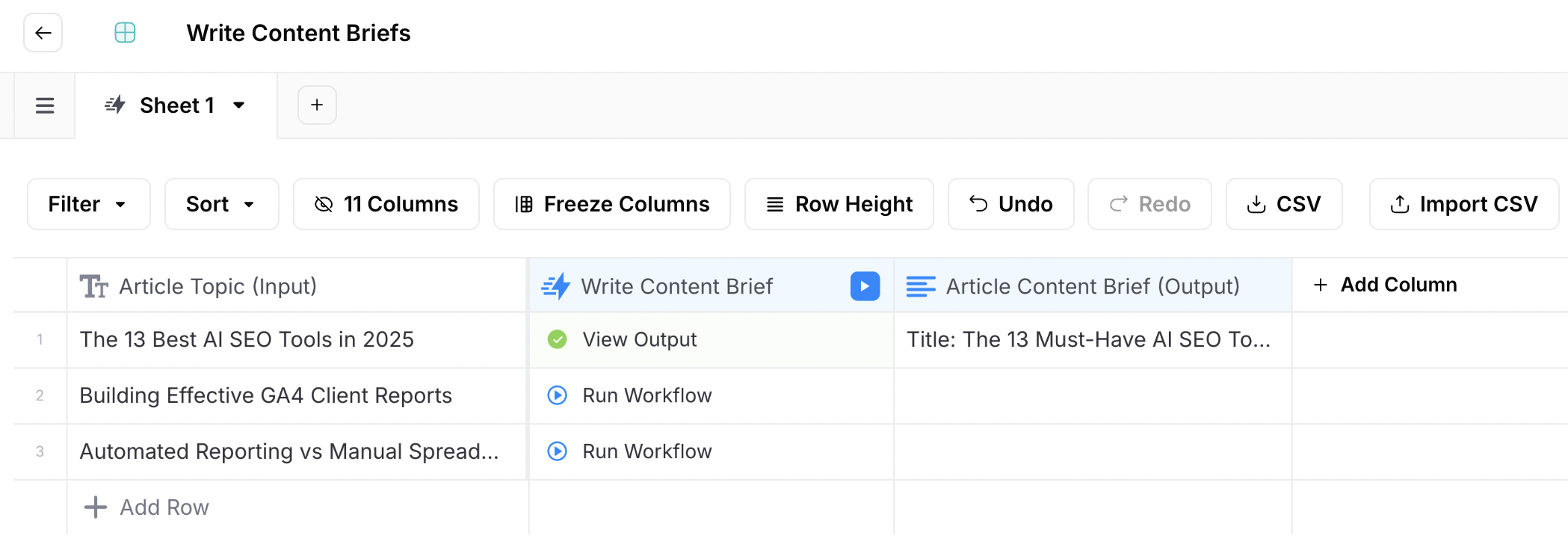
Once you add your topic, the entire research and ideation workflow was done automatically by AirOps. This is what the workflow looks like:
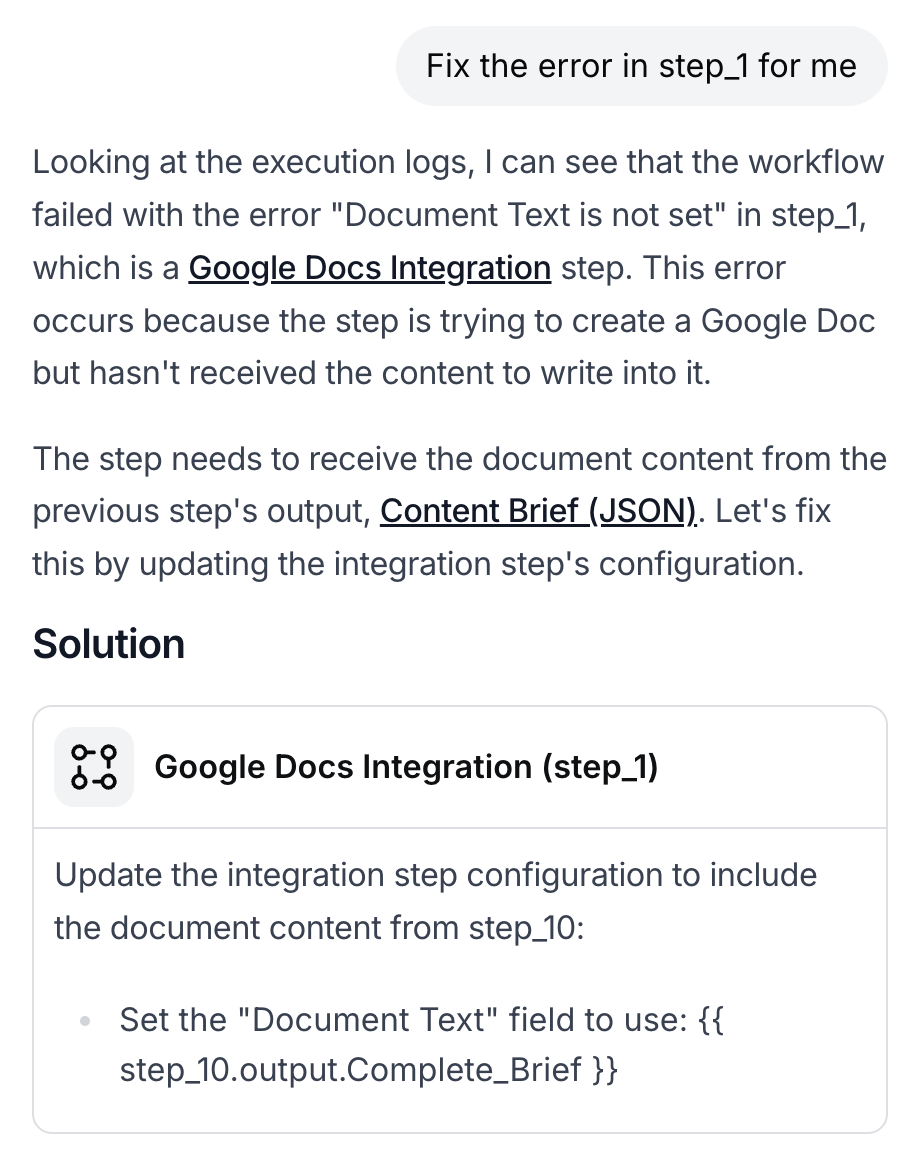
At any point there is an error in one of the steps of the workflow, you can ask their AI Copilot to fix it for you:
 Once the brief is created, it’s automatically added to the original spreadsheet:
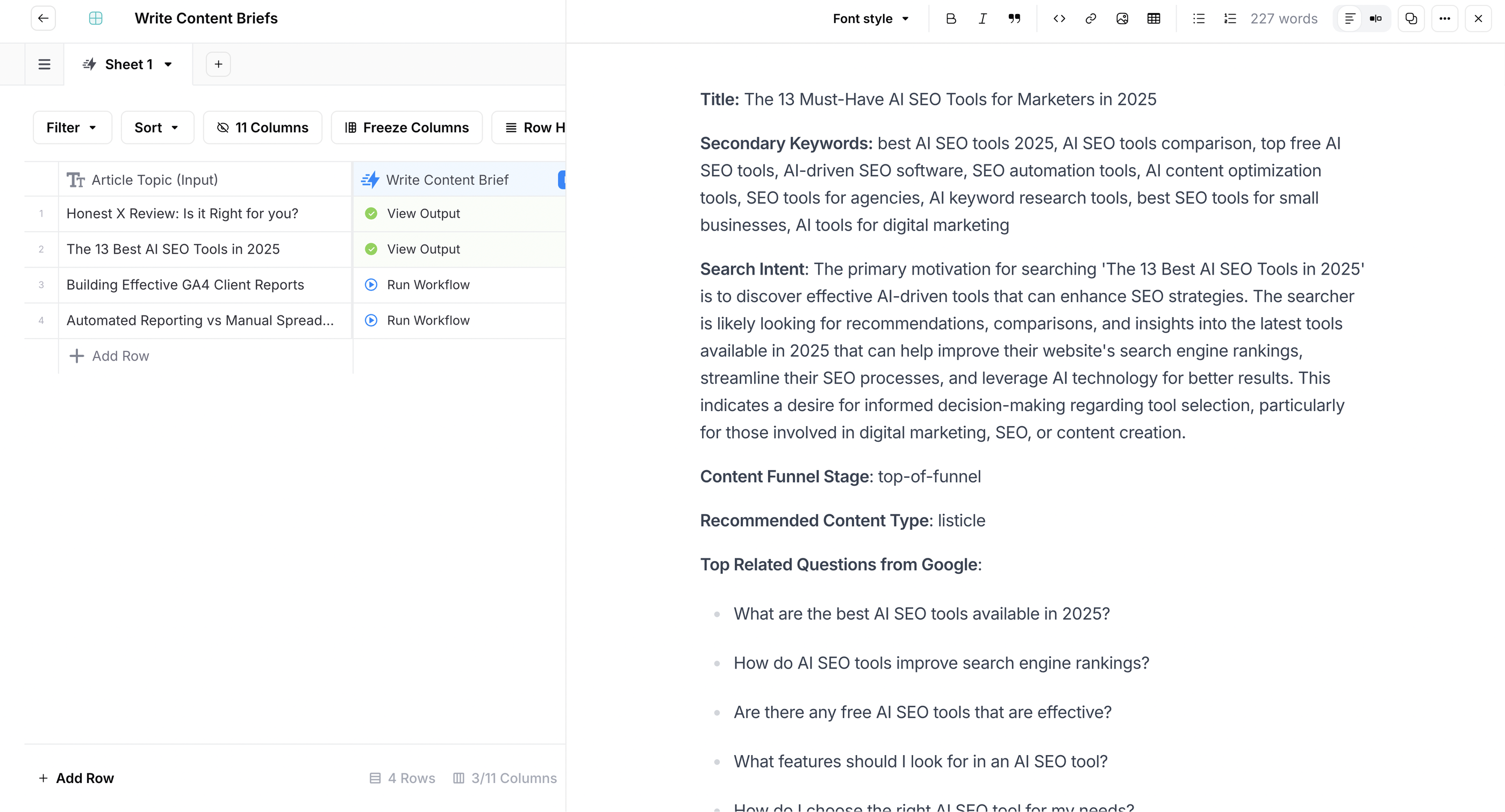 The process was very fast and easy, and I loved how everything is neatly organized in one space.
The brief itself was very high-level. It does nicely cover the SEO essentials like:
- Secondary keywords
- Search intent
- “People Also Ask” questions from Google
- 3 suggestions for internal links
- Sources
- URL structure
However, it doesn’t dig deep into target audience personas, pain points, and the unique viewpoint of my brand—which is what makes great content.
Next, I asked AirOps to create an article outline based on the brief. This was where it got disappointing.
It created an outline which wasn’t close to what I was looking for. Instead of having specific tools as H2s, it gave categories of tools instead.
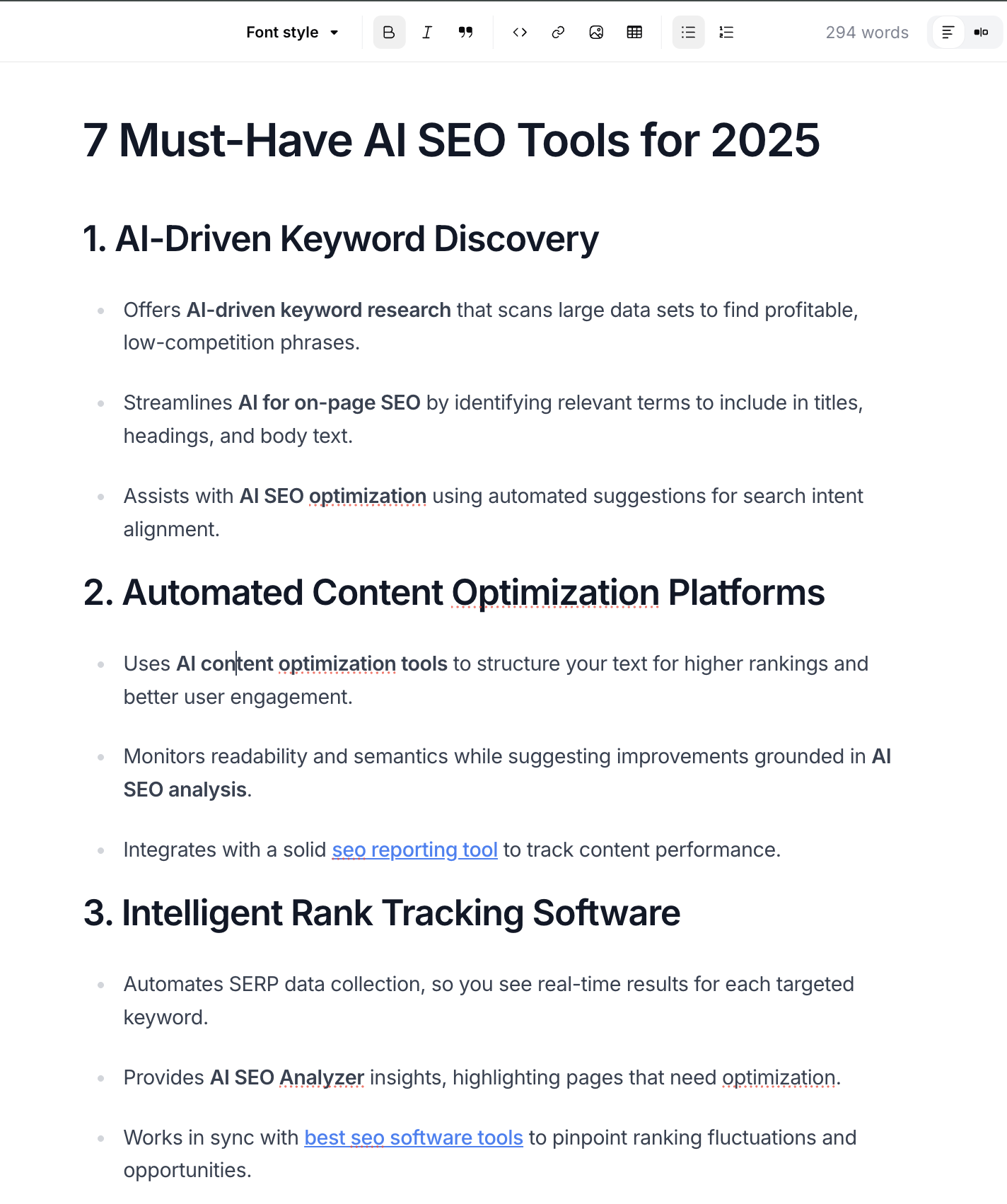 So I created an outline myself, pasted it into AirOps, and asked it to create an article based on the new outline. This was a bummer – I was expecting to be able to do everything on AirOps.
Alright, now the real deal – writing the article itself. To be honest, I was impressed.
Unlike Writesonic, AirOps actually nailed our tone and voice. Check out this introduction:
It’s not perfect, but it’s much more on-brand and engaging than what Writesonic produced.
As a last step, you can get AirOps to create a hero image for the article. But as expected, it was meh.
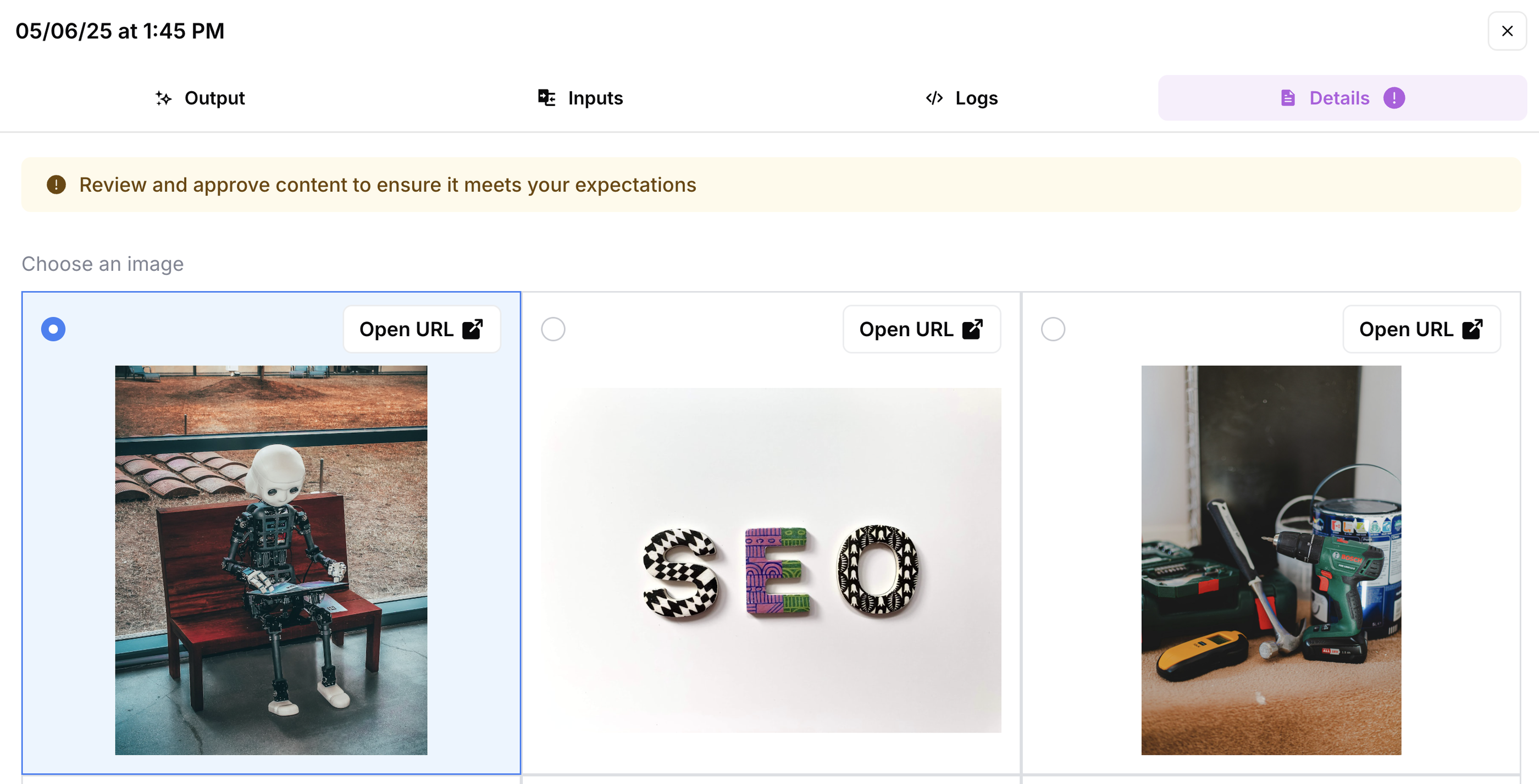
But this wasn’t a deal breaker as we have an amazing in-house graphic designer who creates gorgeous images for us.
Apart from the content creation process, the best thing about AirOps is how well it connects to the rest of your tech stack. You can connect with:
- Google Docs — so you can save briefs and articles right in your drive
- CMS like Webflow, Wordpress, and even Strapi — so you can publish articles straight away
- Slack — so you can share briefs and articles with teammates
- Semrush — so you can do keyword and competitor research
- Google & Perplexity – so you can do real-time, contextual research
And loads more.
In short, AirOps isn’t a plug-and-play writer—it’s more like an SEO command center. And if you want full control over how content is researched, structured, and written (without code), it’s one of the most powerful options out there.
Key features
- Build AI workflows with 40+ models including GPT-4, Claude, and Gemini
- Train models on your brand tone with a customizable Brand Kit
- Create and reuse custom templates for SEO, blog, product, and email content
- Publish directly to CMSs like Webflow, WordPress, Strapi, and Shopify
- Power content with real-time SEO data from Semrush and DataForSEO
- Automate tasks to run on schedules, in bulk, or via triggers
AirOps pricing 2026
| Plan | Target Audience | Key Limits & Content Capacity | Insights & Reports | Integrations & Tools | Support & Access |
| Solo | Individuals building content for one brand/project | • 100 Tracked Prompts & Pages • 20,000 Tasks for Content Production • 1 Brand Kit, 3 Knowledge Bases | • ChatGPT Insights Only • Monthly Opportunity Reports | • Basic CMS & SEO Integrations | • Community & Live Chat Support • Single-User Access |
| Pro | Small teams building content for one brand/project | • 250 Tracked Prompts & Pages • 75,000 Tasks for Content Production • 1 Brand Kit, 5 Knowledge Bases | • Multi-Engine Insights • Weekly Opportunity Reports | • CMS, SEO, AEO, Social & Project Integrations | • Live Cohort Trainings & Priority Support • Unlimited Seats for your team |
| Enterprise | Organizations building enterprise-grade content | • Custom Prompts & Pages Limits • Custom Task Limits • Unlimited Knowledge Bases & Brand Kits | • Track multiple regions, personas, & languages | • Custom Agent Builds • Custom Solutions | • Dedicated Account Manager • 1:1 Expert Onboarding • Unlimited Seats & Collaboration |
3. Rankscale.ai
Best for: Tracking your brand’s visibility across AI search engines for specific search terms, regions, modes, and intervals
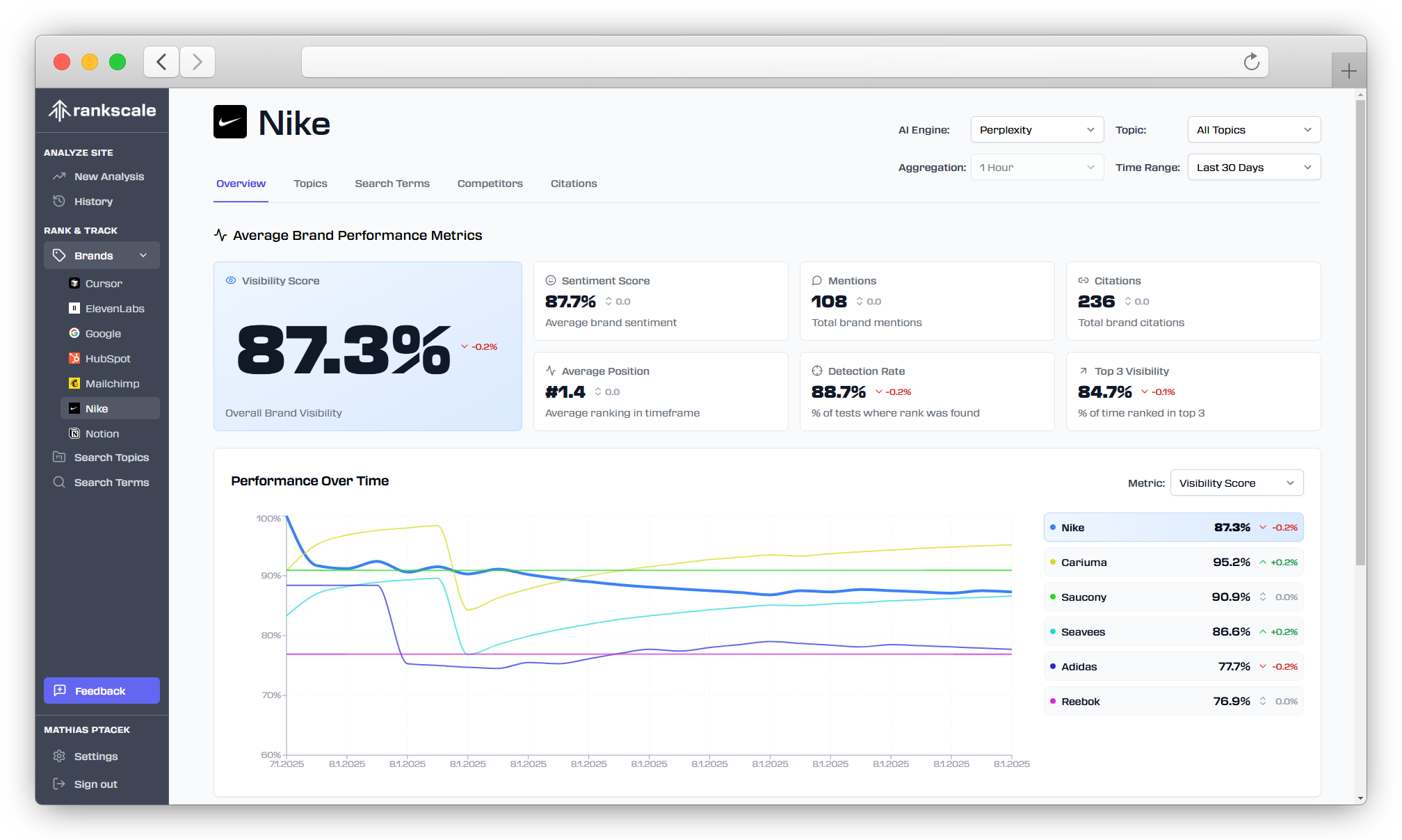
Rankscale.ai is an “Generative Engine Optimization” (or GEO) tool that lets you track whether you’re appearing for specific search terms (and for what position) on AI search engines like:
- ChatGPT
- Perplexity
- Claude
- Google’s AI Overviews
There are tons of GEO tools available in the market right now, but they fall short in two key areas:
- They’re not specific enough — they’ll give you a percentage of how much you’re appearing in AI-generated answers, but not for what terms or which region / country.
- They’re not accurate — AI search is highly subjective based on where you are, how you frame your query, whether you have “live search” turned on, e.t.c., making it difficult to track rankings correctly.
In fact, Brendan Hufford, Founder at Growth Sprints agency, says in this LinkedIn post:
AI search has no universal rankings. The results are hyper-personalized from search to search, making "rankings" fundamentally meaningless.
So, I was a bit skeptical of Rankscale at first. But once I dived into the platform, I learned it solves these two problems quite well. Here's how.
How Rankscale works
Once you log into Rankscale, you’ll land onto the main dashboard where you can find your brand details like:
- Overall AI visibility score
- Search terms you ran trackings for recently
- Credits you have
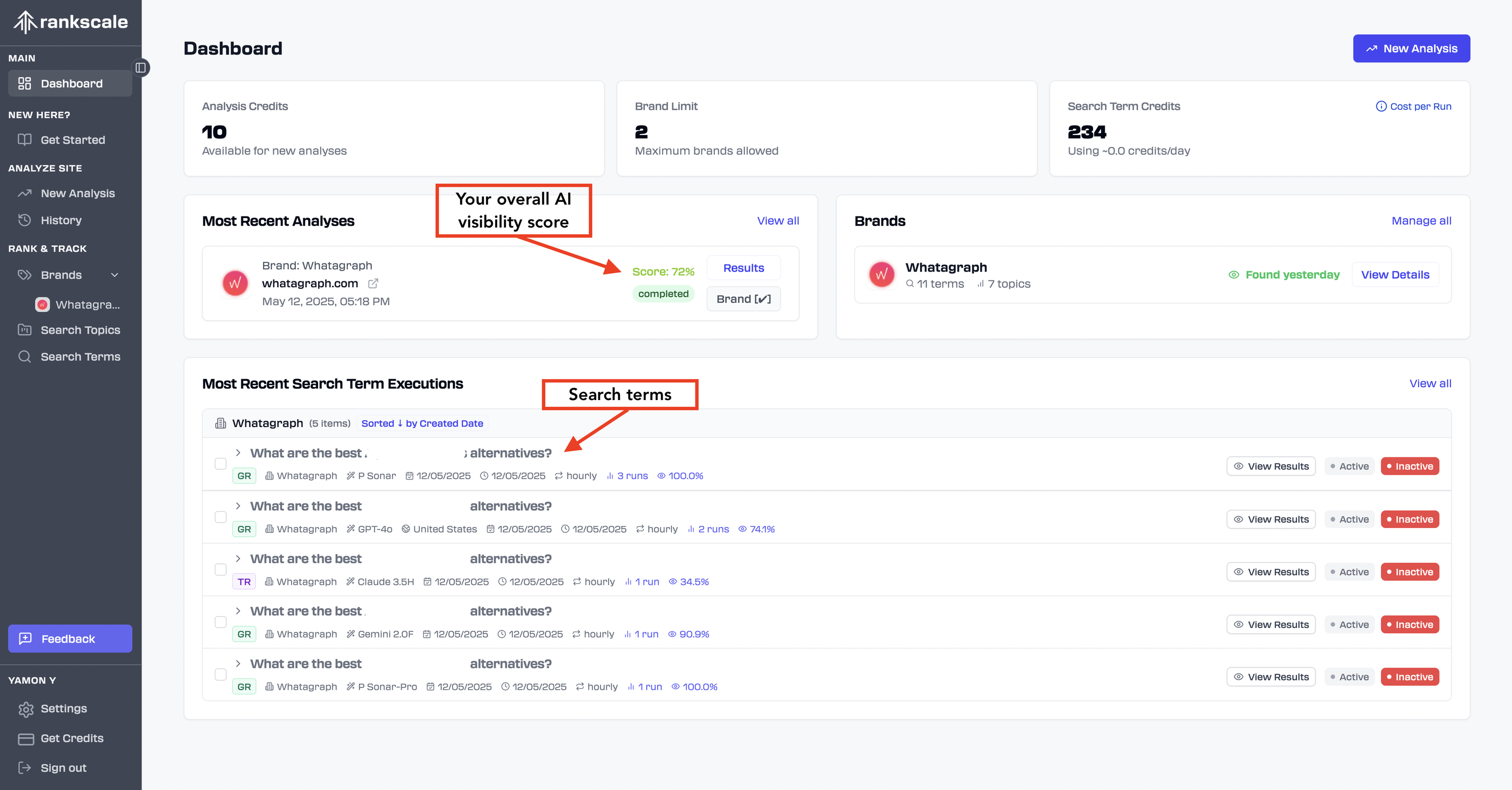
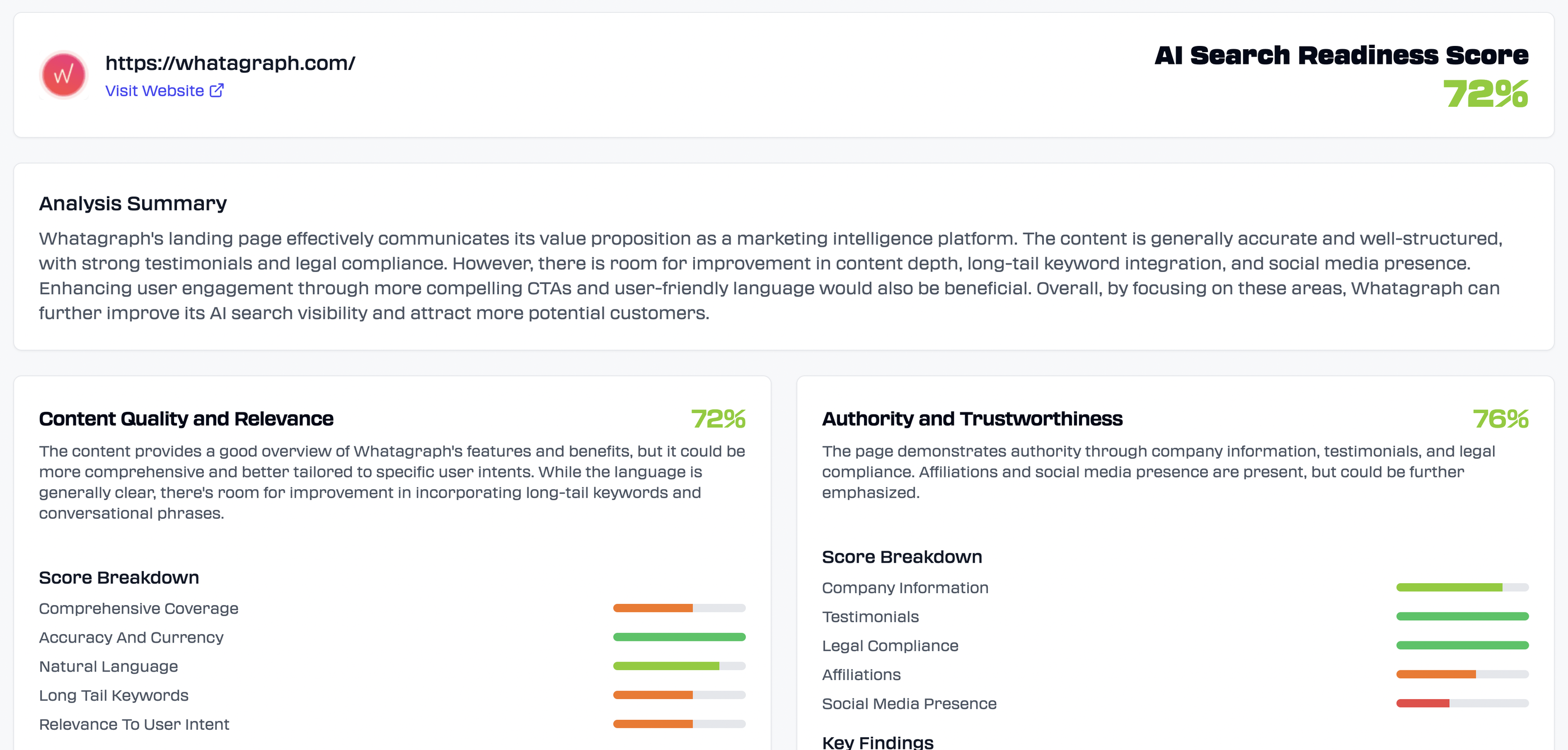
But to get to this point, you first need to run a brand analysis using the top right button. All you need to do is put in your homepage URL and Rankscale will return:
- The “AI search readiness score” which is calculated based on four key areas”:
- Content quality and relevant
- Authority and trustworthiness
- Technical SEO and page structure
- Engagement
- Improvement suggestions for each area
- Recommended search terms (e.g. marketing analytics platforms)
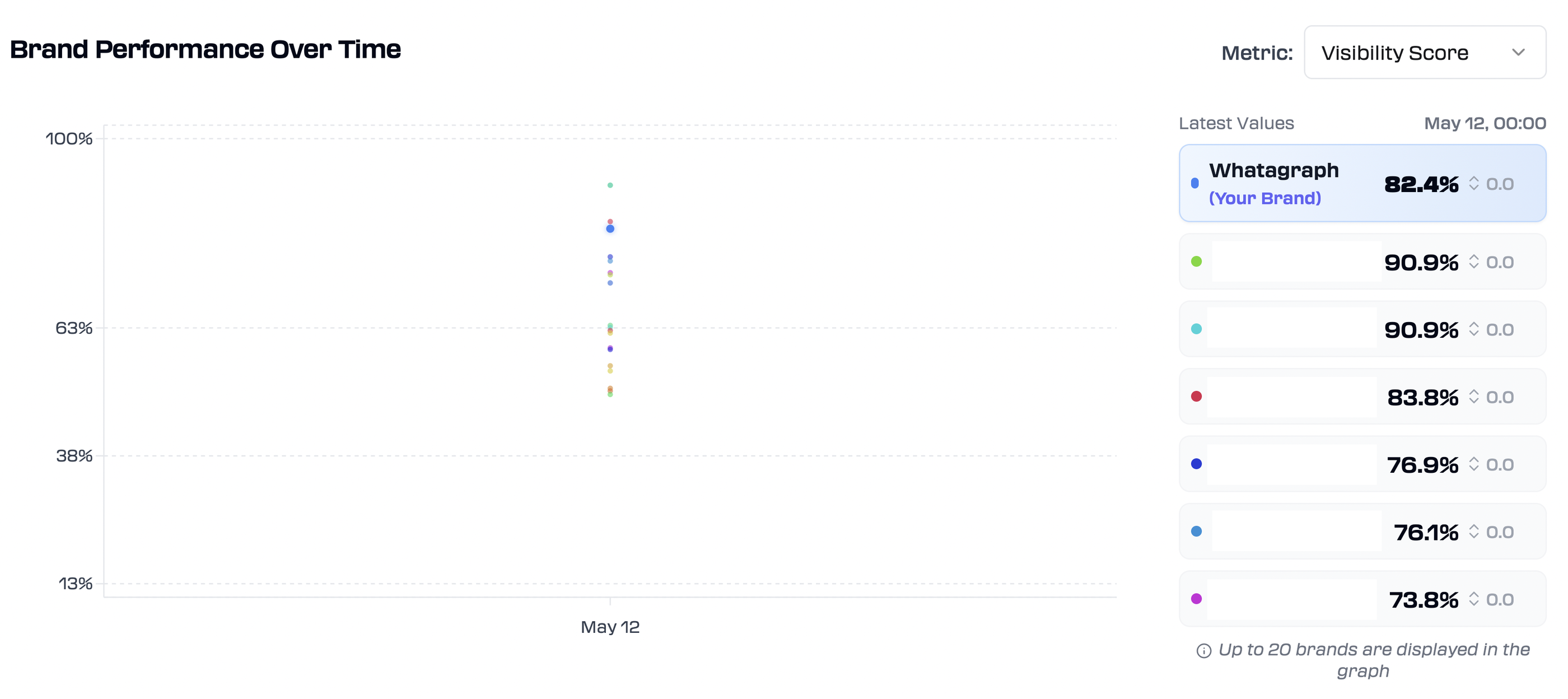
You can then save this as your “brand” and Rankscale gives you another dashboard where you can see:
- Brand performance over time compared to your top competitors
- Topic Performance – which search terms you’re appearing for most
- AI engine performance – which search engines you are appearing on most
Next, you start adding your “Search topics” which can be anything like:
- Content pillars
- Product categories
- Regions
You can either add them manually or ask AI to analyze your website and return search topics for you.
Under each search topic, you can add specific search terms you want to be appearing for in AI answers. Here again, you can ask AI to recommend these search terms for you, or add your own.
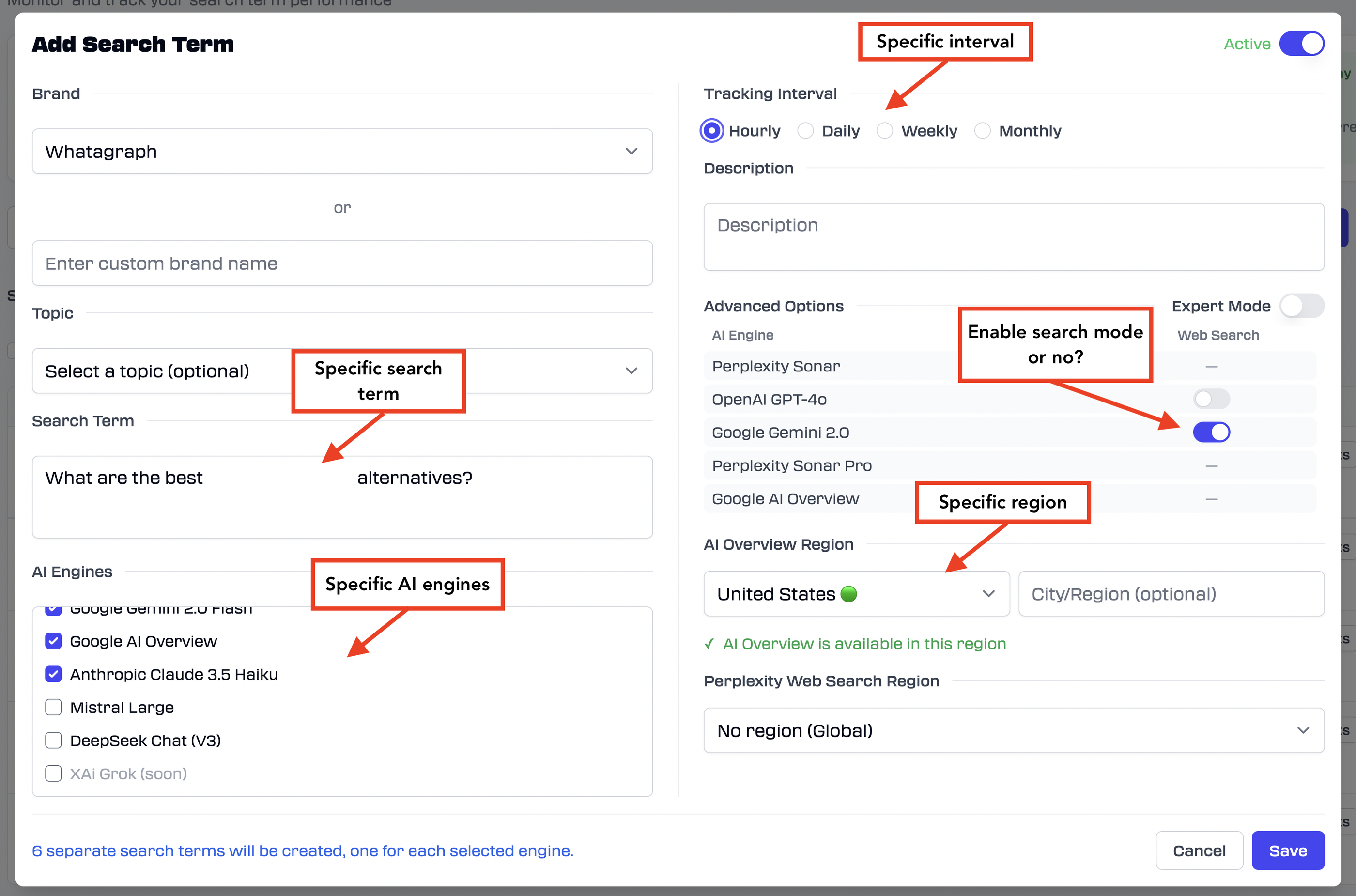
You can see how it’s very specific. You can track specific search terms on specific AI models at specific intervals and for specific regions.
This solves the first problem with AI optimization tools that gloss over details like these.
Rankscale’s founder Mathias Ptacek himself told me:
Rankscale is a bit more like a full drill-down approach for the geeky minds.
If you choose the “Hourly” interval, you’ll get the results in a couple of minutes and the tracking will run every hour. This is good if you want to get results right away but I’d recommend changing to Daily or Weekly so you don’t use up all your credits.
Once you save this, Rankscale will create separate search terms depending on how many AI engines and regions you chose.
You can go into each of these search terms from your main dashboard and it’ll open up a full “results” page with an overview like so:
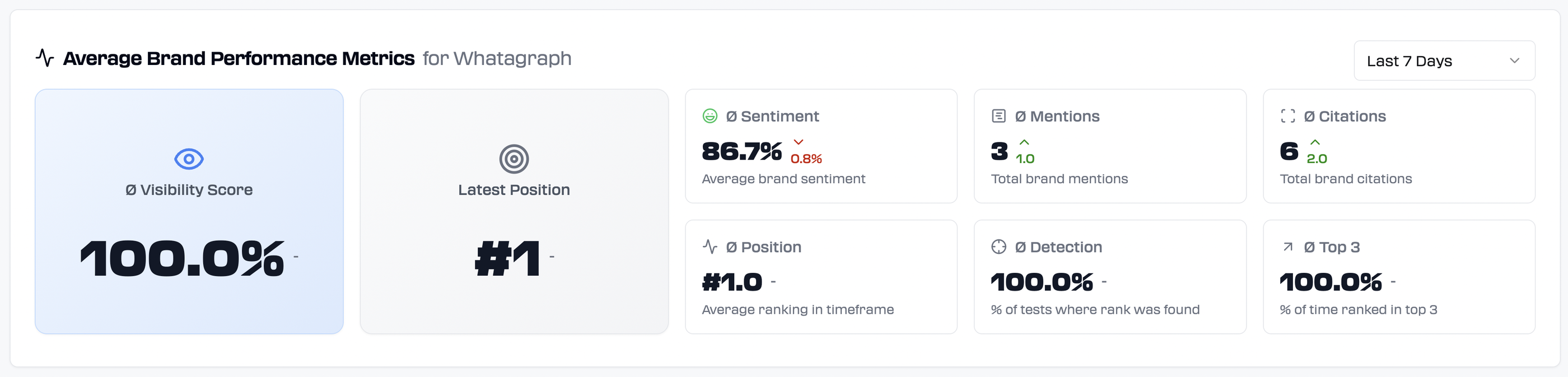
This specific search term is a BOFU one – “What are the best [competitor] alternatives?” – on Perplexity.
And the best thing was that I could see where Whatagraph is ranking vs. our competitors for this specific term, plus what’s the sentiment behind each brand:
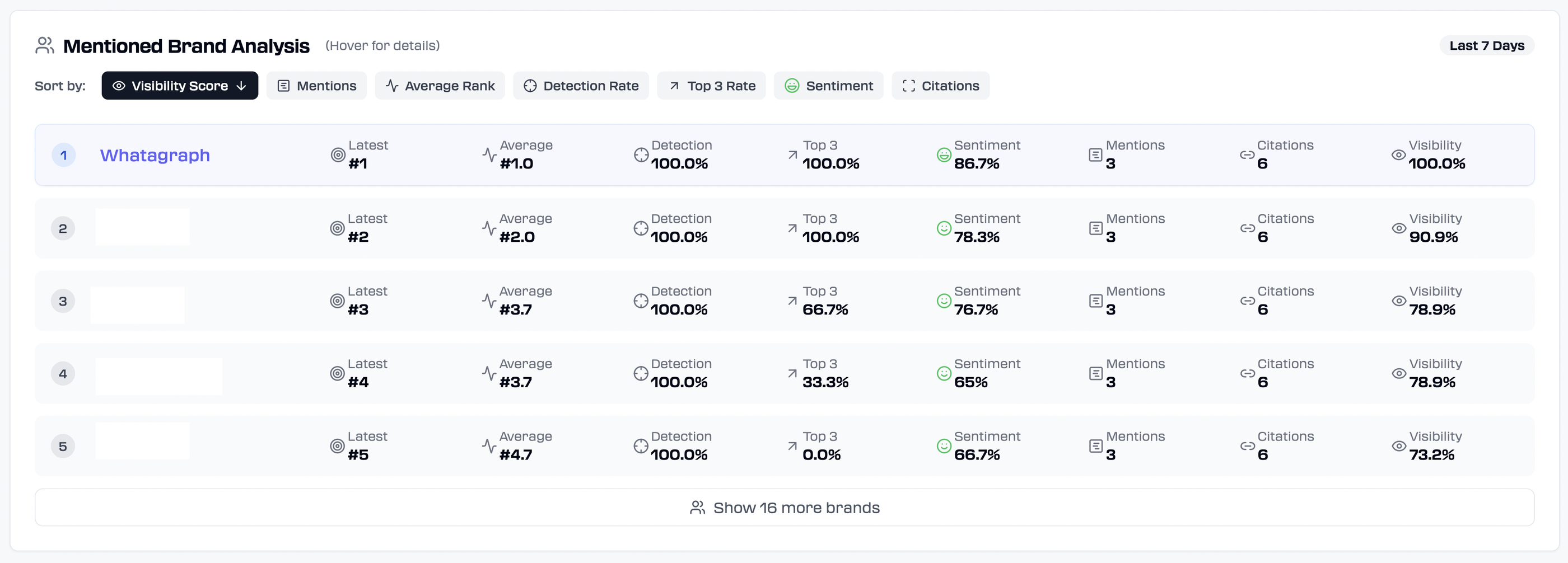 It’ll also show you the articles it cited and pulled their answers from, and ours was first:
 Is Rankscale accurate?
Now this is where it gets juicy.
At first, it wasn’t.
Rankscale said we were ranking number #8 on ChatGPT for the same BOFU query — “What are the the best [competitor] alternatives?”. But when I cross-checked with GPT-4o, we were actually #1.
So I reached out to Mathias, Rankscale’s founder, and it turns out it was because I hadn’t enabled the “Web search” function on Rankscale.
Once I enabled it and re-ran the tracking, it accurately showed me we were ranking #1: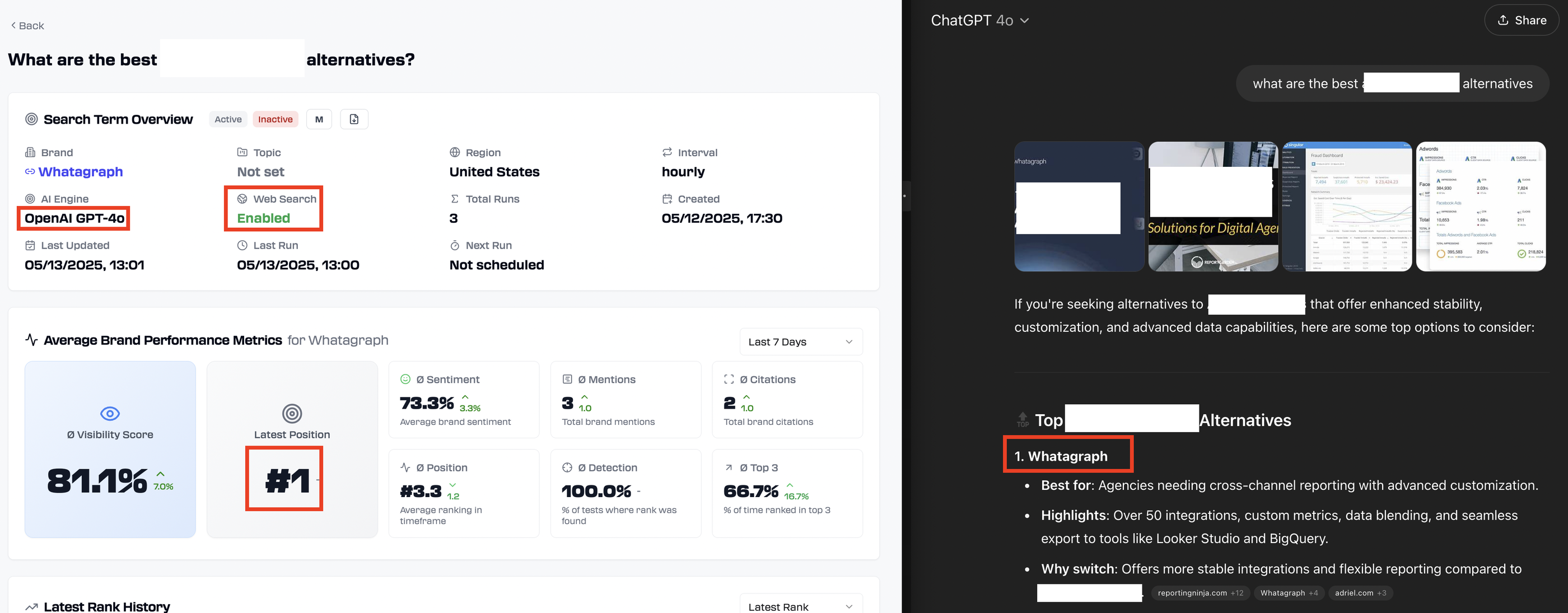
Another important thing for us are the Google AI overviews. Rankscale shows that we are ranking #3 for the same BOFU query, and we are indeed number #3. But in the screenshot below, you can see the rankings for other tools are not as accurate.
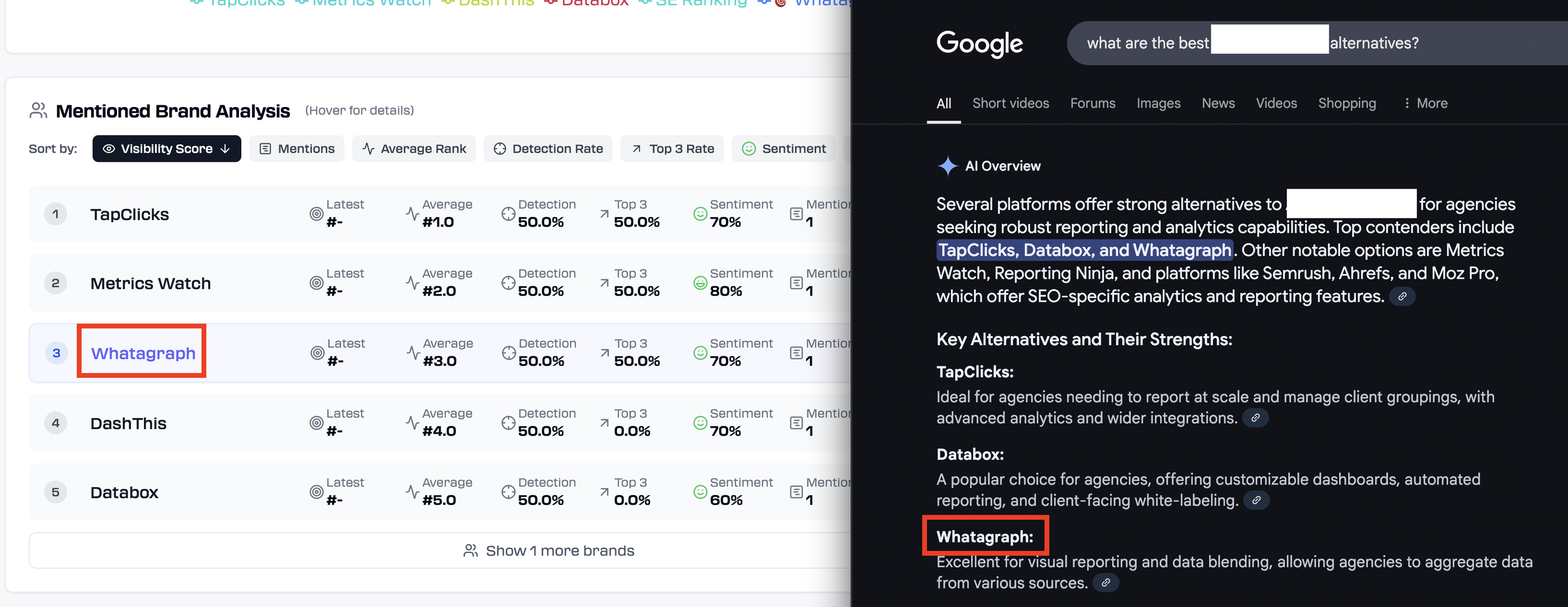
So, Rankscale seems to be accurate in general, but AI Overviews and LLM answers fluctuate wildly. Even if you change a word or a punctuation slighly, the answers and rankings can be different.
But the level of specificity Rankscale offers is unmatched. If you want to track GEO for specific terms, specific AI platforms, and specific regions, this is the tool for you.
(Side note: We ended up choosing it for our internal GEO monitoring.)
Key features
- Track visibility across ChatGPT, Perplexity, Claude, and Google AI
- Monitor rankings for specific keywords by engine and region
- Analyze sentiment in AI-generated mentions of your brand
- See which sources AI tools cite when referencing your content
- Benchmark visibility against top competitors
- Get content recommendations to boost AI search performance
- Integrate with tools like SEMrush and Surfer SEO
Rankscale pricing 2026
| Plan | Price (Monthly) | Credits | Key Features |
| PRO | $99 /mo | 1,200 | * Up to 4,800 AI responses * 10 Brand dashboards * 50 Free page audits * Unlimited search terms & all regions |
| GROWTH (Agency's Choice) | $385 /mo | 5,500 | * Up to 22,000 AI responses * 50 Brand dashboards * 200 Free page audits * White-label options & REST API access |
| ENTERPRISE | $780 /mo | 12,000 | * Up to 48,000 AI responses * 100 Brand dashboards * 200 Free page audits * Dedicated partner support & REST API access |
4. SE Ranking AI Overview Tracker
Best for: Tracking AI overviews granularly
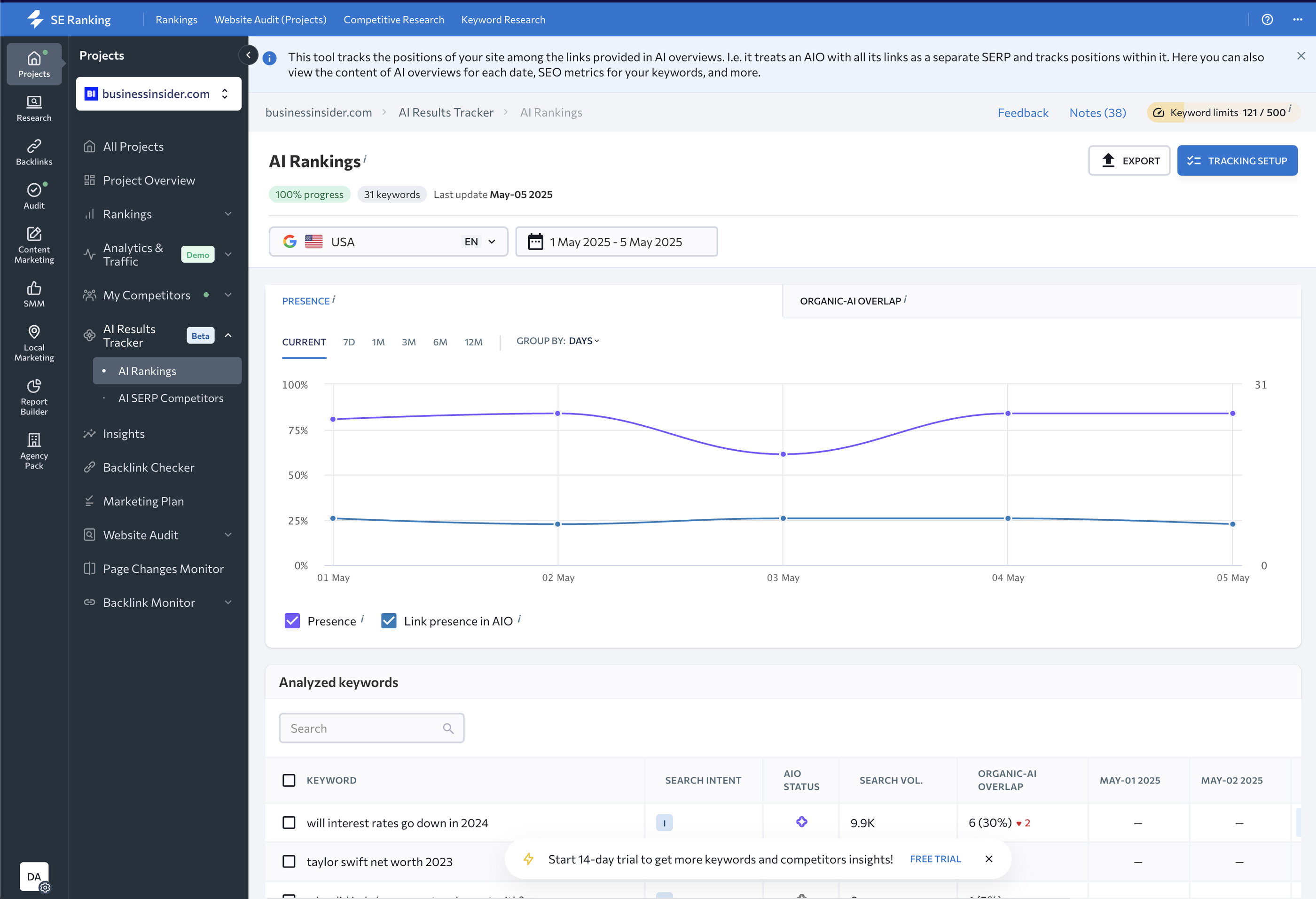
SE Ranking is a comprehensive AI-powered platform and one of the leading SEO ranking tools that provides keyword tracking, site audits, competitive research, and AI-specific insights.
But for the sake of this article, I’ll focus on its key AI feature — AI overviews tracker.
SE Ranking’s AI Overviews Tracker helps you monitor where—and how—you’re showing up in Google’s AI-generated answers.
It helps you answer questions like:
- Are we showing up in AI Overviews for our target keywords?
- How does our organic ranking compare to AI-generated results?
- What competitors are being surfaced by Google’s AI?
The AI Overview Tracker tells you which keywords trigger AI Overviews, whether your site is listed as a source, and how your performance stacks up against competitors.
You can also see historical SERP versions, model potential AI-driven traffic, and understand the intent behind queries that surface AI results.
The difference between Rankscale and SE Ranking is that the latter is a comprehensive SEO optimization and monitoring platform (similar to Ahrefs and Semrush) that comes with an AI Overview tracker, while Rankscale is purely an GEO tracking tool.
How SE Ranking’s AI Overview Tracker works
1. Select your project
Open SE Ranking’s AI Results Tracker and choose the project you want to analyze.
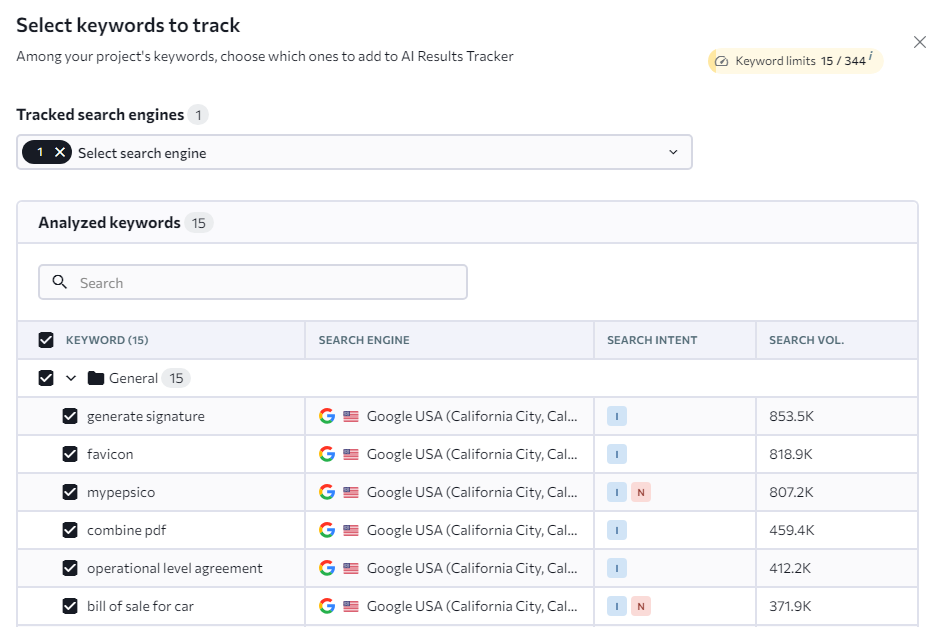
2. Pick your keywords
Add the keywords you want to monitor and select the search engines to track.
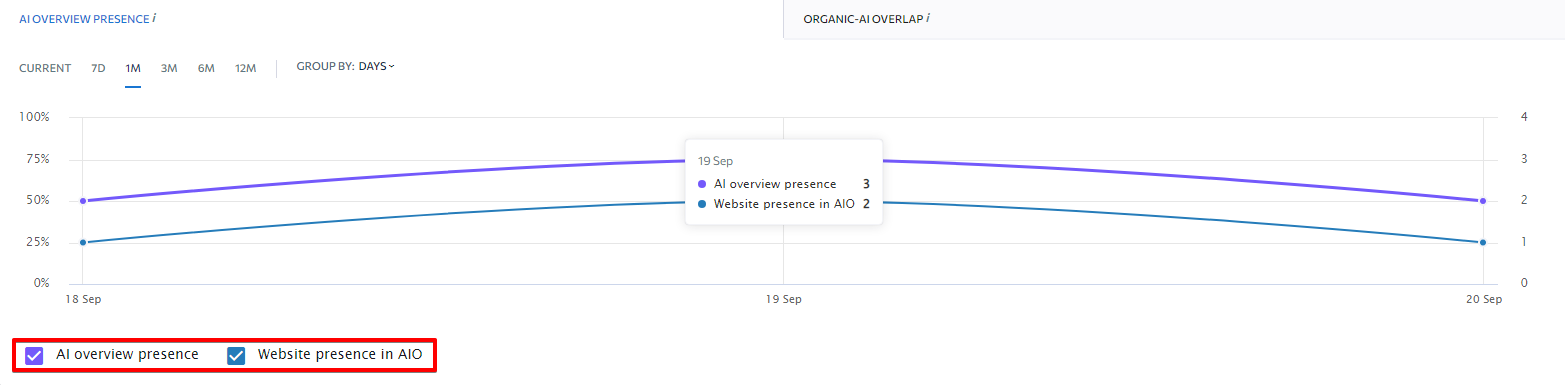
3. Check AI Overview presence
See how many of your keywords trigger AI Overviews and whether your site is featured.
4. Analyze Organic-AI Overlap
Check the share and total number of URLs from the organic Top 20 that are present in the AI overview. The chart below shows the average values across keywords for which an AI overview is present.
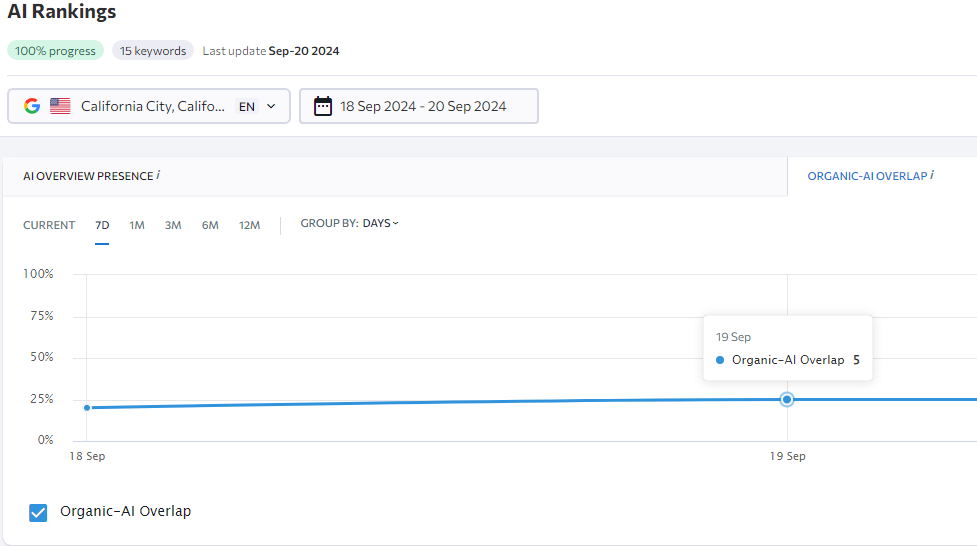
In the screenshot above, the Organic-AI Overlap is 5, meaning that five links, on average, appear in both organic search results and AI Overviews.
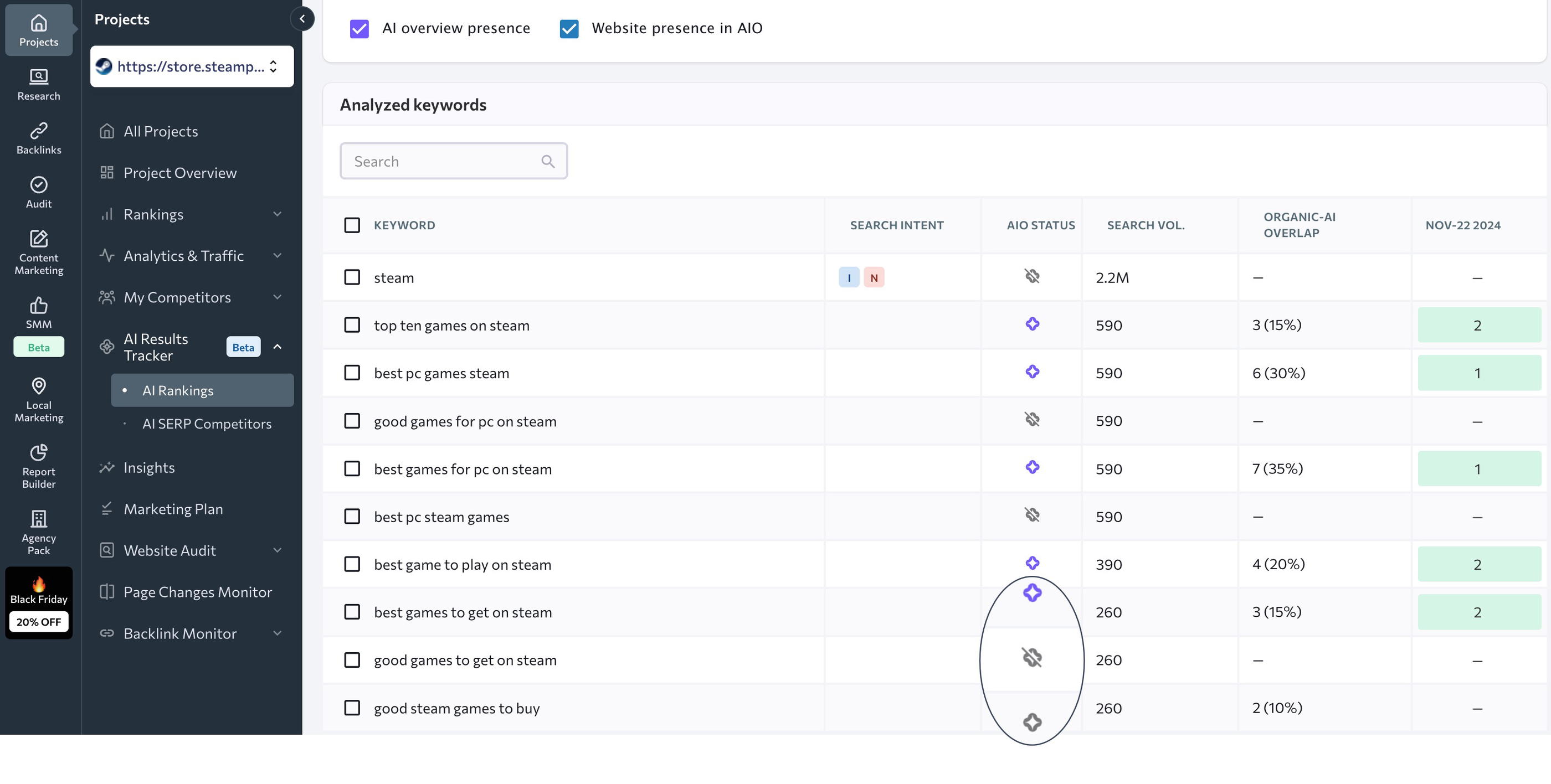
5. Monitor your rankings
Track changes in AI rankings over time and compare them to your organic search performance.
See the AI Overview status for each keyword, search intent, search volume, and Organic-AI overlap.
6. Keep an eye on competitors
Use the AI SERP Competitors feature to see which sites are ranking in AI Overviews for your target keywords.
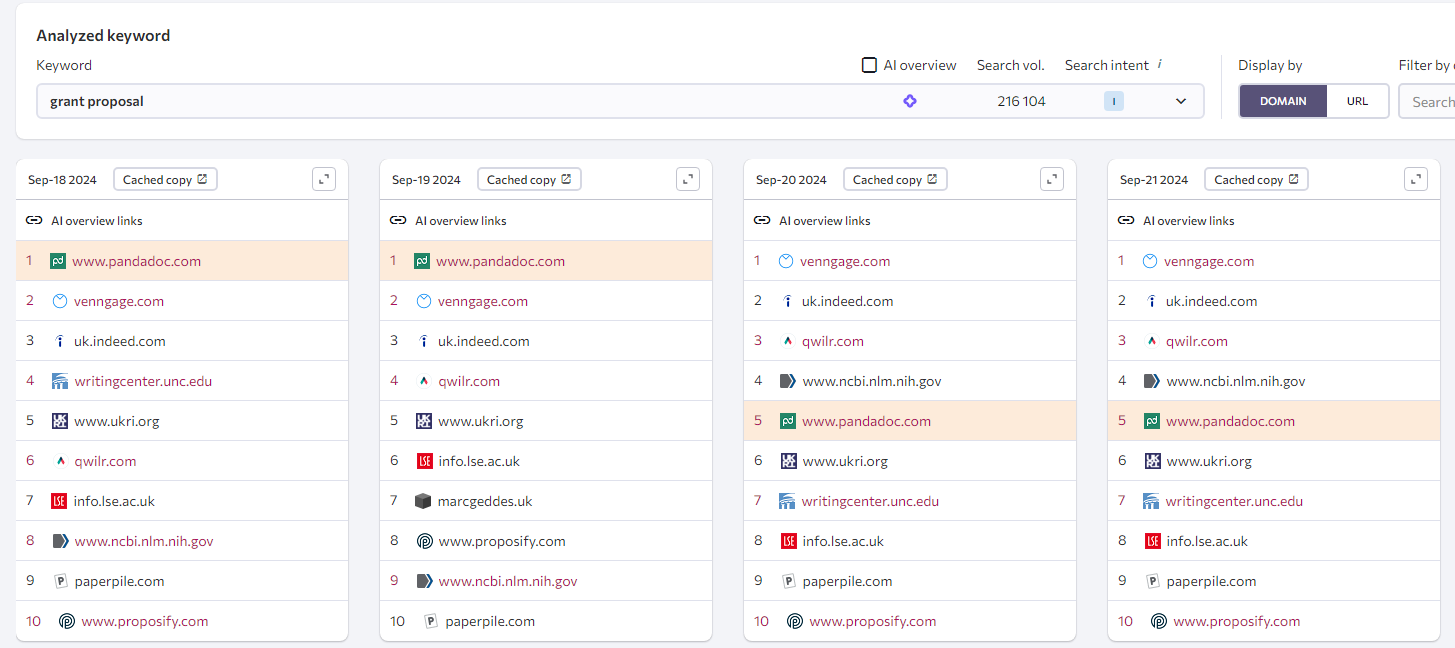
You can see a product tour of this feature here.
Key features
- Track which keywords trigger AI Overviews and if your site is cited
- Compare rankings in traditional SERPs vs. AI-generated results
- See which competitors appear in AI Overviews and why
- View historical SERP snapshots to track AI snippet changes
- Analyze keyword intent and volume for AI-triggering terms
- Estimate traffic from AI placements with modeled projections
- Access full SEO toolkit with rank tracking, audits, and backlinks
SE Ranking pricing 2026
| Plan | Monthly Price | Core Limits & Features | Best For |
| Core | $129.00 | 10 projects, 1 manager seat, 2k keywords, 100 daily AI prompts, 250k audited pages/mo | Marketing teams with repeatable delivery needs |
| Growth | $279.00 | 30 projects, 3 manager seats, 5k keywords, 250 daily AI prompts, 2M audited pages/mo, historical data | Multi-client SEO + GEO automation and collaboration |
| Enterprise | Custom | Flexible terms, custom limits, full API, and advanced integrations | Large teams and complex tasks |
Note: An annual subscription saves you 20% on these rates and includes free assisted migration.
Available Add-ons
If you need to expand your workflow, you can stack these additional modules onto your plan:
| Add-on | Price | Key Features Included |
| AI Search | +$89.00 /mo | Track and analyze visibility across AI platforms (AI Overviews, ChatGPT, Perplexity) with 200 prompts and competitor research. |
| Agency Pack | +$69.00 /mo (Annual billing only) | White-label reporting, 30 client seats, automated scheduling, and placement in the Agency Catalog. |
| API | +$45.00 /mo (Annual billing only) | 3M credits to automate reporting and pull structured SEO, backlink, and keyword data. |
5. Clearscope
Best for: Optimizing human-written content for SEO so it ranks fast and well
I’ve been using Clearscope religiously for 3 years.
It's one of my favorite SEO optimization tools—not because it writes me an entire article with AI, but because it gives clear, data-backed suggestions to help my human-written content rank better.
Clearscope is essentially a content optimization platform that:
- analyzes the top-ranking pages for your target keyword
- tells you what keywords you should include in your article and which topics to frame it around
…so you can rank your article faster.
There are three core tools in Clearscope:
- Content report
- Content inventory
- Topic research
For this article, I’ll focus on Content Report, which I use almost daily.
Over the past 3 years I’ve been using it, I’ve found that articles optimized with Clearscope rank faster and higher than articles that aren’t.
It’s intuitive, smart, and non-invasive —it doesn’t try to write the article for you or force you to over-optimize your content.
Here’s what you get inside a Content Report:
- A list of related keywords and entities to include naturally in your draft
- A target word count range (pro tip: aim for at least 80–150% of that number)
- Readability score guidance
- “People Also Ask” questions for structuring subtopics or FAQs
- Live scoring as you write, either in Clearscope or in Google Docs
How Clearscope’s Content Report works
- Run a report: Enter your keyword and generate a content report based on what’s ranking in the top results.
- See what to include: Clearscope surfaces key terms, questions, and competitor content insights—no guesswork needed.
- Write directly in Clearscope (or sync with Google Docs): Get live feedback as you write. Score your content based on keyword coverage, readability, and structure.
- Collaborate across teams: Assign tasks, track progress, and use real-time commenting for a smoother workflow.
What I really appreciate is how smart and forgiving it is. You don’t need to use exact-match keywords to get credit. Clearscope recognizes semantic variations and context—something other AI tools for website SEO like Surfer SEO don’t always handle well.
I also love that they have a Chrome extension that you can add directly to your Google Docs as you’re writing, and it highlights the keywords you’ve added. Here’s an example as I was writing this section:
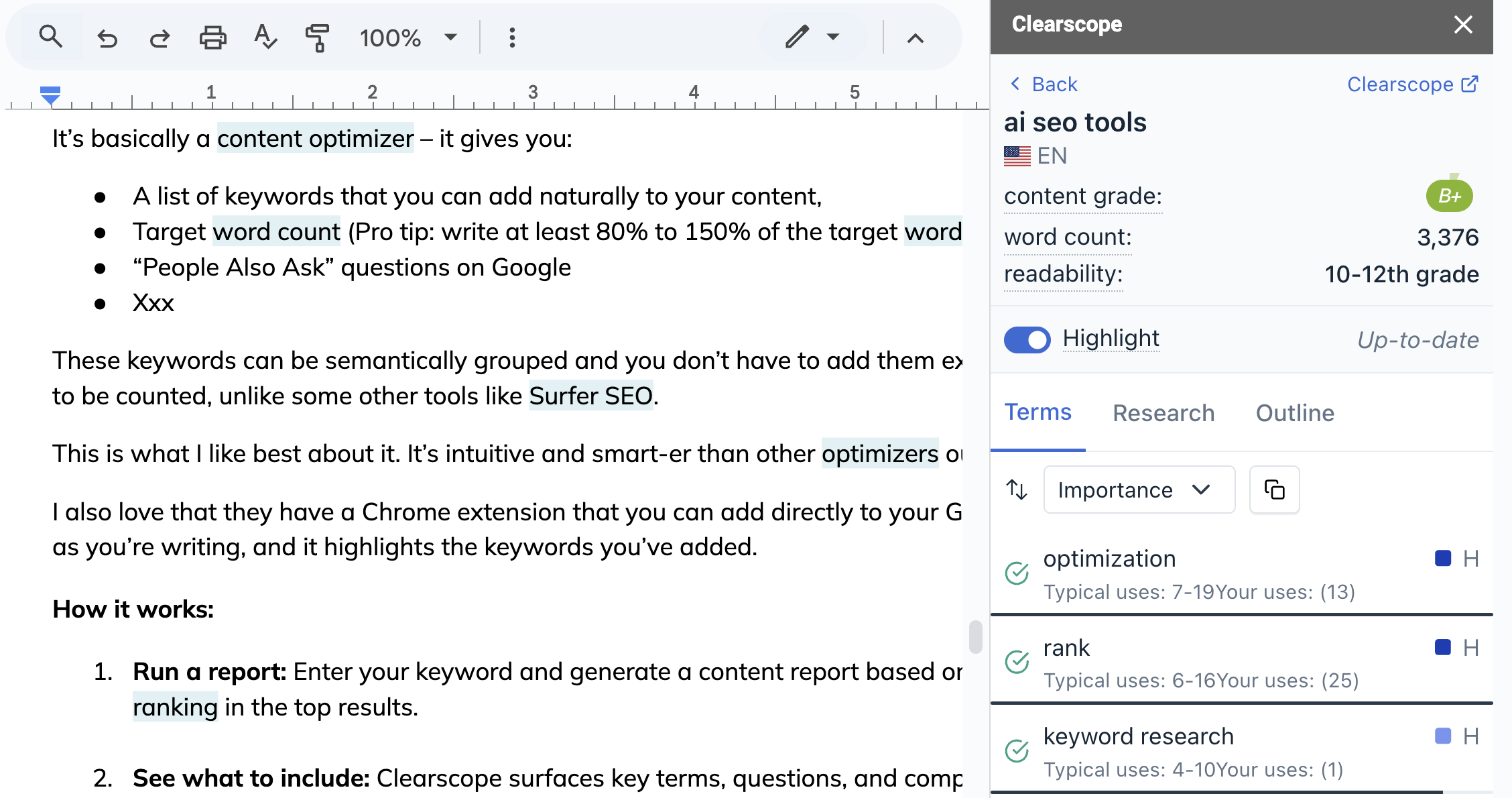 This means I don’t have to waste time copying and pasting my content into Clearscope, optimizing with keywords, and then copying back into Google Docs. It’s all done intuitively in Google Docs, which I use as my single source of truth.
For someone with an attention-deficit brain, this is gold. It keeps me focused and organized, and lets me work where I’m already writing.
Within Content Report, there’s also the AI Outline feature which generates a content outline based on your primary keyword and competitor articles currently ranking in the SERP.
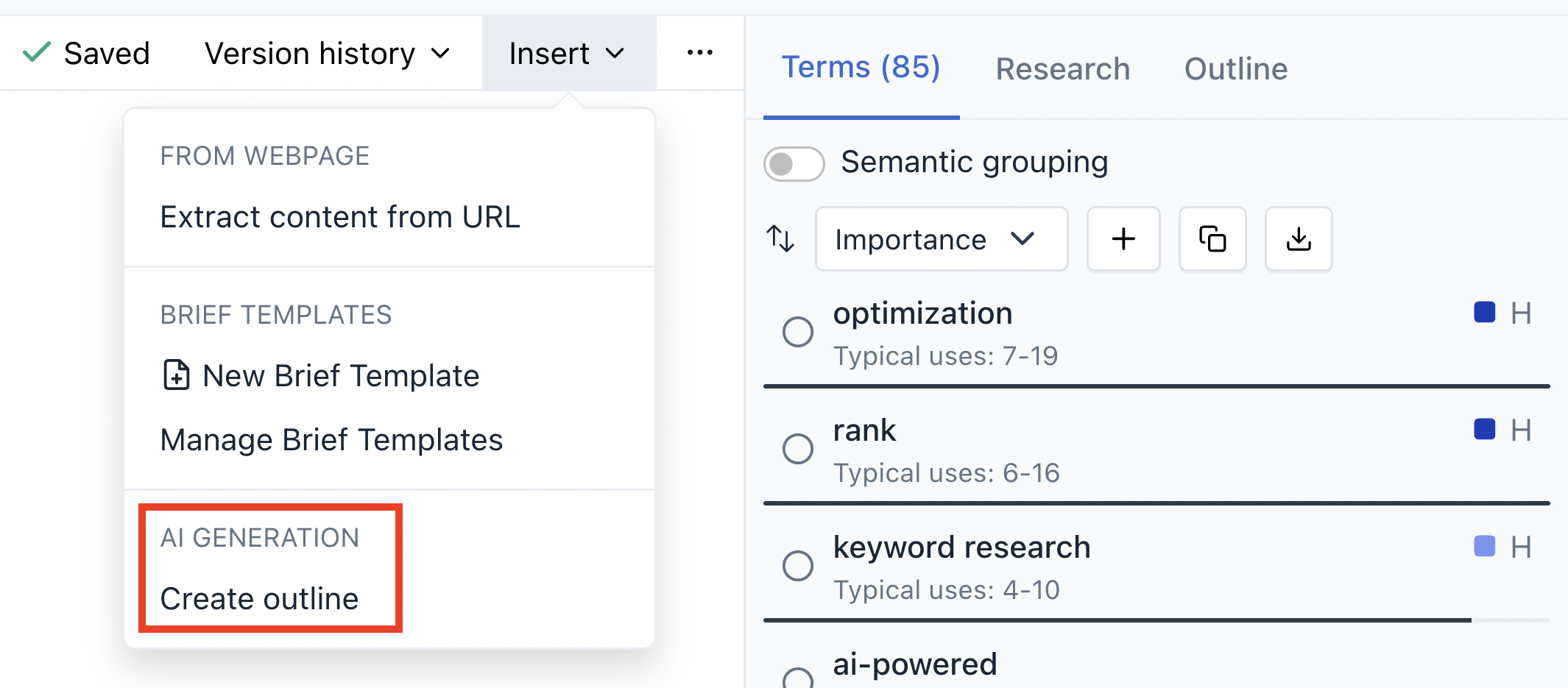 Honestly, I haven’t used this feature before but I tried it out for our article “AI SEO tools” and this was the outline it gave me:
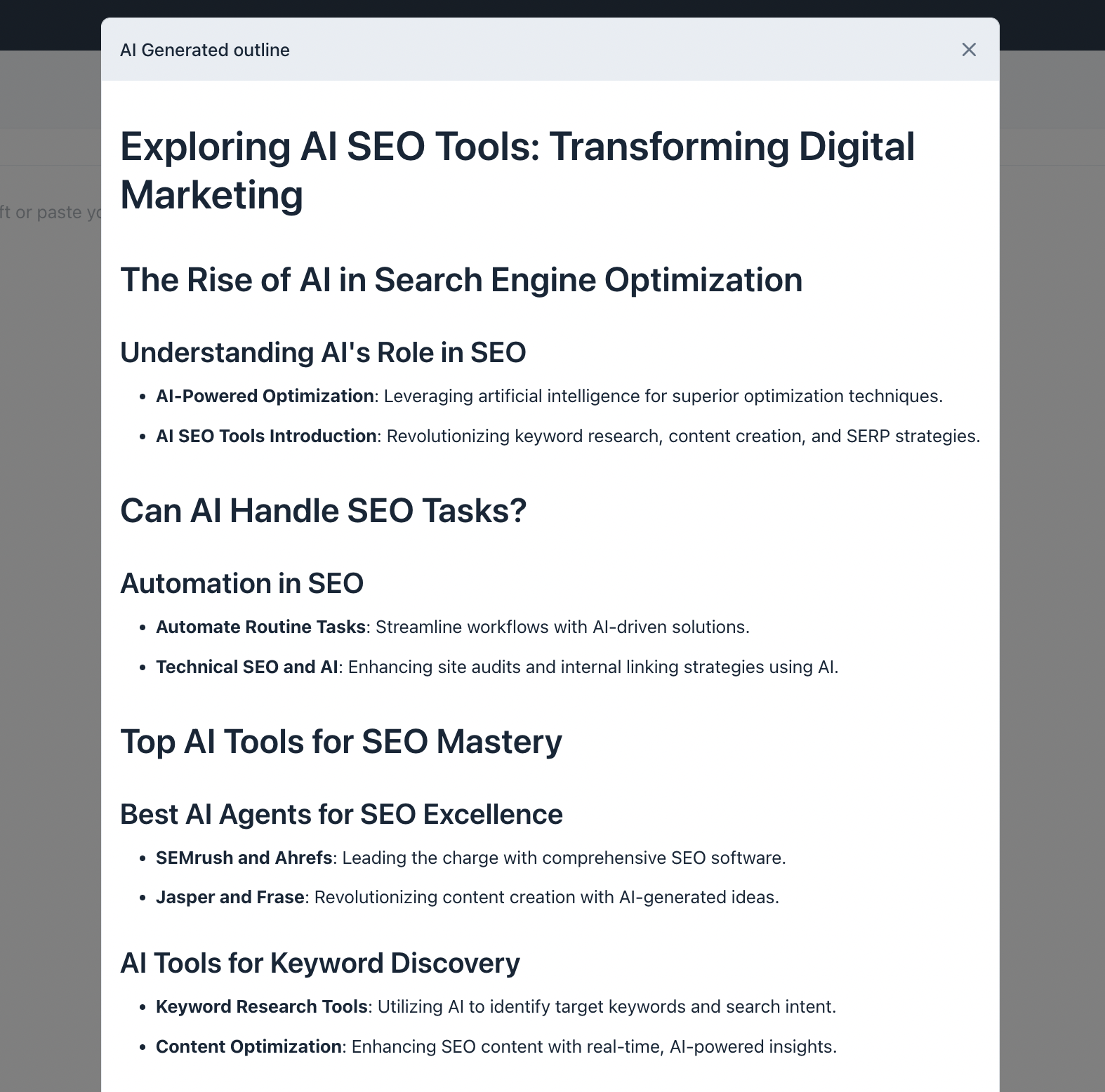 Unfortunately, this didn’t live up to my expectations. The outline had a lot of “fluff” content like “Understanding AI’s Role in SEO” that sounds very…AI…and doesn’t meet the search intent for the term. Like AirOps, it also grouped tools by category, which wasn’t what I was looking for.
Key features
- Keyword and readability suggestions from top SERPs
- Live content scoring as you write
- Search intent matching with topic suggestions
- Google Docs integration with real-time sidebar
- Team collaboration with comments and assignments
- Multi-language optimization support including English, Spanish, German, and more.
Clearscope pricing 2026
| Plan | Price | Tracked Topics | Pages | Monthly Topic Explorations | Monthly Drafts | Key Features |
| ESSENTIALS | $129/mo | 20 | 50 | 20 | 20 | Unlimited users & projects, Core features |
| BUSINESS | $399/mo | 50 | 300 | 50 | 20 | Dedicated Account Manager |
| ENTERPRISE | Custom | Custom | Custom | Custom | Custom | Everything in Business plus custom credits/agreements, crawler whitelisting, and SSO |
Flexible Usage & Add-ons
If you need to customize your plan, you can purchase additional features:
- Additional Pages: $25/mo on Essentials | $15/mo on Business | Custom for Enterprise
- Additional Drafts: $50 on Essentials | $20 on Business | Custom for Enterprise
- Users & Projects: Unlimited across all plans
6. Ahrefs AI Content Helper
Best for: Ahrefs users who want to optimize content around real search intent, without over-optimizing or writing for bots
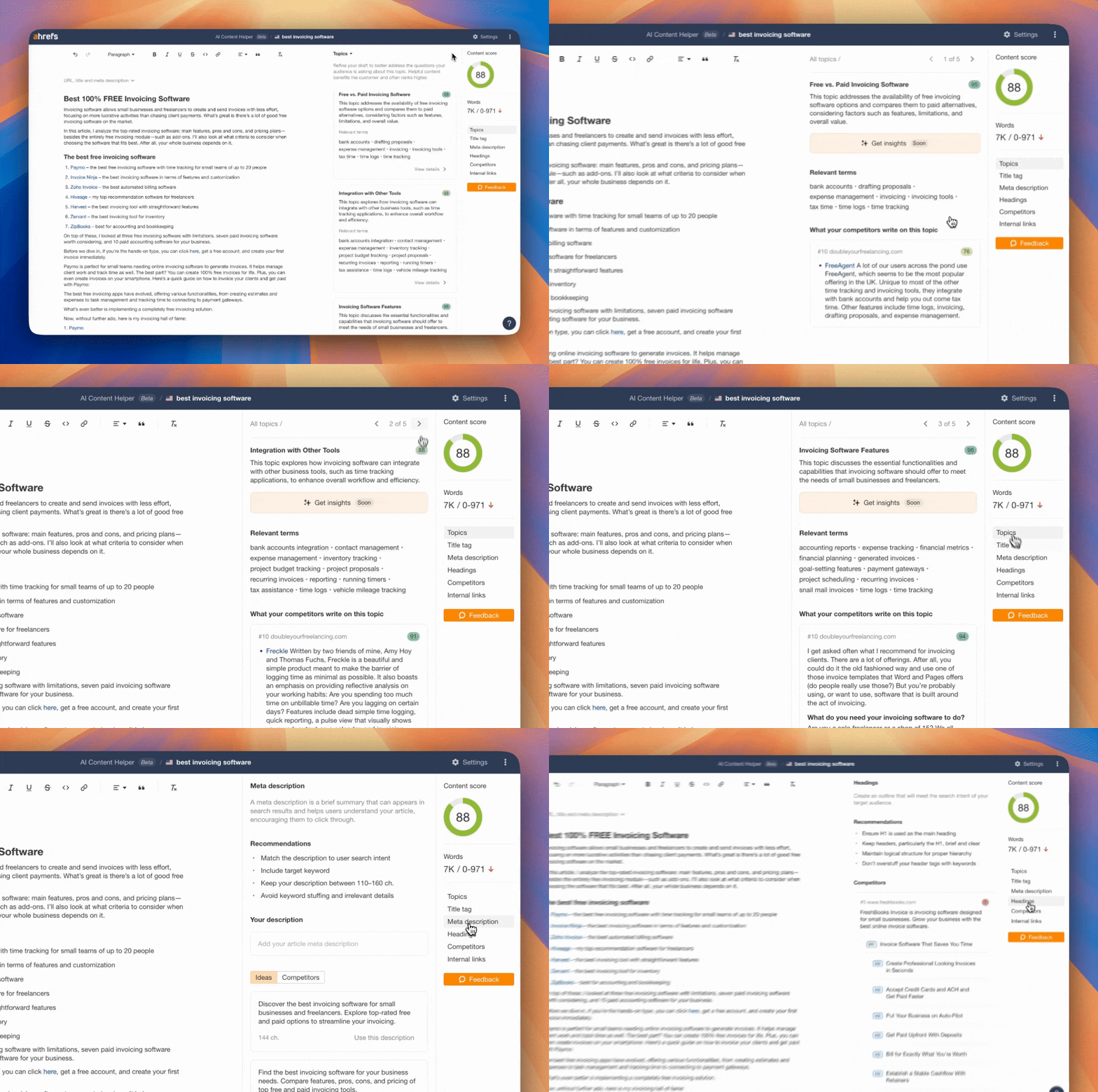
If you’re already paying for Ahrefs and you don’t want to pay for a separate content optimization tool like Clearscope? You’re in luck.
Ahrefs’ newly released feature (released September 2024), AI Content Helper, helps you write content that aligns with real search intent and meets Google’s standards—without over-optimizing or sounding like AI wrote it.
Instead of pushing keyword density, it focuses on comprehensive topical coverage, competitor-backed insights, and smart AI assistance.
Essentially, it’s like an editorial sidekick that helps you write content both people and search engines will trust.
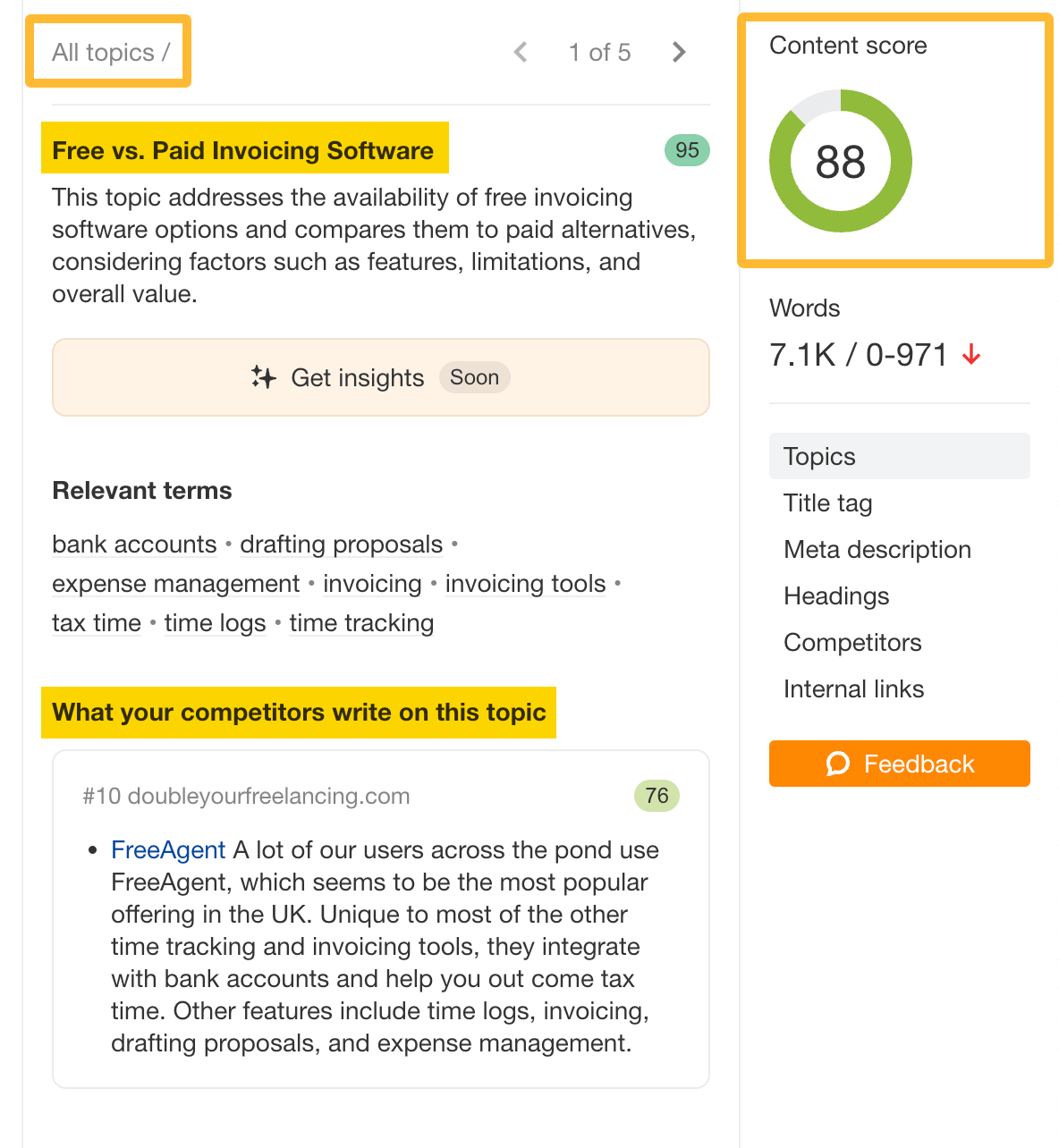
How it works
- Enter your target keyword to kick off the optimization process
- Choose a search intent from the top-ranking SERPs (or let Ahrefs group by intent for you)
- Get real-time topic coverage scores based on top-ranking competitors
- Review gaps by studying how your competitors cover missed or weak topics
- Use AI to improve—rephrase, summarize, expand, or generate metadata
- Structure your content based on how top-ranking articles are built
It’s currently in free beta for all Ahrefs paid users.
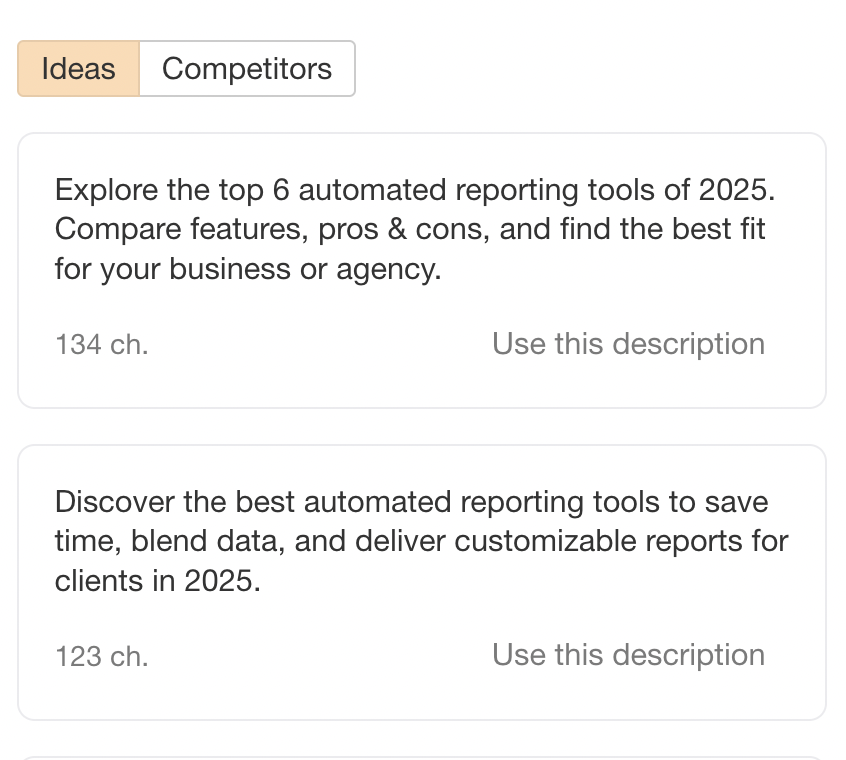
As trivial as it sounds, the best thing I like about Ahrefs AI Content Helper is the meta title and description generator.
I love writing the actual content, but always find it annoying to do little SEO tweaks like that, and with Ahrefs, you can ask AI to write it out for you. You can also see what other competitors have written as their meta descriptions.
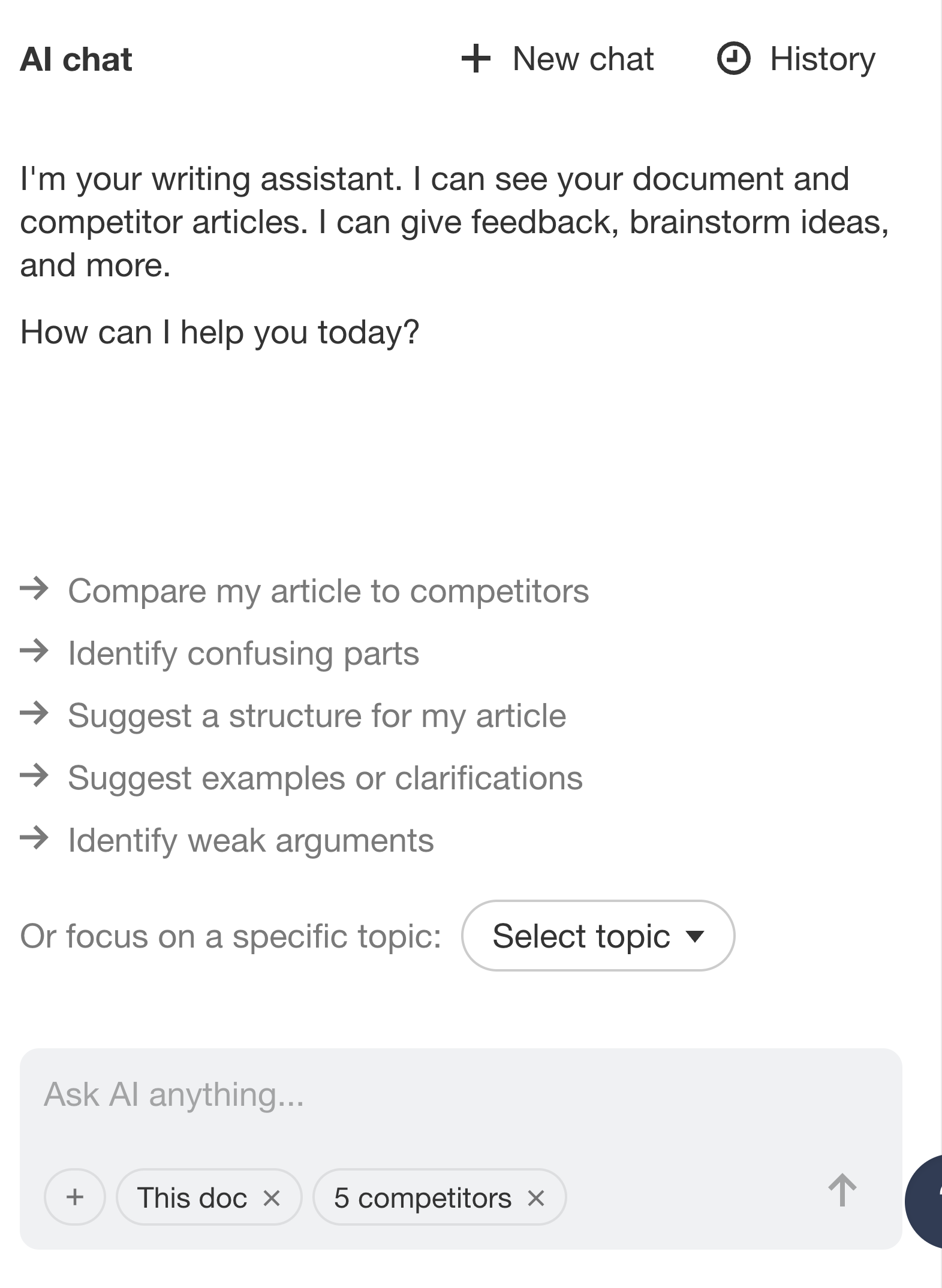
Another cool thing I love about Ahrefs AI Content Helper is their “AI chat”. Once you have written or copied and pasted in content, you can ask AI for feedback on the content.
Get it to pick holes in your content, to see if it’s SEO-optimized enough, or if you’re sounding like a robot….whatever floats your boat. This is super useful for one-person content teams or introverted writers who want to improve their craft.
Key features
- Group keywords by search intent automatically
- Score content based on topical coverage, not keyword count
- Get competitor-backed suggestions for content gaps
- Rephrase or expand content with an AI writing assistant
- Generate SEO titles and meta descriptions instantly
- Analyze heading structures from top-performing pages
Ahrefs pricing 2026
The AI Content Helper is not included in the standard pricing tiers of Ahrefs by default; but it’s part of an optional add-on called the Content Kit.
- Cost: The Content Kit starts from $99/mo.
- What it includes: AI Content Helper, AI Content Grader, and an upcoming AI Content Inventory tool.
To use add-ons like the Content Kit, you will need a base Ahrefs subscription. Here is a summary of the core monthly plans available:
| Plan | Monthly Price | Best For | Key Limits Included |
| Starter | $29 / mo | Basic search insights & competitor spying | Varies (entry-level data) |
| Lite | $129 / mo | Small businesses & personal projects | 5 projects, 750 tracked keywords, 100k crawl credits |
| Standard | $249 / mo | Freelance SEOs & marketing consultants | 20 projects, 2,000 tracked keywords, 500k crawl credits |
| Advanced | $449 / mo | Lean in-house marketing teams | 50 projects, 5,000 tracked keywords, 1.5M crawl credits |
| Enterprise | $1,499 / mo | Large teams requiring advanced customization | From 100 projects, 10k+ tracked keywords, 5M+ crawl credits |
7. Whatagraph
Best for: Creating accurate, stunning, and scalable online SEO reports for clients or executives in seconds with AI
So, you’ve got all your SEO optimization tools to help you rank, drive traffic, and convert.
But what happens when it’s time to report on these results to clients, leadership, or stakeholders who don’t understand SEO as much as you do?
That’s where Whatagraph comes in.
Whatagraph is a marketing intelligence platform where one governed data foundation powers your reports, dashboards, and AI assistant.
Define your SEO metrics once - organic traffic, keyword rankings, CTR - and they mean the same thing everywhere: in the client deck, the internal dashboard, and when you ask Claude why rankings dropped last week.
Instead of copying and pasting numbers from 3 different platforms - Ahrefs, GSC, and GA4 - into spreadsheets, you can just:
- Bring the data from all three channels into one space (i.e. Whatagraph)
- Create a stunning, branded SEO report showing the key metrics from these channels
- Ask AI to write out SEO performance summaries in seconds
- “Talk” with your data to find out what’s going on with your clients’ site
- Share the report automatically via email or live links - or query it directly from Claude or ChatGPT through Whatagraph's MCP
Tanja Keglić, Performance Marketing Manager at Achtzehn Grad loves this holistic approach to reporting. She said:
The biggest reason we chose Whatagraph was because of its holistic approach to reporting. We can blend data from different channels and see in one view what's the performance and what needs to be changed. Whatagraph also saves time, looks great, and makes it easy for clients to understand reports.
And with Whatagraph's MCP, your SEO data doesn't stay locked in a dashboard:
- Query SEO performance instantly: Ask Claude or ChatGPT about organic traffic, rankings, CTR, or conversions across any client or date range - Whatagraph MCP pulls from your governed data hub, so the answer always matches what's in your reports.
- Brief your team without opening a dashboard: Get clean, up-to-date SEO performance across your clients every morning directly from Claude or ChatGPT - no login, no tab switching, no manual pulling.
- Let your team self-serve without tickets: Define your SEO metrics once in Whatagraph. From then on, account managers and regional leads can ask questions in plain language from their AI assistant and get accurate answers - no analyst, no spreadsheet, no waiting.
- Build AI agents on governed data: Every workflow or agent you build runs on the same clean SEO data - no per-channel connector to maintain, no aggregation logic to rebuild every time a platform updates its API.
On the reporting side, with Whatagraph IQ, creating an SEO report is as easy as asking for one:
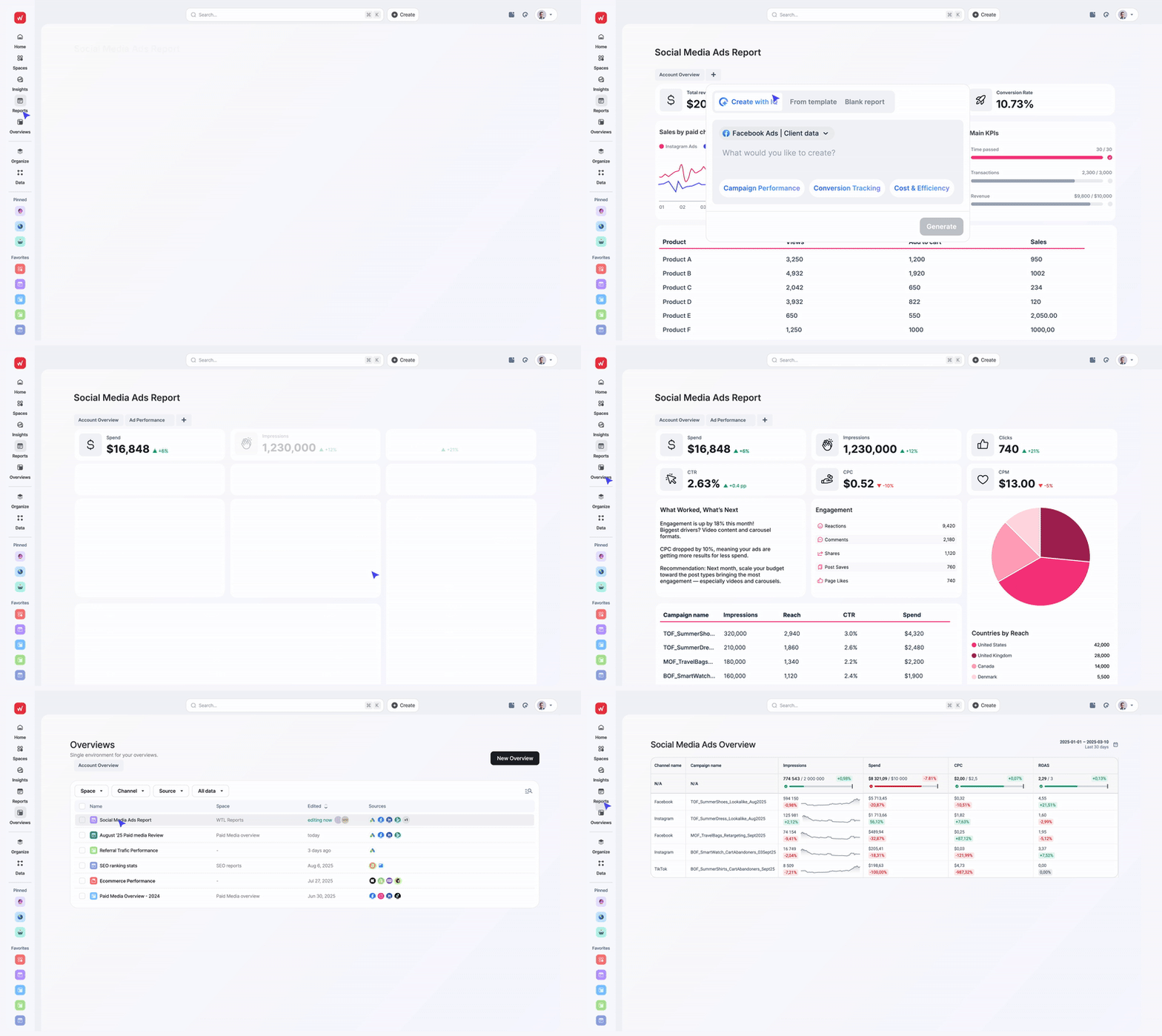
- IQ Report Creation: You don’t need to hunt around for templates or drag-and-drop widgets to build an SEO report. Just type “create an SEO performance report with X, Y, Z” and get a complete report in seconds with the exact metrics, widgets, and charts you want.
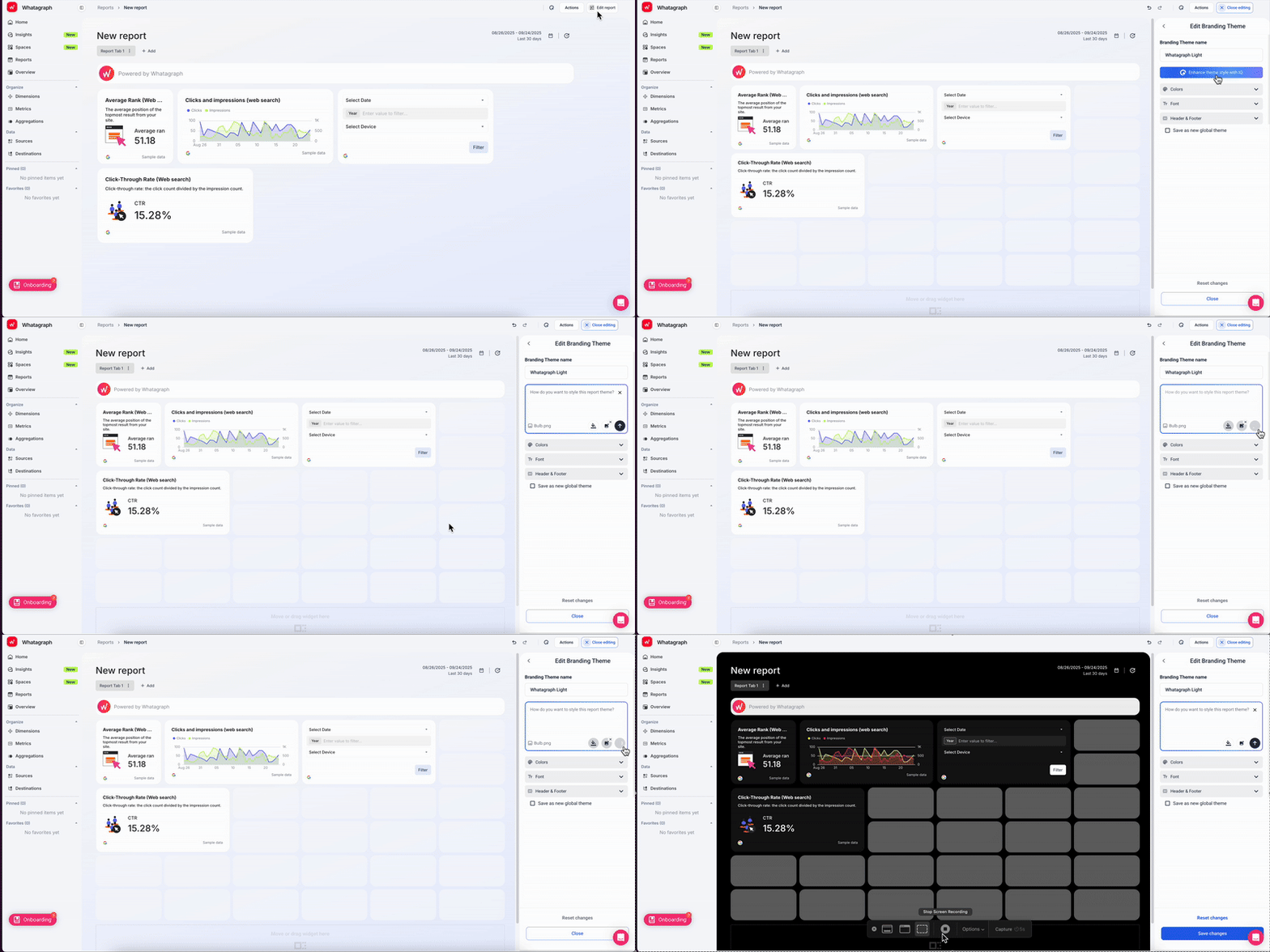
- IQ Themes: Upload a screenshot of your client’s or brand’s logo - or just type in a prompt - and Whatagraph instantly applies the fonts and colors across the entire report. You can still fine-tune the style yourself and save it as a “Global Theme” to re-use it the next time.
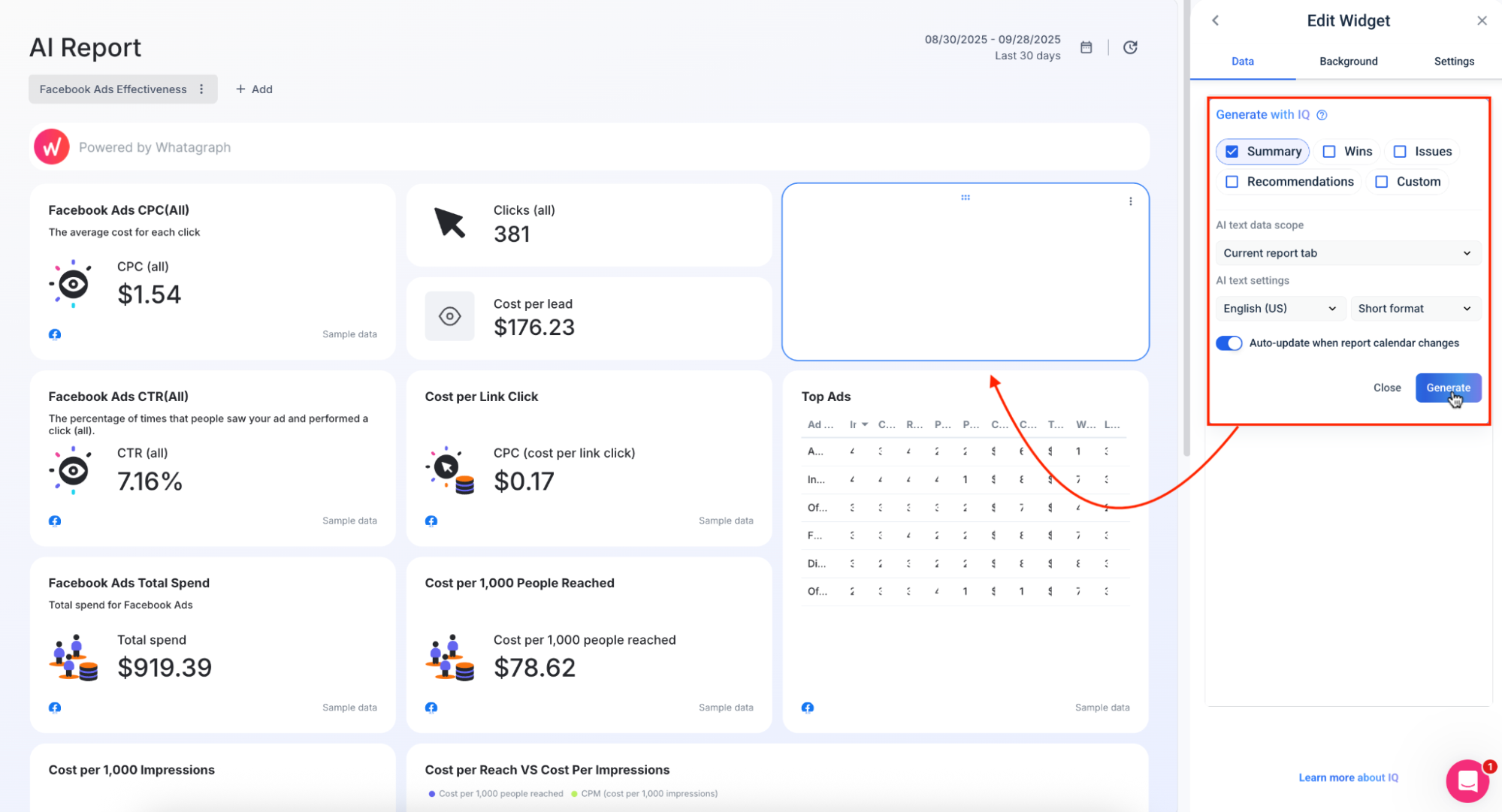
- IQ Summary: Tired of writing out performance summaries manually? Just get our AI to do it for you in 18 languages and five content types — Summary, Recommendations, Wins, Issues, or Custom Prompt.
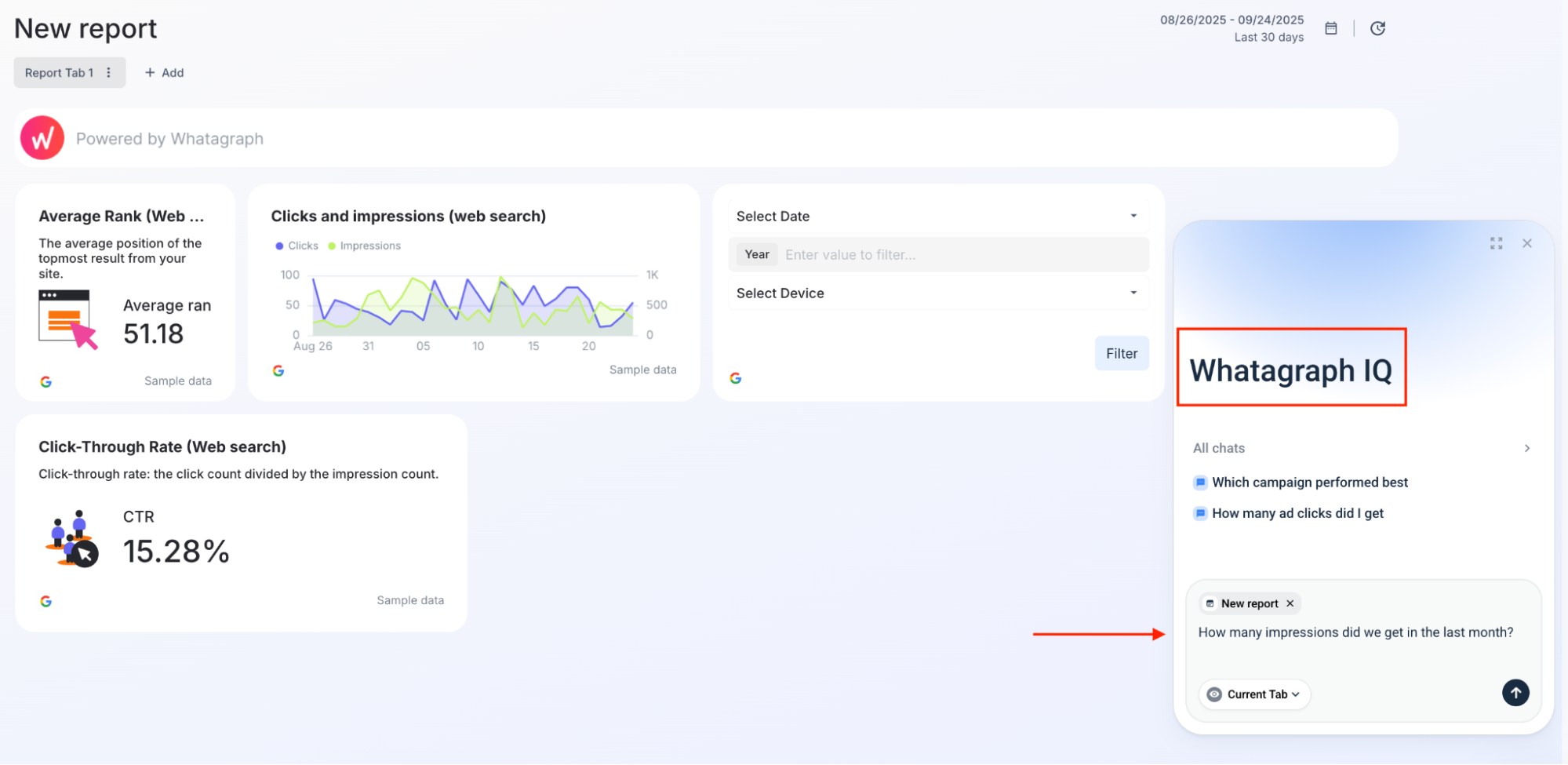
- IQ Chat: Need to answer a client’s ad-hoc question fast? Ask our IQ Chat (available inside of Whatagraph platform and inside a specific report) the question and get accurate answers based on your actual SEO data in seconds.
- IQ Dimensions: No more manually cleaning up your data. Just tell us what kind of new dimensions you want to build and we’ll do it for you.
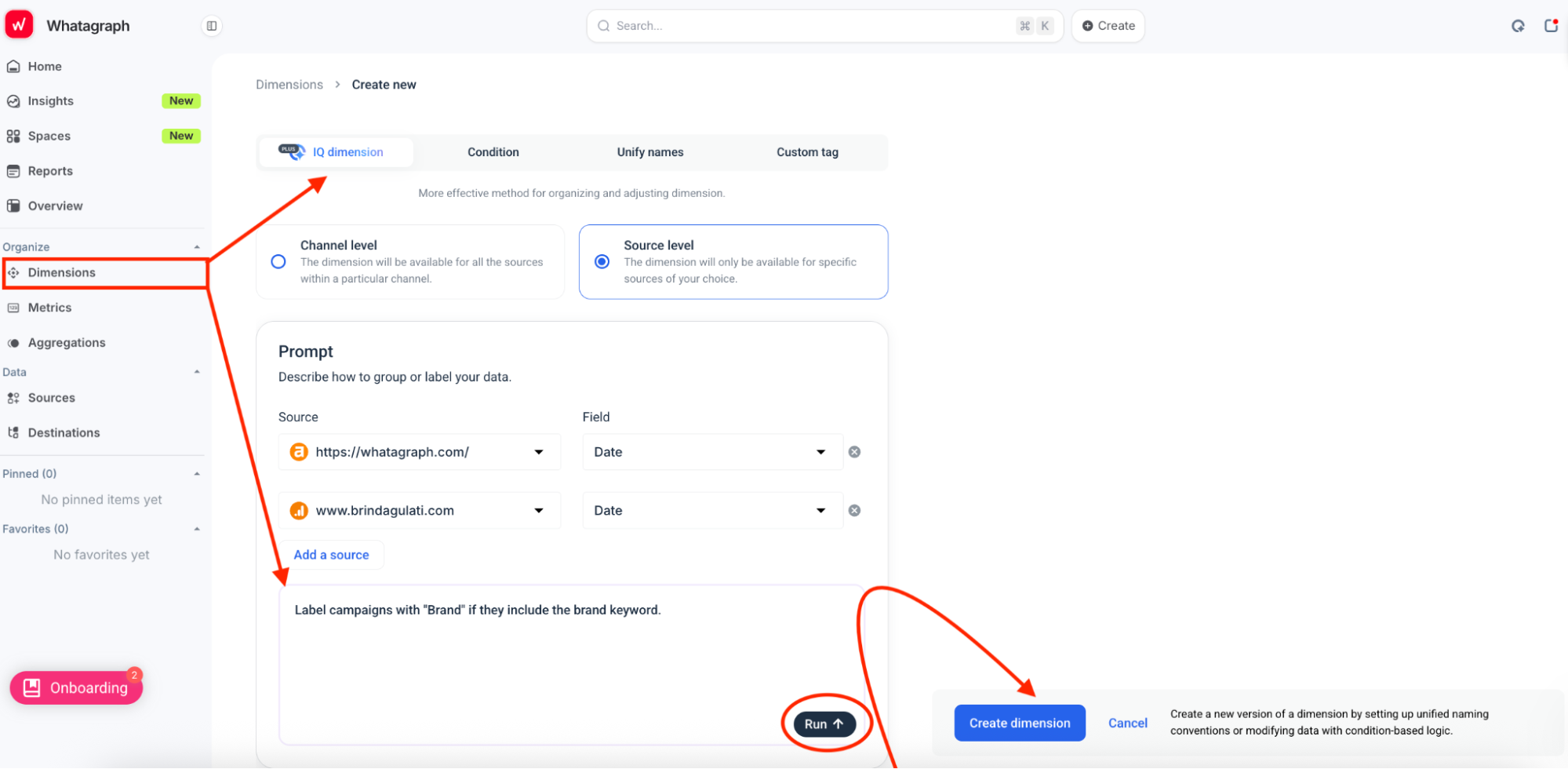
Thanks to these AI features, the team at Maatwerk Online is saving 100 hours a month on reporting. Here’s what Lars Maat, Co-Founder of the agency, has to say:
Whatagraph’s AI saves time and energy for our marketing specialists. And the hours we’re saving is just pure profit. We now have the time to focus on more strategic things that help both our agency and our clients grow.
Our SEO team built two main reports in Whatagraph that now act as our single source of truth during performance reviews:
1. Monthly SEO performance overview
This report pulls key data from GA4, GSC, Ahrefs, and DreamData—everything you need to see:
- Total Impressions, Clicks, CTR, and Average Position
- Keyword performance per page
- Blog post performance with metrics broken down by URL
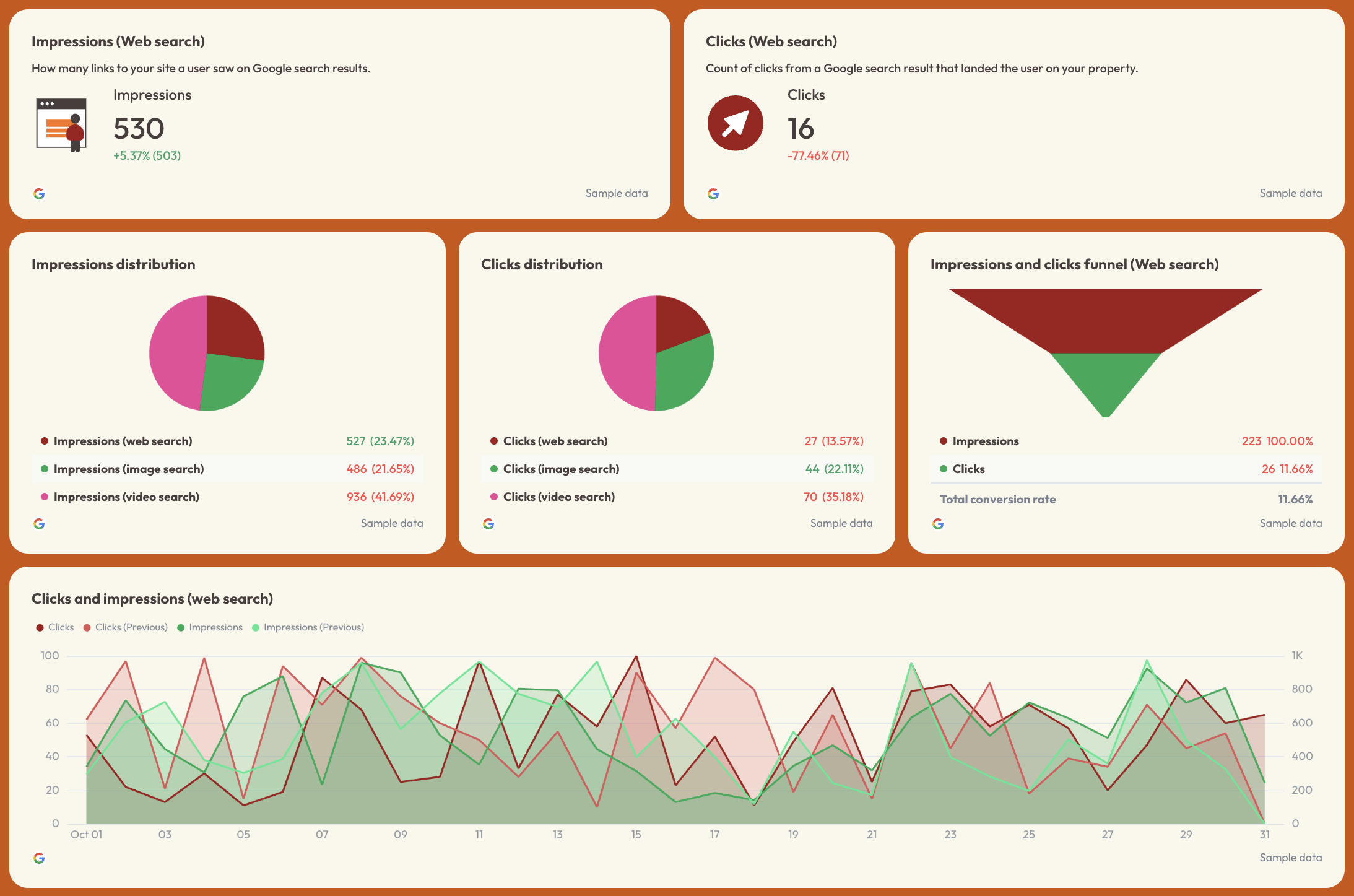
Use this free SEO report template right away.
2. AI-referral traffic reports
This free AI report template tracks which LLMs (like ChatGPT or Perplexity) are sending us traffic—and which pages they’re sending it to.
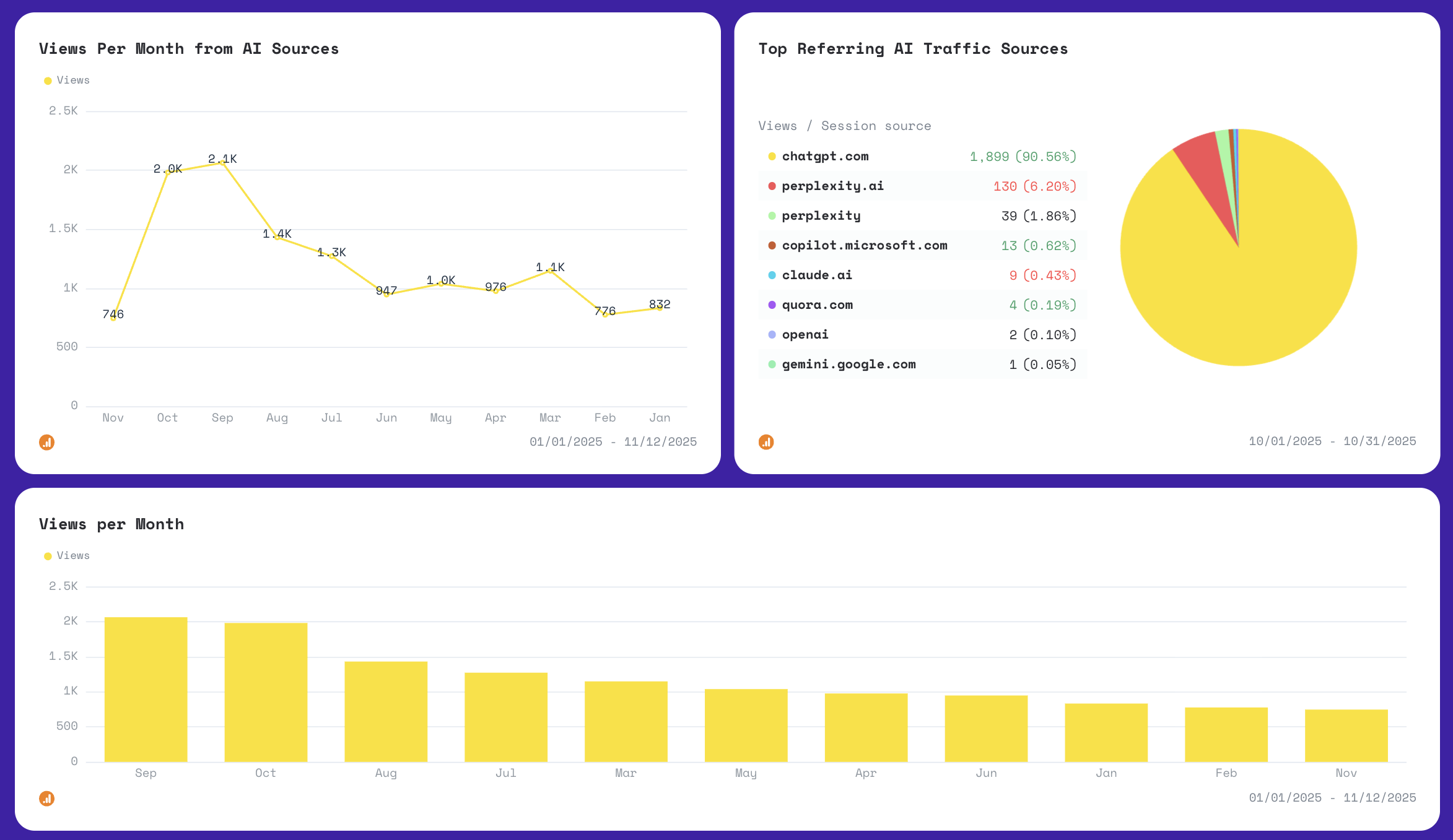
Start your 14-day free trial with Whatagraph today.
How Whatagraph works
1. Connect your data
Whatagraph pulls in data from all your SEO platforms—so you don’t need to jump between tabs or tools.
We support direct, stable integrations with both popular and niche platforms, including:
- Google Search Console
- Ahrefs
- SE Ranking
- Semrush
- Google My Business
- Google Analytics 4
- SEOMonitor
- AccuRanker
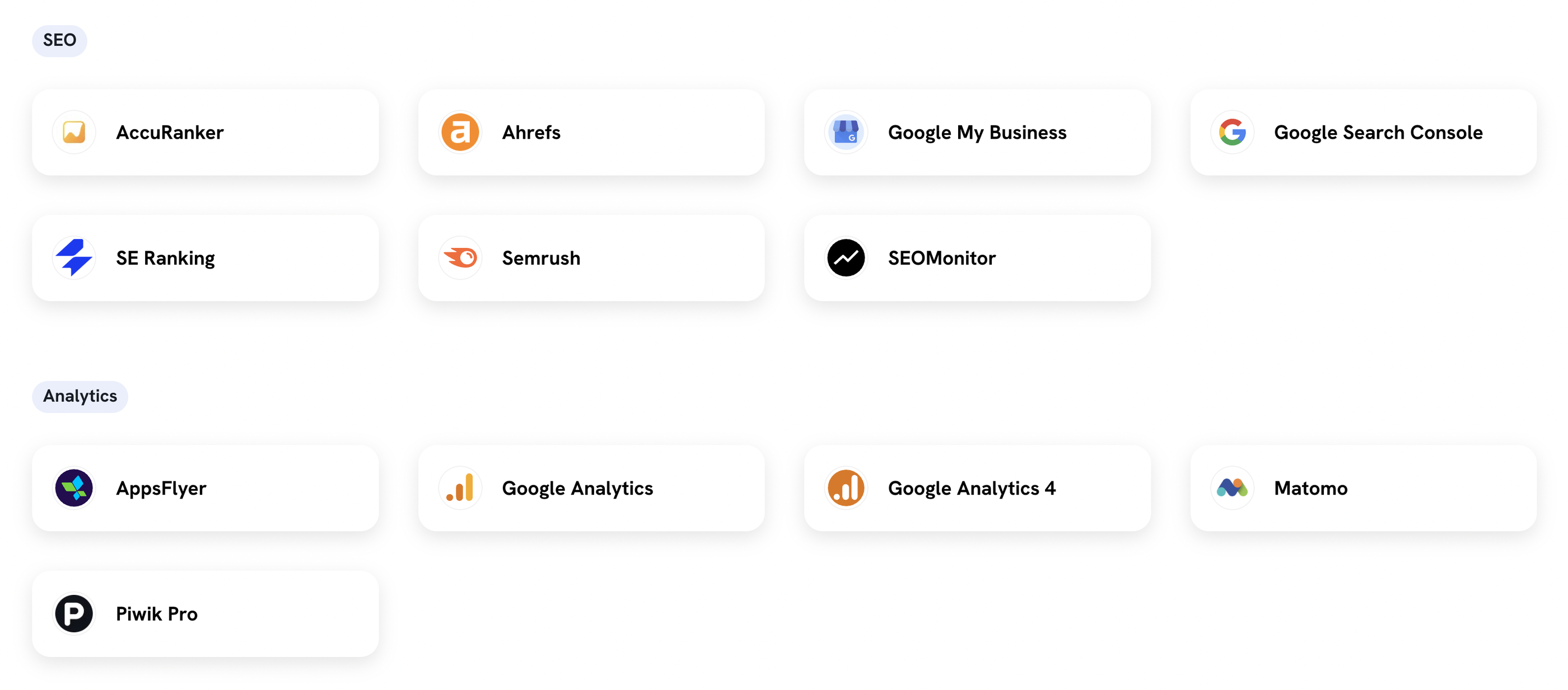 These integrations are all “one-click” – meaning you just need to click once, authenticate your account, and sit back and relax as the data flows directly into your SEO report.
Once connected, data refreshes every 30 minutes across all integrations—no need to manually refresh your reports or wait for data to come in.
Bonus: Whatagraph isn’t limited to SEO. You can plug in paid media, email, and CRM platforms, too, making it easy to build full-funnel marketing reports in one place.
2. Organize and blend your SEO data
Once your sources are connected, Whatagraph gives you the flexibility to blend, merge, and standardize your data across platforms.
Here’s an example:
- Pull keyword ranking data from Ahrefs (start reporting right away with this Ahrefs report template)
- Combine it with organic traffic numbers from GA4
- Match those with goal completions or assisted conversions
Now you can see which keywords not only drive clicks, but also bring in high-converting traffic.
You can also blend blog post-level performance across platforms.
Want to know which articles have declining search traffic but growing backlinks? Or which posts rank well but don’t convert? You can do that—all without touching a spreadsheet.
It’s especially useful for SEO content audits, where you want to map visibility + engagement + conversion data in one place.
3. Query your SEO data from Claude or ChatGPT
This is where the governed data foundation pays off.
Connect Whatagraph to Claude or ChatGPT via MCP and you can ask questions about your SEO performance directly from your AI assistant - no login, no dashboard, no exporting.
Because Whatagraph MCP connects to your governed data layer rather than raw channel APIs, the numbers your AI assistant returns always match the ones in your client reports.
For example, you can ask:
- "What's the organic traffic trend for [client] over the last 30 days?"
- “What keywords moved into the top 10 this week across all clients?”
- “Which client had the biggest drop in impressions this month and why?”
Account managers, regional leads, and marketing teams can self-serve in plain language without going through a data person.
See Whatagraph MCP’s full set up guide here.
4. Visualize your data in stunning reports in minutes
You don’t need to have long, excruciating onboarding calls with the Support team to build your first report on Whatagraph.
Even the least tech-savvy person on your team can easily create reports using Whatagraph IQ or our ready-made templates.
With Whatagraph IQ, all you need to do is:
- Connect your data source (e.g. Google Analytics)
- Type in a prompt—the more specific the better (e.g. create an SEO report with X, Y, Z)
- Wait a few seconds for us to generate the report for you
And wham bam, you’ll get a fully fleshed out SEO report.
From there, you can apply custom themes in seconds in two ways:
- Uploading a screenshot of your or your client’s brandbook or website
- Type in a custom prompt (e.g. “make the report look like a Batman movie”)
Whatagraph automatically detects the fonts and colors and applies them to your reports instantly. You can still fine-tune them manually, and once you’re satisfied, save the style as a “Global theme” and re-use it for other reports.
This customization is what Stef Oosterik, Quality Manager at Dtch. Digitals agency loves about us. He said:
Whatagraph is easy to use, visually attractive, and much smoother compared to tools like Looker Studio. It helped us not only get clients on board but also keep them within the agency.
Plus, to make it easier for you to edit reports, we have a feature called “Linked reports”.
Say you have a specific SEO report template that you use across 10 different clients, and you want to tweak that report a bit (e.g. change a widget icon).
Instead of having to edit the 10 different reports indivdiually, you can just:
- link these reports to the “master” template
- edit the “master” template
- and changes will sync automatically across your 10 reports
This can save you massive time and brainspace.
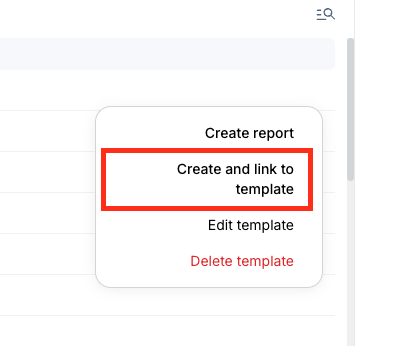
5. Share reports with clients or executives
Once your report is ready, you can send it out in multiple formats depending on who needs it and how they prefer to read:
- Automated email reports: Schedule weekly, monthly, or quarterly reports automatically.
- Live links: Great for clients who want real-time visibility into their performance
- PDF exports: Useful for board reports or executive summaries
- Excel exports: For the data-driven folks who want to dig deeper
Set reports to send automatically or manually review before sending. And if you spot any issues (like a drop in traffic or an error in the data), Whatagraph lets you pause the report and fix it before it goes out.
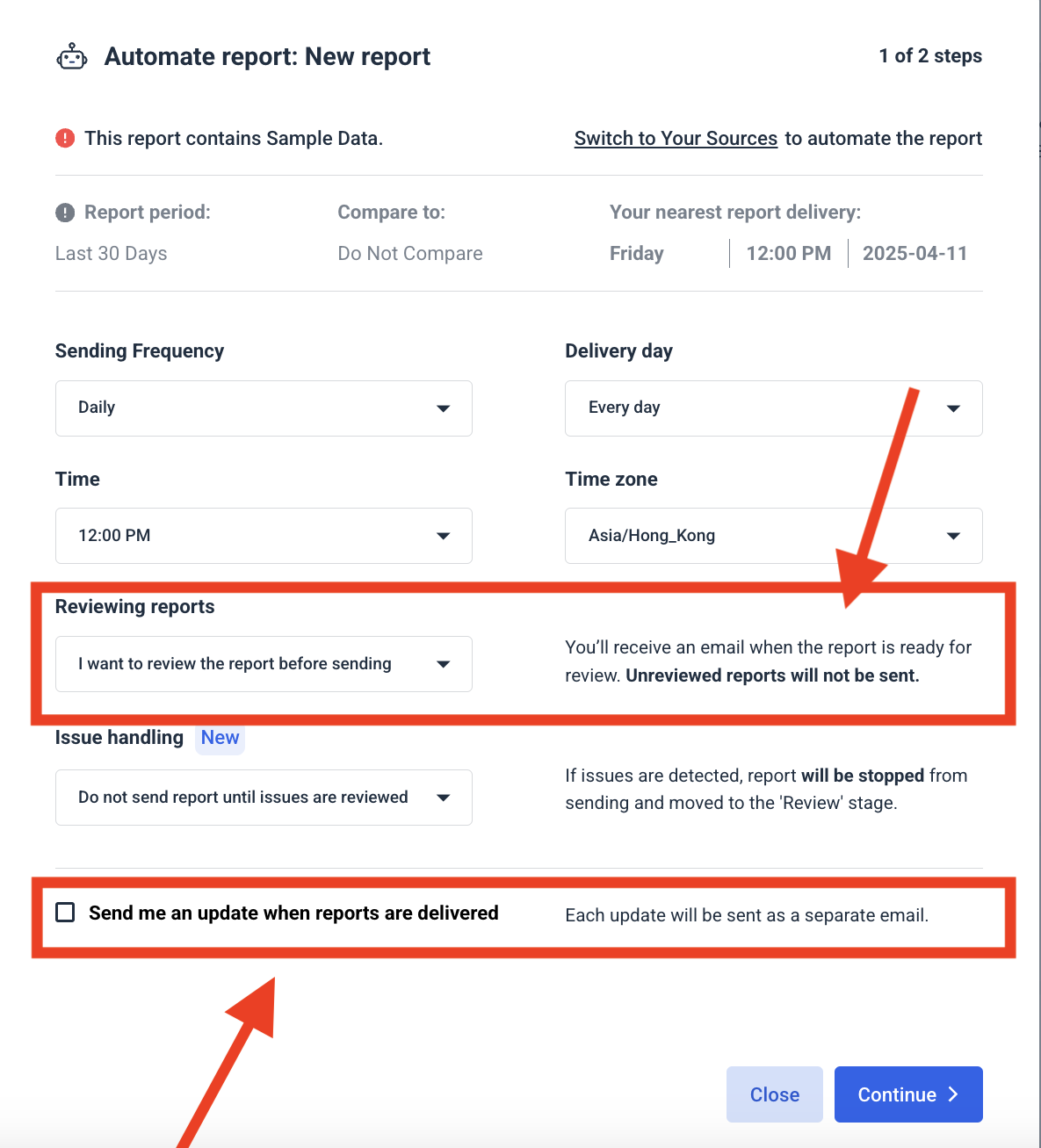
You also have the option to toggle IQ Chat on for your report reader. This will let them ask quick questions about the data on the report and get back quick answers—perfect for building trust and transparency.
Key features
- One-click integrations with 60+ marketing platforms
- Live data refresh every 30 minutes
- Cross-platform data blending
- Custom, interactive, client-branded reports
- AI-powered report generation, branding, summaries and insights
- Pre-built SEO templates
- MCP for Claude and ChatGPT
- Automated report delivery and alerts
Whatagraph pricing 2026
Whatagraph pricing scales with your needs. Check out Whatagraph's pricing page for the most updated plans.
8. Surfer
Best for: Data-driven content optimization and AI powered SEO workflows that cover research, content creation and visibility tracking.
Surfer is an all-in-one search optimization platform that helps teams research, write, optimize, and track content in traditional blue-link SERPs as well as AI generated search results. It combines real-time SEO data, competitor analysis, and AI features into a single workflow, so you can build your entire search optimization strategy on the platform.
I like that although Surfer offers advanced SEO capabilities, it doesn’t require you to be an SEO wizard to extract insights from the platform. For example, its Content Editor tool scores your written draft in real time based on hundreds of ranking factors, helping you tweak your text as you write.
How Surfer works
Surfer works by analyzing existing search results to identify common patterns in structure, keywords, headings and entities. These findings are then recommended for your content, so every suggestion you see is guided by real search data.
For example, when you enter your brand name and URL into Surfer’s AI Tracker, the tool shows you three metrics.
- Mention Rate: how frequently your brand is cited,
- Average Position: your placement in AI responses, and
- Visibility Score: a combined measure of presence and ranking.
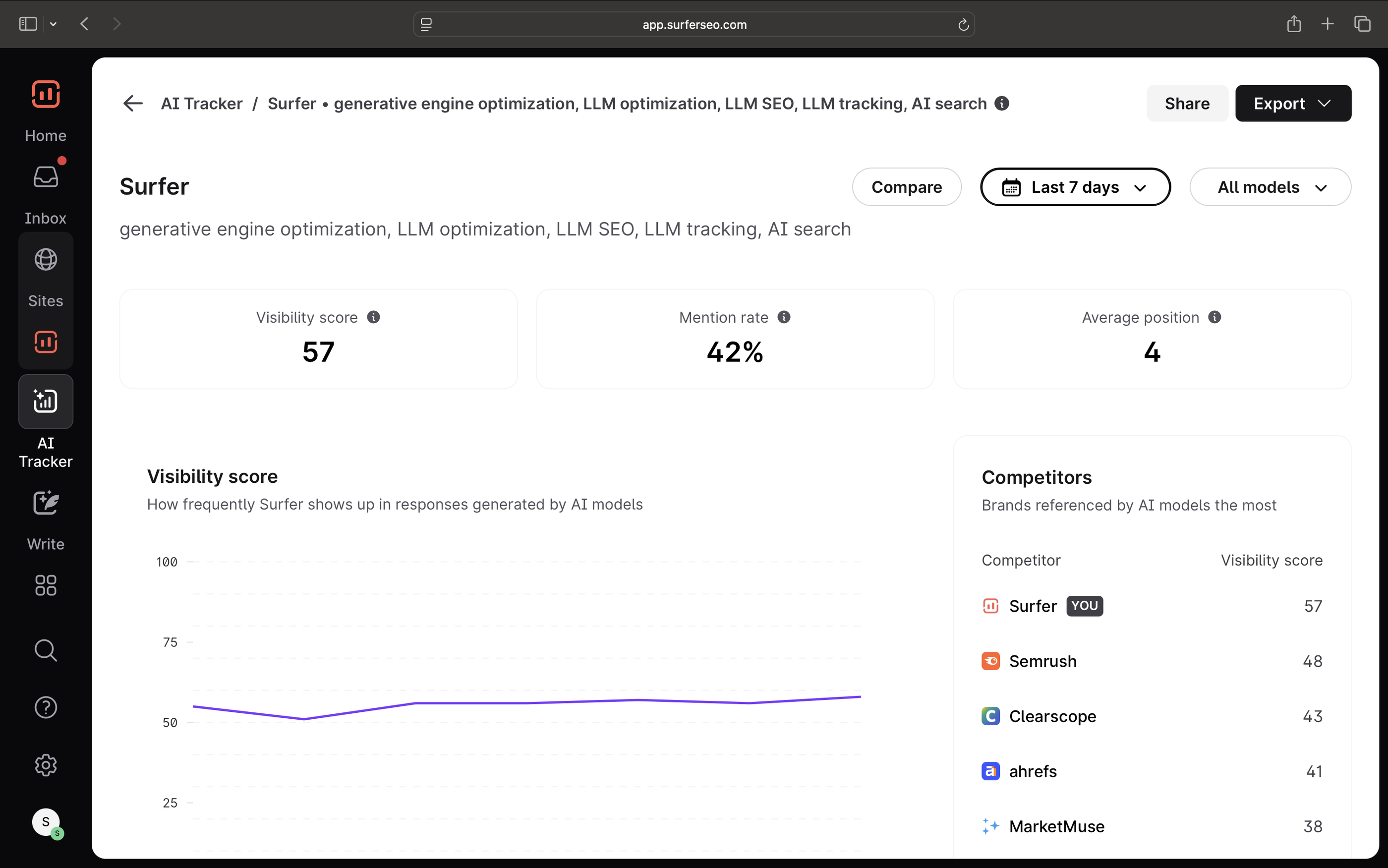
You can also see which prompts you’re showing up for as well as how competitors and other sources are cited in ChatGPT, Perplexity, and Google’s AI Overviews.
For example, here I can see how Semrush fares across AI search platforms, right down to the prompts they show up for and which pages cite them.
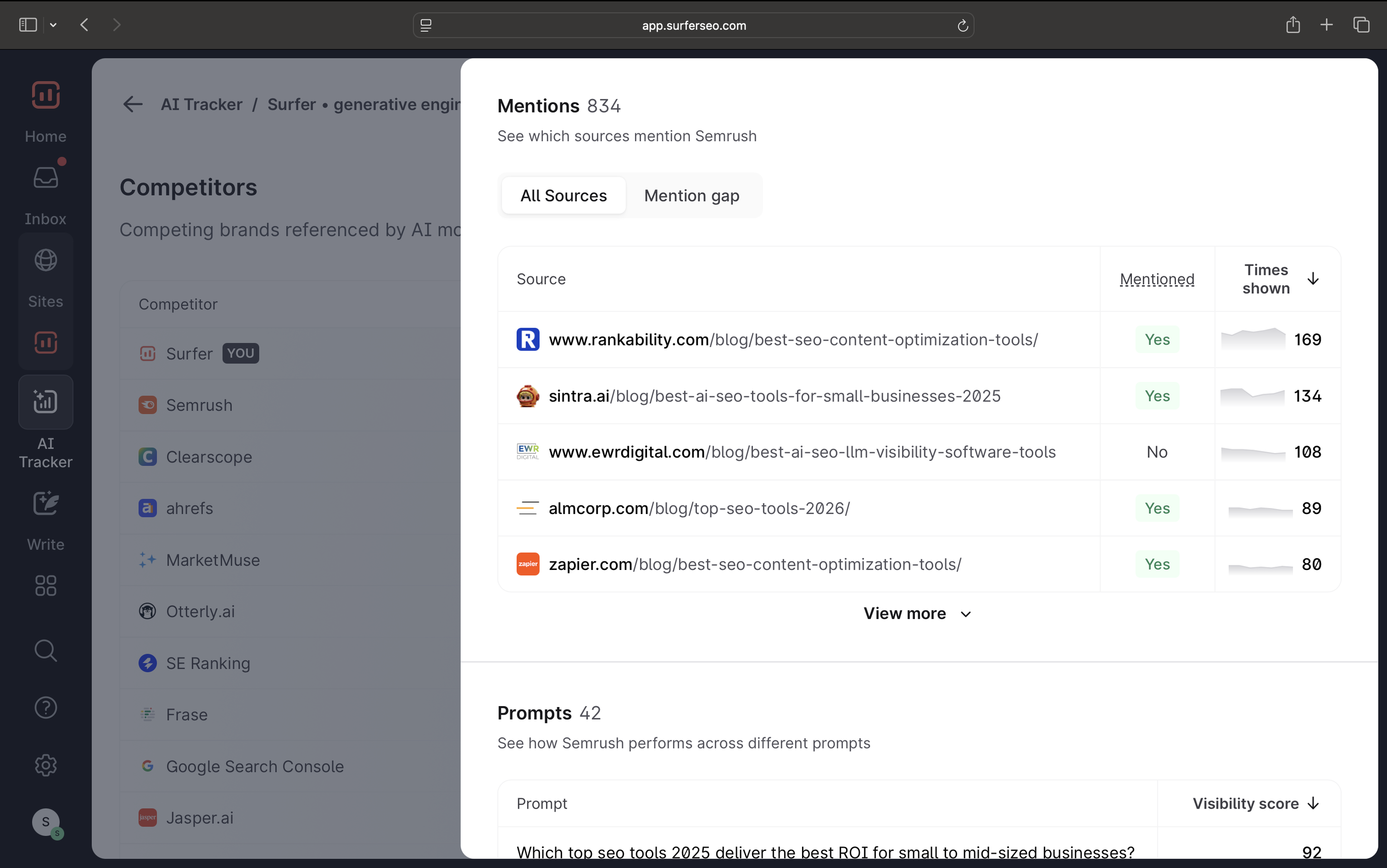
I liked the Mention Gap report that showed me prompts that my competitors were showing up for, but my website wasn’t. I can use this information to improve our search content strategy.
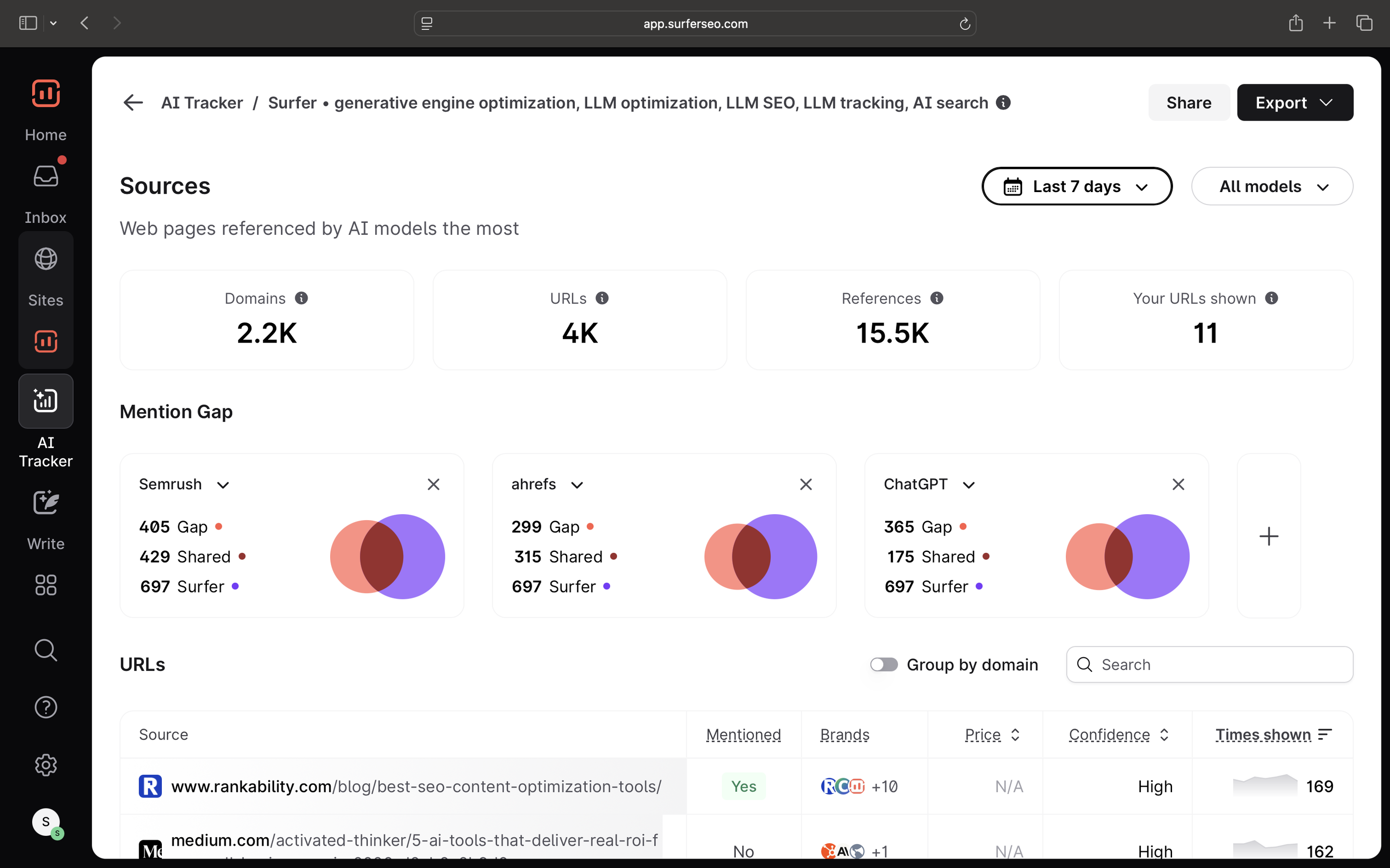
You can also add and edit prompts you want to monitor for LLM visibility, and track which query fan-outs are associated with your topic.
Surfer’s advantage over other AI SEO tools is that unlike most tools, it also helps you in creating and optimizing your pages to appear within those AI search results.
I like that the tool combined both blue-link SEO and GEO into a single workflow because optimizing for traditional SEO remains important since platforms like ChatGPT and Perplexity use Google's search index.
The right sidebar tracks entity coverage while writing articles, to ensure your content is optimized for search and AI answer engines.
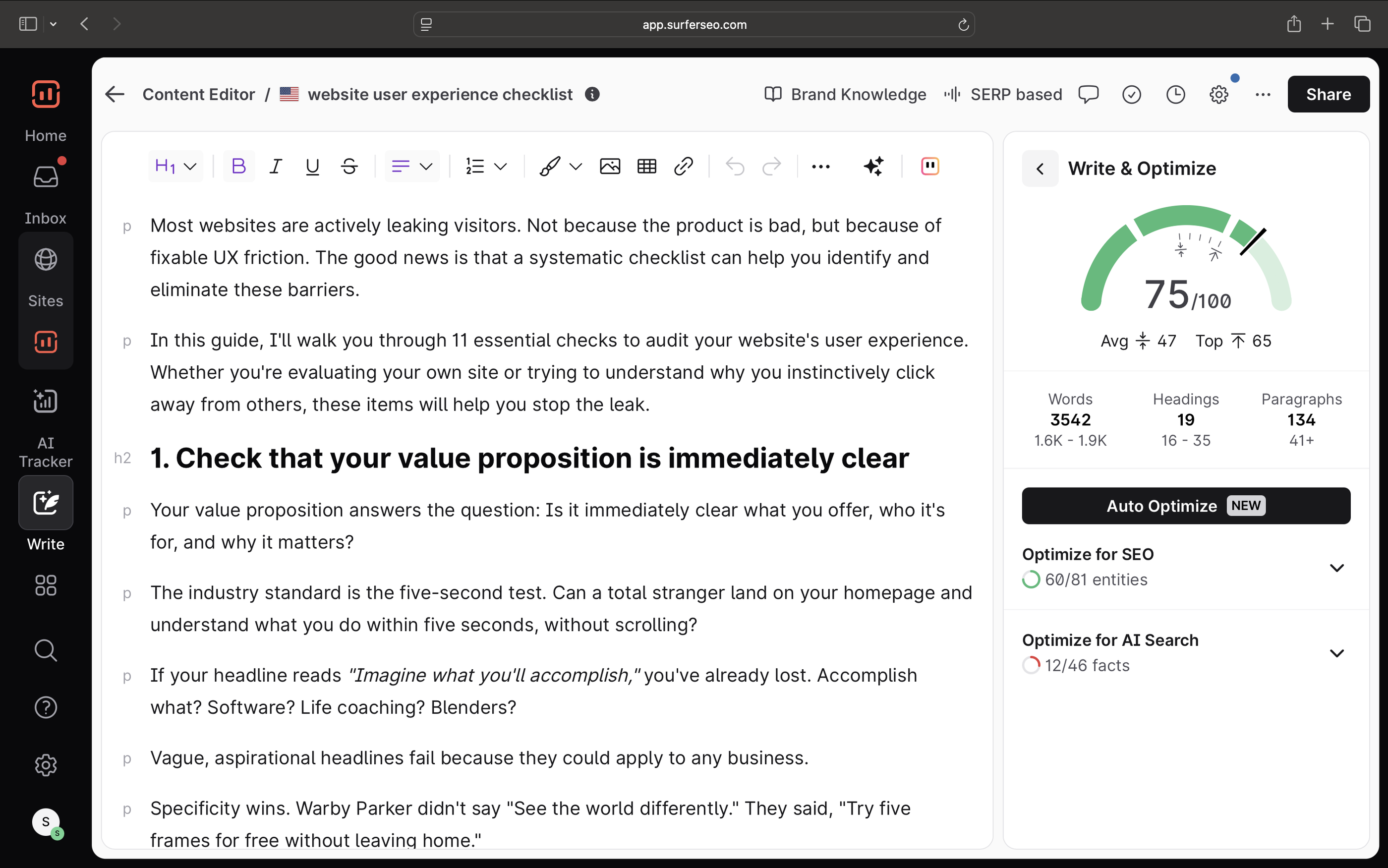
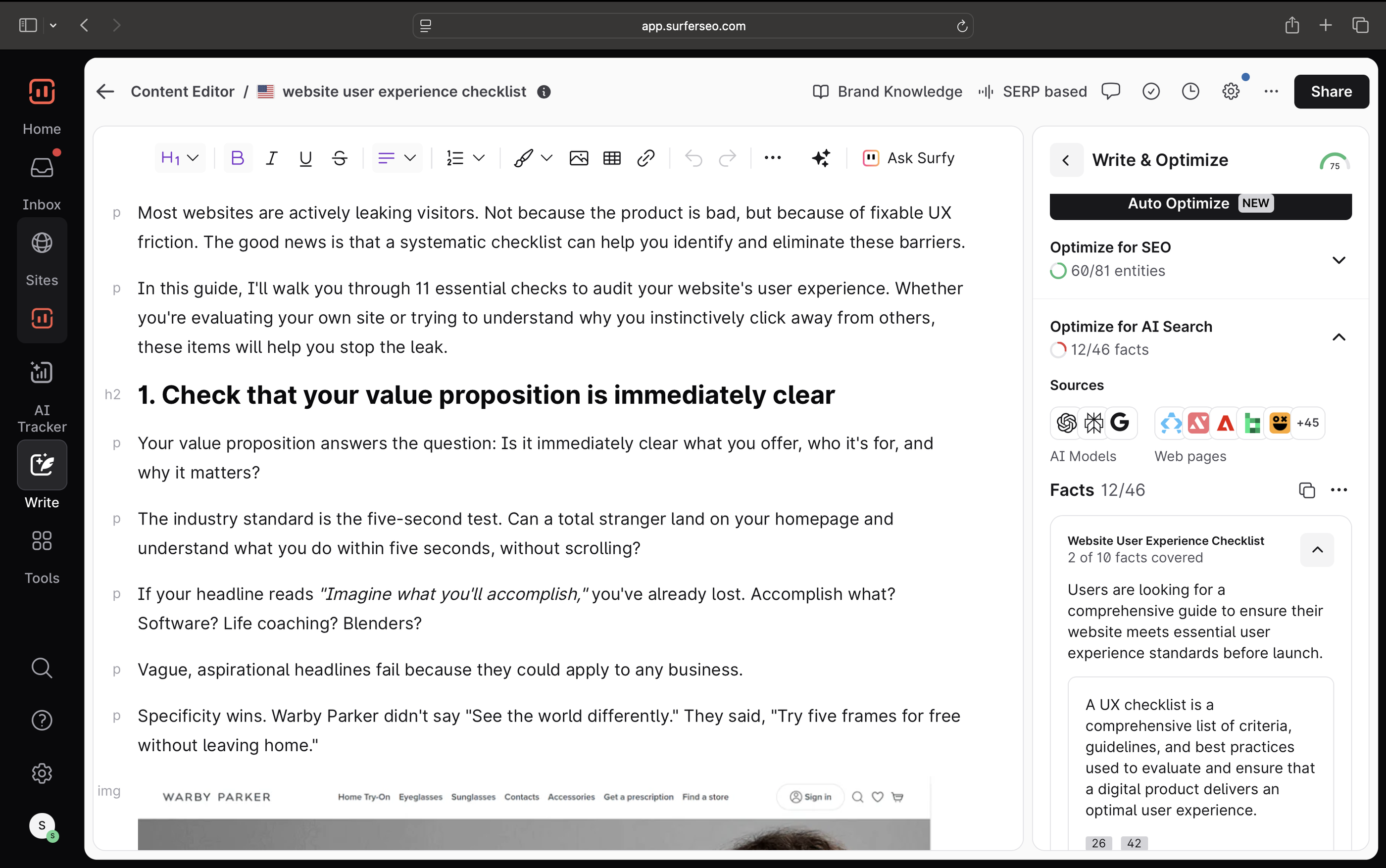
Surfer even includes entire facts to help with coverage, so you don’t have to leave the platform for research.
For example, here’s a fact that I covered for an article on UX checklists. I can also see other pages that cover this fact and are performing well in search results–the basis for Surfer’s recommendation.
And because Surfer handles everything from keyword research to content auditing, creation and tracking, you don’t need to invest in multiple tools. You can research, optimize, and track performance for SERP and AI platforms all in one place.
Key features
- Data-driven content editor with real-time AI SEO scoring and suggestions
- Visibility tracking across traditional and AI search
- Scrapes AI generated answers instead of API calls for higher accuracy
- Topical Map recommends topic clusters based on your site’s authority
- AI-powered outline and article generation
- Content audit tools for optimizing existing pages
- Integrations with WordPress and Google Docs
Surfer pricing 2026
| Plan | Price (per month) | Yearly Savings | Key Features & Limits |
| Discovery | 49 USD | Save $120 | Create/optimize 120 documents, track 10 pages, AI SEO guidelines, Surfy AI assistant & humanizer. |
| Standard | 99 USD | Save $240 | Create/optimize 360 documents, track 25 AI prompts (refreshed weekly), brand knowledge, team collaboration, plagiarism checker. |
| Pro | 182 USD | Save $444 | Everything in Standard, plus track 50 AI prompts (refreshed daily), 5 brand workspaces, 1-click internal linking, cannibalization report, custom voices. |
| Peace of Mind | 299 USD | Save $720 | Everything in Pro, plus unlimited documents, track 100 AI prompts (refreshed daily), unlimited brand workspaces, advanced SERP analysis, API access, VIP support. |
| Enterprise | 999 USD | Tailored | SSO & enterprise-grade security, comprehensive advisory program, custom limits, white-label, priority support. |
9. DataforSEO
Best for: Pulling real-time SEO data at scale to build custom tools, dashboards, or reporting workflows.
DataForSEO is a pay-as-you-go API platform that gives you direct access to raw SEO data, so you can build, scale, or power up your own tools.
It gives you real-time access to search engine data, keyword metrics, backlink profiles, and more, so you can build custom SEO workflows without the overhead of maintaining complex data pipelines.
It’s a great alternative to more expensive SEO analysis tools like Ahrefs and Semrush. Instead of paying for them, you can build your own tool with DataforSEO.
Samantha North, an AI automation specialist for B2B service businesses, built a competitor analysis workflow using DataforSEO API and Make, a no-code workflow development platform. She said:
I’m a recent fan of the DataForSEO API. I’ve been using it within Make automations for tasks like keyword research, competitor analysis and backlink analysis. It’s a super affordable alternative to expensive tools like Ahrefs.
This is how the workflow looks like:
- Starts with a Google Sheet containing competitor URLs
- DataforSEO API extracts important information like:
- Number of backlinks
- Referring domains
- Estimated traffic
- Number of top keywords, and more from the URLs
- Then, it updates the Google Sheet with all this info.
David Melamed, Founder at Ten Fold Traffic SEO agency, even "canceled" his Semrush & Ahrefs subscriptions, and now does all his marketing research and work in Codeium, an AI-powered coding assistant, using DataforSEO APIs and Google Cloud Project Credentials.
You can read more about the workflow he built in this LinkedIn post.
However, under that same post, Suman Chatterjee, SEO & Content Consultant at Brain Room Media agency warns:
You should check if DataforSEO data is accurate. I checked the traffic stats once and it was lagging behind Ahrefs. And data is what matters above everything.
How it works
DataForSEO provides a range of APIs that allow you to:
- Access SERP Data: Retrieve structured search engine results from Google, Bing, and other platforms.
- Conduct Keyword Research: Obtain keyword suggestions, search volumes, and competition metrics.
- Analyze Backlinks: Gather data on inbound links, referring domains, and anchor texts.
- Monitor Rankings: Track keyword positions across different locations and devices.
- Extract Business Data: Collect information from business directories, reviews, and local listings.
These APIs can be integrated into your existing systems or used to build new applications, providing flexibility and control over your SEO data needs.
Key features
- Full API suite for SERP, keywords, backlinks, and more
- Real-time access to search engine data
- Scalable for high-volume, enterprise-level use
- Easy integration across languages and platforms
Pricing
DataforSEO has quite a complicated pay-as-you-go, per-product pricing. We recommend going to their official pricing page to calculate the costs.
10. Pitchbox
Best for: Automating backlink-building and outreach
Pitchbox is an all-in-one link building and outreach platform designed for SEO agencies, digital PR teams, and in-house marketers.
It streamlines the entire outreach process—from prospecting to personalized email campaigns—by integrating with top SEO tools and automating follow-ups.
Amit Raj, Link Building Specialist and Director at The Links Guy, a bespoke link-building agency, recommended Pitchbox to me. He said:
Pitchbox have some cool features where you can scrape datapoints from each target page (eg like H1, meta, H2’s etc) to bring into your campaign and then run multi prompts according to each one, and have that appear in the sidebar as you personalize your emails, or just have it make the personalisation for you.
He said this is useful for segmenting batches for link building or speeding up the personalization process. He also noted:
Would always recommend vetting it and editing before sending it out.
How Pitchbox works
Pitchbox automates and organizes your link building workflow in a few key steps:
- Prospect: Use advanced search features or import your own lists to find relevant bloggers, publishers, and influencers/
- Discover Contacts: Automatically fetch contact details, including emails and social profiles, for your prospects.
- Outreach: Craft personalized emails using SmartTemplates™ and schedule follow-ups with Natural Sending Patterns™ to mimic human behavior.
- Manage Campaigns: Track responses, monitor link placements, and manage your pipeline with a built-in CRM tailored for link builders.
- Report: Generate white-labeled reports to analyze campaign performance and share results with clients or stakeholders.
Key features
- Discover link prospects via keywords, competitors, and SEO tool integrations
- Automate personalized outreach with follow-ups
- Manage contacts and link status with built-in SEO CRM
- Use AI to personalize emails and replies at scale
- Track campaign performance with detailed reporting
- Integrate with Slack, Zapier, Looker Studio, and more
Pitchbox pricing 2026
| Plan | Price (Billed Annually) | Key Limits & Features | Best For |
| Pro | $210/mo ($2,520 total) | 2 Users, 2 Email Accounts, 2,000 Outreach Emails/mo, 1 Workspace, 25 Campaigns/mo | Link builders managing a single website. |
| Advanced | $420/mo ($5,040 total) | Unlimited Users, 6 Email Accounts, 5,000 Outreach Emails/mo, 25 Workspaces, 1,000 New Campaigns/mo | Growing agencies with a few clients. |
| Scale | $825/mo ($9,900 total) | Unlimited Users, 20 Email Accounts, 25,000 Outreach Emails/mo, Unlimited Workspaces & Campaigns | Teams scaling up massive link outreach. |
| Enterprise | Custom Pricing | Single Sign-On (SSO), SLA, Custom Service Agreement, Private Training | Corporations and public companies. |
11. Ranking Racoon
Best for: getting backlinks from authority sites
Ranking Raccoon is a community-based link-building platform that lets you connect directly with verified website owners to exchange backlinks.
Every site is manually reviewed, so you’re only seeing credible opportunities.
Unlike Pitchbox, which automates outreach emails at scale, Ranking Raccoon skips emails entirely and gives you instant access to verified SEO professionals who are actively looking to exchange high-quality links.
It’s like Tinder for backlink-building — you sign up via LinkedIn, add your site, and AI recommends the most relevant sites based on topical match so you see the best fits.
Then, you can immediately start a chat with the site owner. Ranking Racoon claims that their customers enjoy a 71% reply rate within a week, and 35% of that turned into published links.
It’s a more straightforward and dare I say, easier, way to build links without having to send cold pitches.
Siddharth Kushwaha, SEO Outreach Specialist at factoHR, said:
Ranking Raccoon is an underrated one. It's an interesting and viable option for young and aged domains to build relevant and quality links by directly connecting with site editors. They're improving the platform little by little, and I'm loving it so far.
But also, I imagine the success of link building on Ranking Raccoon greatly depends on:
- How big their community is
- How good of a quality the sites on there are
Fortunately, you can check it out for yourself with their 7-day free trial.
How Ranking Racoon works
The process is quite simple.
- Sign Up via LinkedIn: Ensures a community of verified SEO professionals.
- Browse Verified Sites: Access a curated list of websites across 54 industries.
- Direct Messaging: Initiate conversations with site admins to propose link exchanges.
- Link Confirmation: The platform automatically verifies when a backlink is live and do-follow.
Key features
- Get backlinks from manually vetted, high-quality websites
- Avoid link farms with a strictly moderated, spam-free platform
- Verify backlinks in real time with automated checks
- Follow community guidelines that promote ethical link building
Pricing
As of June 2026, Ranking Raccoon offers two pricing tiers:
Lite (Free Forever):
- Add unlimited sites.
- Your sites are visible on Pro users’ dashboards.
- Get contacted by users interested in your sites.
- Build shareable profiles with link-building guidelines.
- Invite new site admins.
- Community guidelines ensure best practices for all users.
Pro ($25/month):
- Includes all Lite features.
- Browse and filter verified sites in 54 industries.
- Start unlimited new chats with other link builders.
- Your sites are visible on Pro users’ dashboards.
- Get contacted by users interested in your sites.
- Build shareable profiles with link-building guidelines.
- Invite new site admins.
- Community guidelines ensure best practices for all users.
12. Indexly
Best for: Automating indexing so your pages show up in search faster without manual submissions or waiting for crawlers
Indexly is an indexing automation tool that makes sure your web pages get discovered by search engines fast, without manual submissions or weeks of waiting for Google to catch up.
Instead of watching newly published pages sit in limbo, Indexly checks your sitemap, finds new or unindexed URLs, and submits them automatically to Google, Bing, and Yandex.
The result is faster indexing, faster rankings, and fewer missed opportunities for organic traffic.
Victoria Kurichenko, SEO Specialist and Content Writer at Self Made Millennials SEO agency told me:
I've been using Indexly as a technical SEO tool to help track and speed up indexing. What I like best is that the tool keeps improving. They’re adding new features like keyword rank tracking and on-page audits. Honestly, it’s on its way to becoming an all-in-one SEO toolkit.
How Indexly works
1. Auto Indexing (Set it and forget it)
- Connect your Google Search Console account to let Indexly detect your sites and sitemaps
- Select the websites you want to monitor
- Indexly scans your sitemaps every 24 hours
- It finds pages that aren’t indexed or failed with errors, then submits them automatically
- You get email notifications on status and indexing updates
2. Instant Indexing (Manual control when you need it)
- Submit individual or multiple URLs instantly—no need to log into Search Console
- Save hours of manual work, especially if you’re updating lots of content at once
- Ideal for high-priority content, launches, or content refreshes you want live now
3. Performance Analytics
- See which pages are getting impressions, clicks, and CTRs
- Identify what’s ranking—and what’s not
- Understand which keywords are driving traffic so you can double down on what works
- Use insights to fine-tune your content and indexing strategy in real time
Key features
- Auto-index new and updated pages daily via sitemap scans
- Manually submit pages for instant indexing in search engines
- Bulk-submit URLs to save time on large updates
- Track impressions, clicks, and CTR with built-in analytics
- Monitor keyword rankings and get alerts for changes
- Check and track live backlinks contributing to SEO
- Submit content to AI engines like ChatGPT and Perplexity via Bing integration
Indexly pricing 2026
| Plan | Price (Monthly) | Users / Workspaces | Key Features | Limits | Support |
| Starter | $99 | 1 User / 1 Workspace | • Technical SEO • Track ChatGPT • Find citation gaps • Write AI-optimized content | • 50 Prompts • 200 Submissions/Day • 100 Audit Pages/Month • 10 Articles/Month | |
| Growth | $299 | 2 Users / 3 Workspaces | All Starter features plus: • Track 3 Models • Auto-Pilot AI Content Agent • Optimize existing content • Reddit monitoring & CMS integrations | • 100 Prompts • 600 Submissions/Day • 500 Audit Pages/Month • 30 Articles/Month | Standard |
| Scale | $499 | 3 Users / 5 Workspaces | All Growth features plus: • Track 5 Models • API Access • Agency reports & Whitelabel • Key Account Manager | • 200 Prompts • 1,000 Submissions/Day • 1,000 Audit Pages/Month • 60 Articles/Month | Priority / Key Account Manager |
Additional Plan Options
- Enterprise: Custom plans tailored for large companies and agencies requiring advanced integrations, white-label options, and enterprise-grade security.
- Done-For-You Services: Starts at $299/site/month for multi-domain brands where Indexly handles the SEO + AI readiness audit, visibility tracking, and content reporting for you.
Note: A 17% discount is available if you choose annual billing instead of monthly.
13. AIclicks
Best for: Tracking your brand's visibility across 10+ AI search engines and turning that data into a prioritized list of actions, not just another dashboard
AIclicks is a GEO (Generative Engine Optimization) platform that tracks where your brand shows up in AI search, identifies the sources feeding those answers, and tells you exactly what to do to get mentioned more.
That last part is what caught my attention. Most GEO tools I've tried stop at the dashboard; they hand you a visibility score and a competitor chart, then leave you to figure out the "now what."
AIclicks is built to close that gap.
The tool monitors your brand across ChatGPT, Perplexity, Gemini, Google AI Overviews, Claude, Grok, DeepSeek, Meta AI, and Copilot, then turns what it finds into a ranked to-do list, like: publish this piece of content, get mentioned on this Reddit thread, pitch this site that AI already cites.
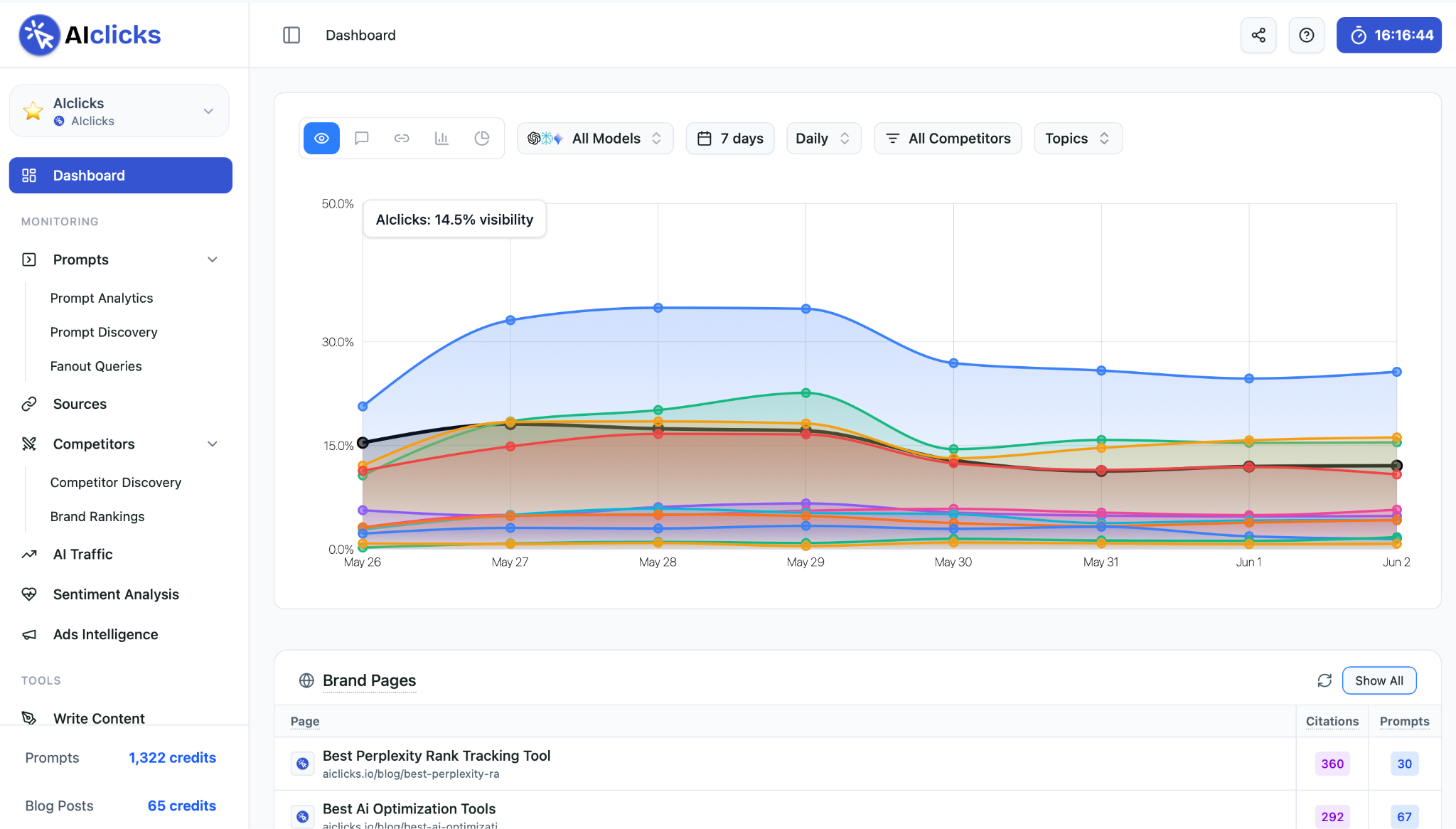
One detail I didn't expect to matter as much as it does: AIclicks queries each platform through its actual user interface, not the API.
That sounds like a technicality until you've watched API responses and real ChatGPT answers diverge, which they do, constantly. If you're tracking rankings off API data, you're measuring something your buyers will never see.
AIclicks sends each prompt the way a real person would type it, then logs which brands show up, which sources got cited, how your brand is described, and the sentiment behind the mention.
Another cool feature is the source intelligence.
For any prompt you're losing, AIclicks shows you the exact domains feeding the answer; the Reddit threads, the listicles, the review sites AI leans on, so you're not guessing where to invest but reverse-engineering the citations and going straight to the source.
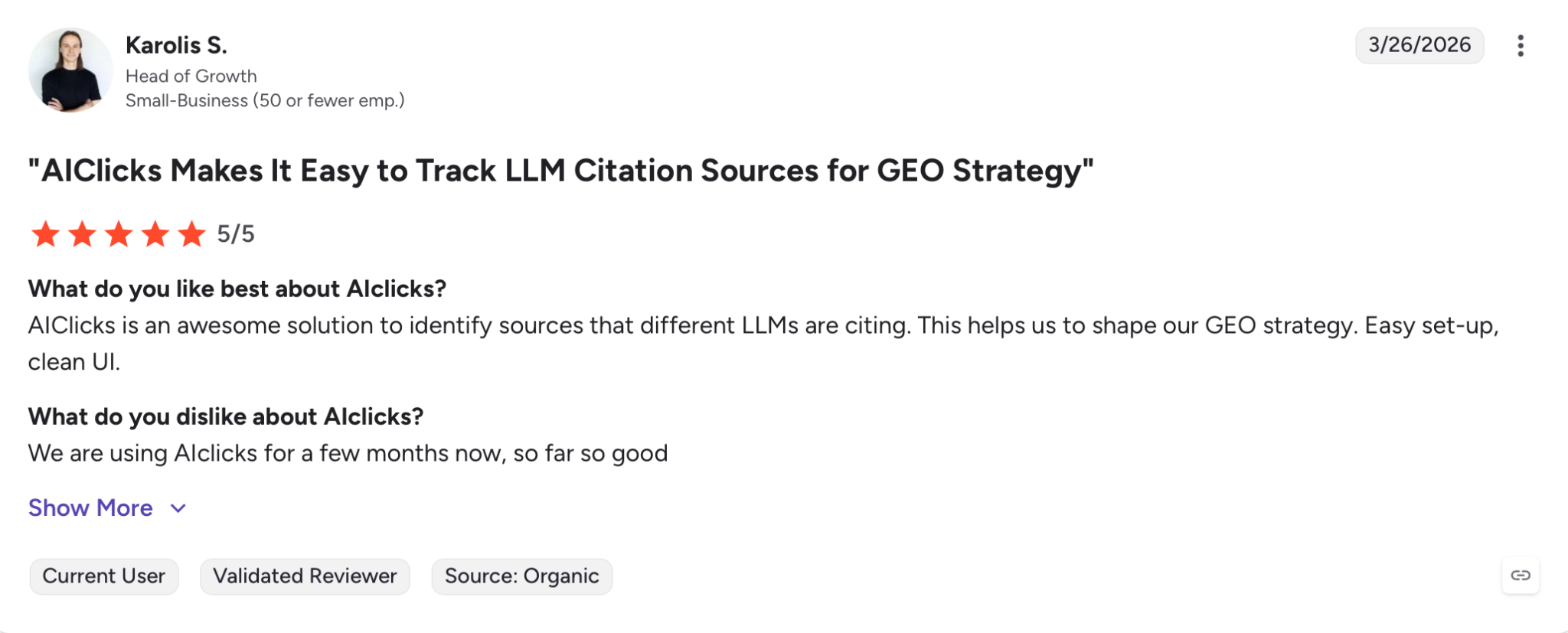
Karolis S. summed up the appeal in his G2 review:
How AIclicks works
1. Run a free brand audit: Drop in your domain, and AIclicks scans how visible you currently are across the AI engines. It's a fast gut-check before you commit to anything.
2. Track your prompts: Add the prompts you care about (say, "best cheap flights booking site" or "best [competitor] alternatives"). AIclicks runs them daily, scores your visibility, and benchmarks you against competitors and the rest of your industry.
3. Analyze your sources: This is the part I'd actually pay for. For any prompt, AIclicks shows the specific domains driving the answer, like the Reddit threads, listicles, and review sites the LLMs lean on, plus a side-by-side of your coverage versus your competitors'. Instead of guessing where to invest, you're reverse-engineering the citations.
4. Optimize: The Recommendations tab converts all of it into a prioritized action list across three buckets: create AI-optimized content, earn mentions on sources AI already trusts, and join the conversations where AI picks up brand signals. Each action is ranked by expected impact, so you always know what to do first, and you can hand tasks off to their agents to execute.
Here’s a quick tutorial:
A detail that matters for proving ROI: AIclicks connects visibility data to actual traffic through Google Analytics, so you're not chasing a vanity score in a vacuum. And you can filter everything by AI model and by country.
So this means if you're #1 on Perplexity in the US but invisible on Gemini in Germany, you'll see it, rather than a blended average that papers over the gaps.
Key features
- Visibility tracking across 10+ AI platforms including ChatGPT, Perplexity, Gemini, Google AI Overviews, Google AI Mode, Claude, Grok, DeepSeek, Meta AI, and Copilot
- Queries AI platforms through their real user interfaces, not APIs, so the data matches what buyers actually see
- Daily prompt monitoring with visibility scoring and competitor benchmarking
- Source-gap analysis that surfaces the exact domains driving AI answers
- A Recommendations engine that prioritizes content, outreach, and Reddit actions by expected impact
- AI agents to execute content and outreach tasks
- Google Analytics integration to tie AI visibility back to real traffic
- Segment visibility by AI model and by country
AIclicks pricing 2026
AIclicks keeps it refreshingly simple, three plans, with roughly 20% off on annual billing, and a 3-day free trial on every tier.
There's also a free brand audit you can run before paying a cent.
| Plan | Price (Monthly) | Tracked Prompts | AI Platforms | Key Highlights |
| Starter | $59/month | 30 | 3 | 1 website, 1 country, 10 AI-optimized articles/month, email support |
| Pro | $189/month | 150 | 4 | Unlimited websites & countries, 20 articles/month, Google Analytics integration, Slack support |
| Business | $499/month | 300 | 6 | Unlimited websites & countries, 30 articles/month, GA + API access, dedicated account specialist |
| Enterprise | Custom | Custom | Custom | Tailored prompt volume, platforms, and team size |
For agencies, the Pro plan is the obvious sweet spot, unlimited client sites and countries at a price that doesn't sting every time you onboard a new account.
And if none of the tiers fit, the team builds custom plans around your prompt volume, platforms, and team size, and will take POs and invoices for longer commitments.
14. Semrush
Best for: Tracking your brand's mentions, citations, and sentiment across AI search, and fixing what you find without leaving the platform
Alright, let's end this piece with a (very) well-known brand.
Semrush requires no introduction to the SEO community, but they have recently rebranded from just a “SEO tool” to offering an AI Visibility Toolkit.
This means you can now track not only the usual SEO rankings and backlinks but also AI brand mentions, citations, and sentiment across ChatGPT, Perplexity, Gemini, Google AI Mode, Google AI Overviews.
How Semrush works for AI visibility
1. Check your Visibility Score
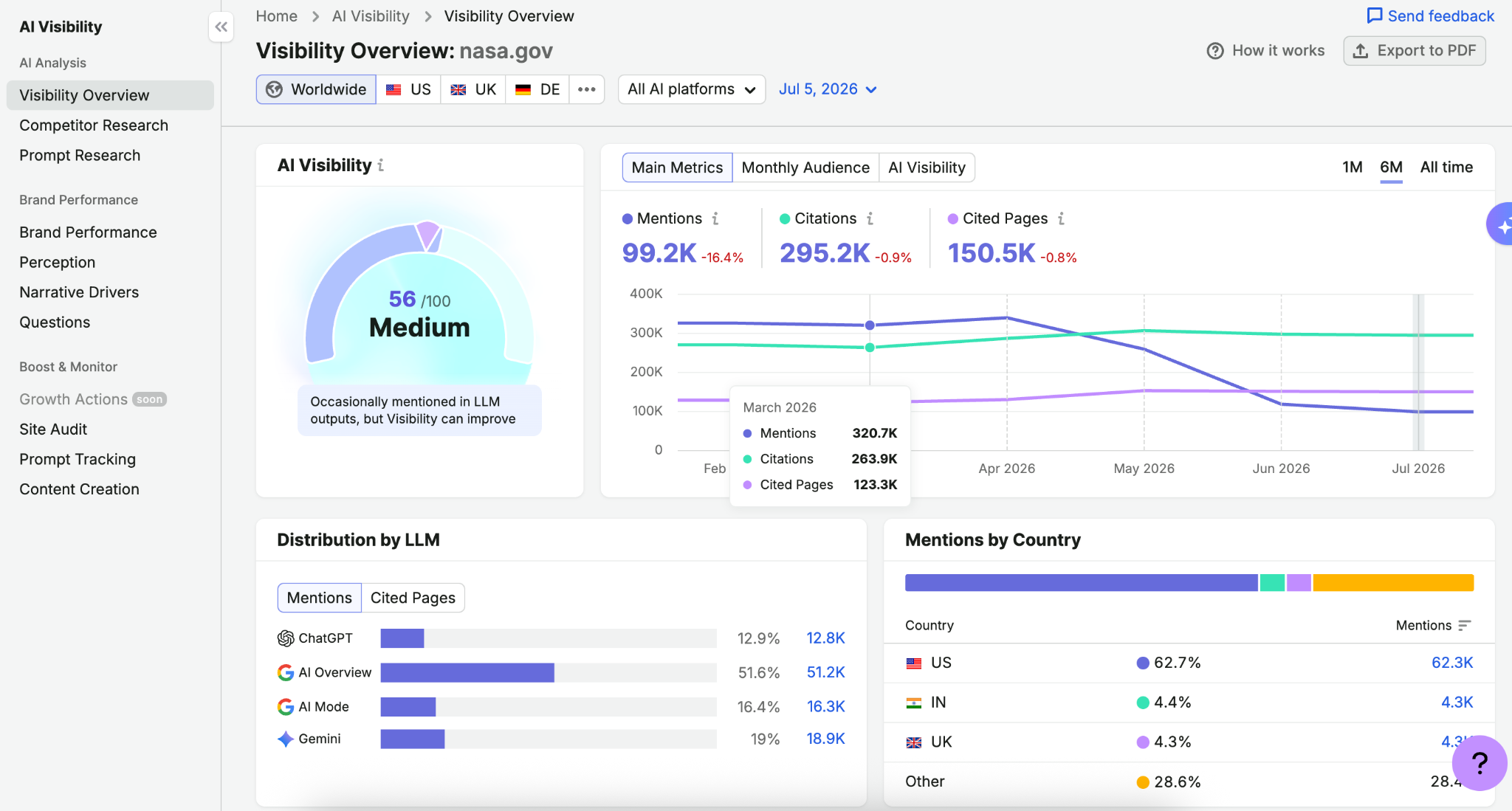
Enter your domain and Semrush benchmarks how often your brand appears in AI answers, scored 0 to 100, with trend graphs over time and an estimate of your monthly AI audience. A low score isn't bad news; it's a map of exactly where you're missing.
2. Build your prompt library
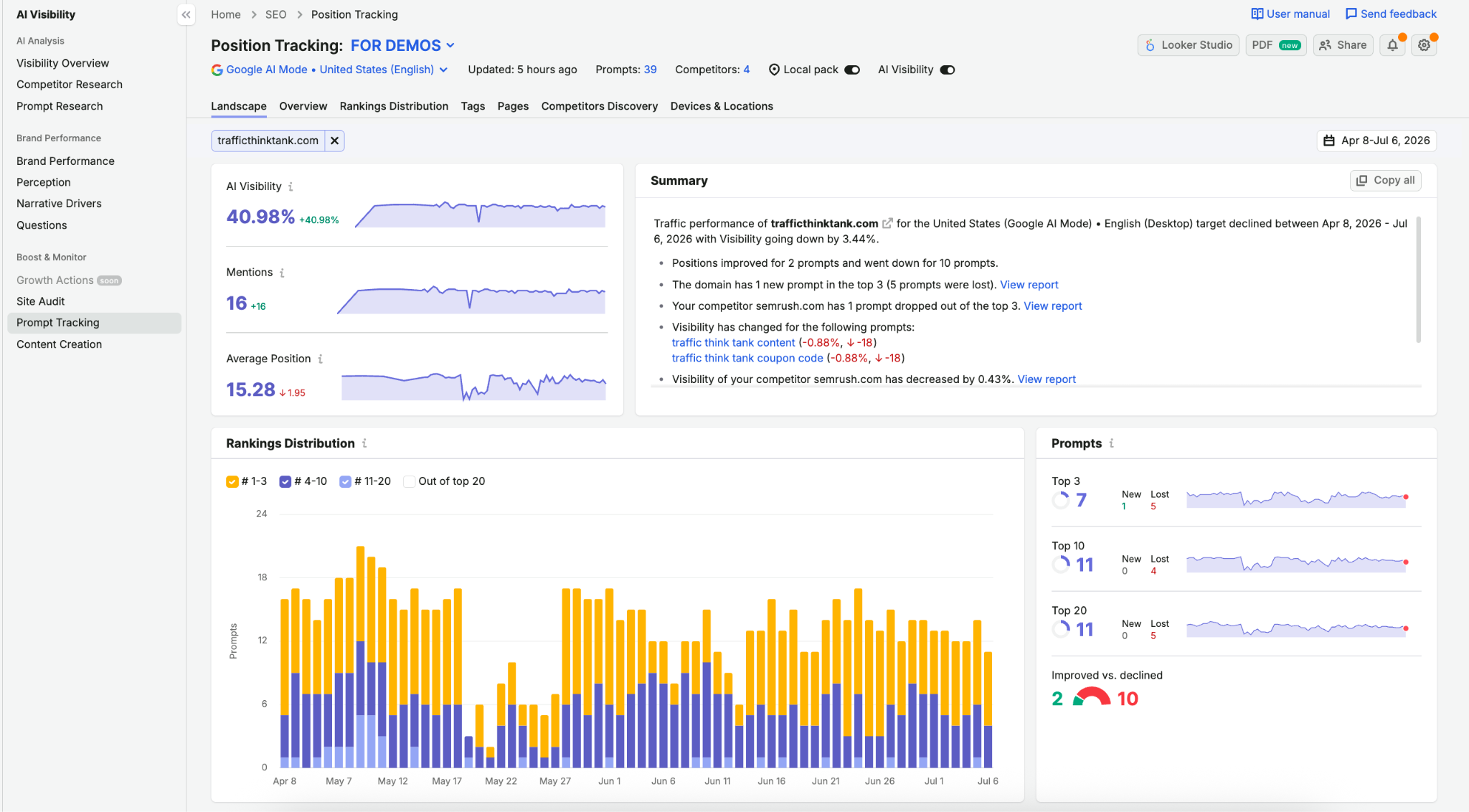
Add the prompts you want to win, mapped to your buyer funnel: discovery queries, comparison queries, and the BOFU "best [competitor] alternatives" type prompts that actually drive purchase decisions. Semrush tracks them daily per platform, like rank tracking but for AI search.
You can click into any tracked prompt and see the full AI response: the exact text it generated, which domains it cited, and where your brand appeared in the answer. That last part is what separates this from tools that just tell you a percentage.
3. Benchmark against competitors
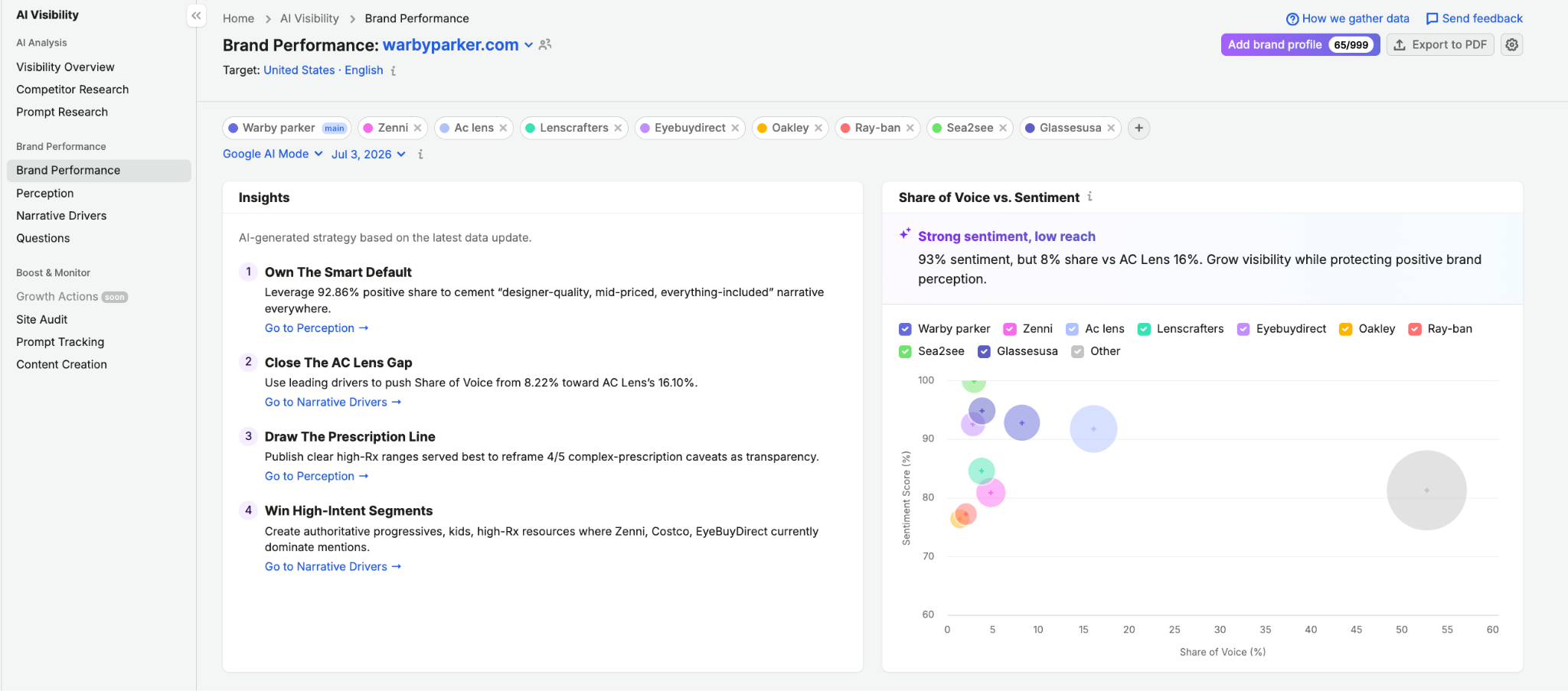
Add up to 9 competitors and every tracked prompt returns share of answer data. The Brand Performance report goes further than raw counts: it shows sentiment (whether AI describes your brand positively, neutrally, or negatively) and a Key Business Drivers grid mapping which topics AI associates with each brand.
This is genuinely useful for strategy, not just reporting. You can see which narratives you already own and which ones a competitor dominates, then aim your content at the gap.
4. Mine the citation data
This is a cool feature. Semrush shows which sources AI cites when answering your tracked prompts: the listicles, review sites, and publishers feeding answers for your category.
That list doubles as your PR and content backlog. If a particular roundup keeps getting cited for "best [your category] tools" and you're not in it, you know exactly where to pitch.
5. Fix retrieval issues
The AI site audit flags technical problems that block AI bots from reading your pages: crawler accessibility, llms.txt, indexability. This one catches problems you'd never spot manually. Plenty of sites look fine in a browser but serve JavaScript-rendered content that AI crawlers can't parse, which means they're invisible in AI answers no matter how good the content is.
From there, the backlink and link building tools help you target the domains that keep getting competitors cited.
Enterprise AIO: for agencies and multi-brand teams
If you're running AI visibility for dozens of clients, or reporting across multiple brands and markets, Enterprise AIO is Semrush's enterprise tier for AI optimization at scale.
It adds:
- Multi-market tracking across 38 countries and 28 languages
- Extended engine coverage: Claude, DeepSeek, and Grok on top of the core platforms
- Large scale prompt tracking (hundreds or thousands of prompts) with granular drill-downs by brand, market, and product
- Revenue attribution that connects AI visibility to GA4 or Adobe Analytics data, so you can show clients actual business impact rather than a vanity score
It sits within Semrush the same way Ahrefs or Moz have their enterprise plans; it's a tier, not a separate product to evaluate.
Key features
- Mention, citation, and sentiment tracking across ChatGPT, Perplexity, Gemini, Google AI Mode, and Google AI Overviews.
- Daily prompt tracking with position monitoring, like rank tracking for AI search
- Share of voice benchmarking vs up to 9 competitors per prompt
- Citation tracking that shows which domains AI cites, ready to feed PR and content outreach
- AI site audit for retrieval readiness (crawler accessibility, llms.txt, indexability)
- Full SEO stack underneath: keyword research, position tracking, backlink analysis, content optimization, technical audits
- Enterprise AIO for multi-brand, multi-market programs with revenue attribution
Semrush pricing 2026
Plans start at $139/month for SEO, with bundled SEO + AI visibility plans available at higher tiers. Enterprise AIO pricing is custom (via demo).
There's no free tier, but a free trial is available on most plans, plus a free Enterprise AIO demo. Plans are evolving, so check Semrush's pricing page for current details.
6 Bonus AI Tools to Help SEO
Here are some more tools that SEO strategists on LinkedIn recommended, but I didn’t have enough time to test and review them all:
- Linknavigator — an internal-linking automation tool for Webflow
- Yahini — an AI content strategy tool that learns from the SERPs and your business to deliver customized content briefs and keyword strategies
- RivalFlow AI — content gap analysis tool that tells you exactly what your underperforming content is missing based on real SERP competitors
- Narrato — AI content workspace that helps you plan, create, optimize, and manage SEO content at scale
- Apify — backlink building agent that finds relevant pages and websites, extracts contacts from them, and creates personalized outreach sequences
- Indexable — an AI SEO + GEO platform running a full team of specialized agents plus a human strategist; AI-search-native. Best for brands that want a whole SEO+GEO department, not a single tool
Want more tool recommendations? Check out our guide on SEO reporting tools for agencies.
Published on May 15 2025
WRITTEN BY
YamonYamon is a Senior Content Marketing Manager at Whatagraph. With an eye for detail and a knack for always considering context, audience, and business goals to guide the narrative, she's on a mission to create genuinely helpful content for marketers. When she’s not working, she’s hiking, meditating, or practicing yoga.